Unreal Engine 的运动同步
UE中的移动组件
UE4中的移动同步处理是又大又全,既处理了常规的地表移动,也考虑了飞天、下落、游泳等各种奇怪的移动模式。这样搞的好处是替使用者处理好了各种平常没有想到的细节,坏处就是整个系统实现的极其复杂。常规玩家使用的移动组件逻辑都在UCharacterMovementComponent中,这个类型有很长的继承链:
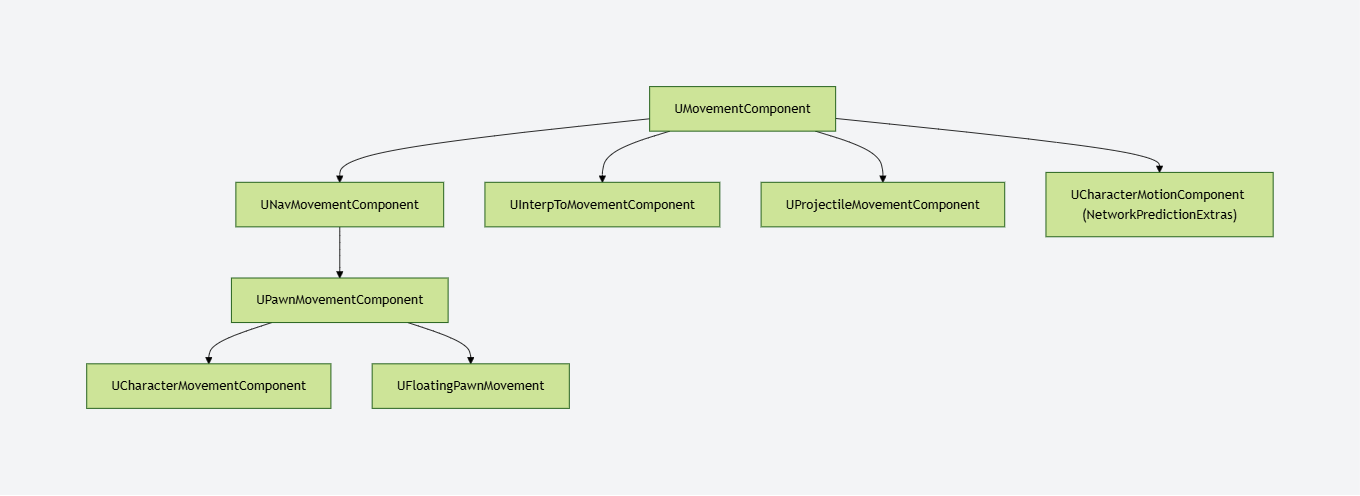
这里我们就从继承链的顶端开始介绍不同的移动组件所肩负的功能。
UMovementComponent作为移动组件的基类实现了基本的移动接口SafeMovementUpdatedComponent(),可以调用UpdateComponent组件的接口函数来更新其位置。
bool UMovementComponent::MoveUpdatedComponentImpl( const FVector& Delta, const FQuat& NewRotation, bool bSweep, FHitResult* OutHit, ETeleportType Teleport)
{
    if (UpdatedComponent)
    {
        const FVector NewDelta = ConstrainDirectionToPlane(Delta);
        return UpdatedComponent->MoveComponent(NewDelta, NewRotation, bSweep, OutHit, MoveComponentFlags, Teleport);
    }

    return false;
}
这里的UpdateComponent类型为USceneComponent,即一个带有位置和形状的组件,最常见的子类为球体、长方体以及胶囊体。UScenceComponent类型的组件提供了基本的位置信息ComponentToWorld,同时也提供了改变自身以及其子组件的位置的接口InternalSetWorldLocationAndRotation()。而UPrimitiveComponent又继承于UScenceComponent,增加了渲染以及物理方面的信息。我们常见的Mesh组件以及胶囊体都是继承自UPrimitiveComponent,因为想要实现一个真实的移动效果,我们时刻都可能与物理世界的某一个Actor接触着,而且移动的同时还需要渲染出我们移动的动画来表现给玩家看。
下一个组件是UNavMovementComponent,该组件更多的是提供给AI寻路的能力,同时包括基本的运动状态,比如是否能游泳,是否能飞行等。
UPawnMovementComponent组件开始变得可以和玩家交互了,前面都是基本的移动接口,不手动调用根本无法实现玩家操作。UPawnMovementComponent提供了AddInputVector(),可以实现接收玩家的输入并根据输入值修改所控制Pawn的位置。要注意的是,在UE中,Pawn是一个可控制的游戏角色(也可以是被AI控制),他的移动必须与UPawnMovementComponent配合才行,所以这也是名字的由来吧。一般的操作流程是,玩家通过InputComponent组件绑定一个按键操作,然后在按键响应时调用Pawn的AddMovementInput接口,进而调用移动组件的AddInputVector(),调用结束后会通过ConsumeMovementInputVector()接口消耗掉该次操作的输入数值,完成一次移动操作。
最后到了移动组件的重头了UCharacterMovementComponent,该组件可以说是Epic做了多年游戏的经验集成了,里面非常精确的处理了各种常见的运动状态细节,实现了比较流畅的同步解决方案。各种位置校正,平滑处理才达到了目前的移动效果,而且我们不需要自己写代码就会使用这个完成度的相当高的移动组件,可以说确实很适合做第一,第三人称的RPG游戏了。
其实还有一个比较常用的移动组件,UProjectileMovementComponent ,一般用来模拟弓箭,子弹等抛射物的运动状态。
移动输入的收集
在APawn上开始有移动输入的处理,方法是设置当前APawn使用的UInputComponent:
/** Creates an InputComponent that can be used for custom input bindings. Called upon possession by a PlayerController. Return null if you don't want one. */
virtual UInputComponent* CreatePlayerInputComponent();

/** Destroys the player input component and removes any references to it. */
virtual void DestroyPlayerInputComponent();

/** Allows a Pawn to set up custom input bindings. Called upon possession by a PlayerController, using the InputComponent created by CreatePlayerInputComponent(). */
virtual void SetupPlayerInputComponent(UInputComponent* PlayerInputComponent) { /* No bindings by default.*/ }
这个InputComponent的主要内容是绑定特定按键来增加各种输入,如前后左右移动、跳跃、开火、技能等:
void AShooterCharacter::SetupPlayerInputComponent(class UInputComponent* PlayerInputComponent)
{
	check(PlayerInputComponent);
	PlayerInputComponent->BindAxis("MoveForward", this, &AShooterCharacter::MoveForward);
	PlayerInputComponent->BindAxis("MoveRight", this, &AShooterCharacter::MoveRight);
	PlayerInputComponent->BindAxis("MoveUp", this, &AShooterCharacter::MoveUp);
	PlayerInputComponent->BindAxis("Turn", this, &APawn::AddControllerYawInput);
	PlayerInputComponent->BindAxis("TurnRate", this, &AShooterCharacter::TurnAtRate);
	PlayerInputComponent->BindAxis("LookUp", this, &APawn::AddControllerPitchInput);
	PlayerInputComponent->BindAxis("LookUpRate", this, &AShooterCharacter::LookUpAtRate);

	AShooterPlayerController* MyPC = Cast<AShooterPlayerController>(Controller);
	if (MyPC->bAnalogFireTrigger)
	{
		PlayerInputComponent->BindAxis("FireTrigger", this, &AShooterCharacter::FireTrigger);
	}
	else
	{
		PlayerInputComponent->BindAction("Fire", IE_Pressed, this, &AShooterCharacter::OnStartFire);
		PlayerInputComponent->BindAction("Fire", IE_Released, this, &AShooterCharacter::OnStopFire);
	}

	PlayerInputComponent->BindAction("Targeting", IE_Pressed, this, &AShooterCharacter::OnStartTargeting);
	PlayerInputComponent->BindAction("Targeting", IE_Released, this, &AShooterCharacter::OnStopTargeting);

	PlayerInputComponent->BindAction("NextWeapon", IE_Pressed, this, &AShooterCharacter::OnNextWeapon);
	PlayerInputComponent->BindAction("PrevWeapon", IE_Pressed, this, &AShooterCharacter::OnPrevWeapon);

	PlayerInputComponent->BindAction("Reload", IE_Pressed, this, &AShooterCharacter::OnReload);

	PlayerInputComponent->BindAction("Jump", IE_Pressed, this, &AShooterCharacter::OnStartJump);
	PlayerInputComponent->BindAction("Jump", IE_Released, this, &AShooterCharacter::OnStopJump);

	PlayerInputComponent->BindAction("Run", IE_Pressed, this, &AShooterCharacter::OnStartRunning);
	PlayerInputComponent->BindAction("RunToggle", IE_Pressed, this, &AShooterCharacter::OnStartRunningToggle);
	PlayerInputComponent->BindAction("Run", IE_Released, this, &AShooterCharacter::OnStopRunning);
}
上面的AShooterCharacter::MoveForward到AShooterCharacter::LookUpAtRate通过绑定特定的Axis来驱动玩家的前后移动、转向移动、视角移动。这里的Axis可以映射到各种输入设备的特定按键上,例如对于普通键盘可以设置W向前S向后,对于Xbox手柄则可以设置为摇杆的前后。这样通过引入Axis中间层,使得输入按键映射在配置文件中指定,不再需要在代码中修改,很方便的就能够接入多个硬件平台。
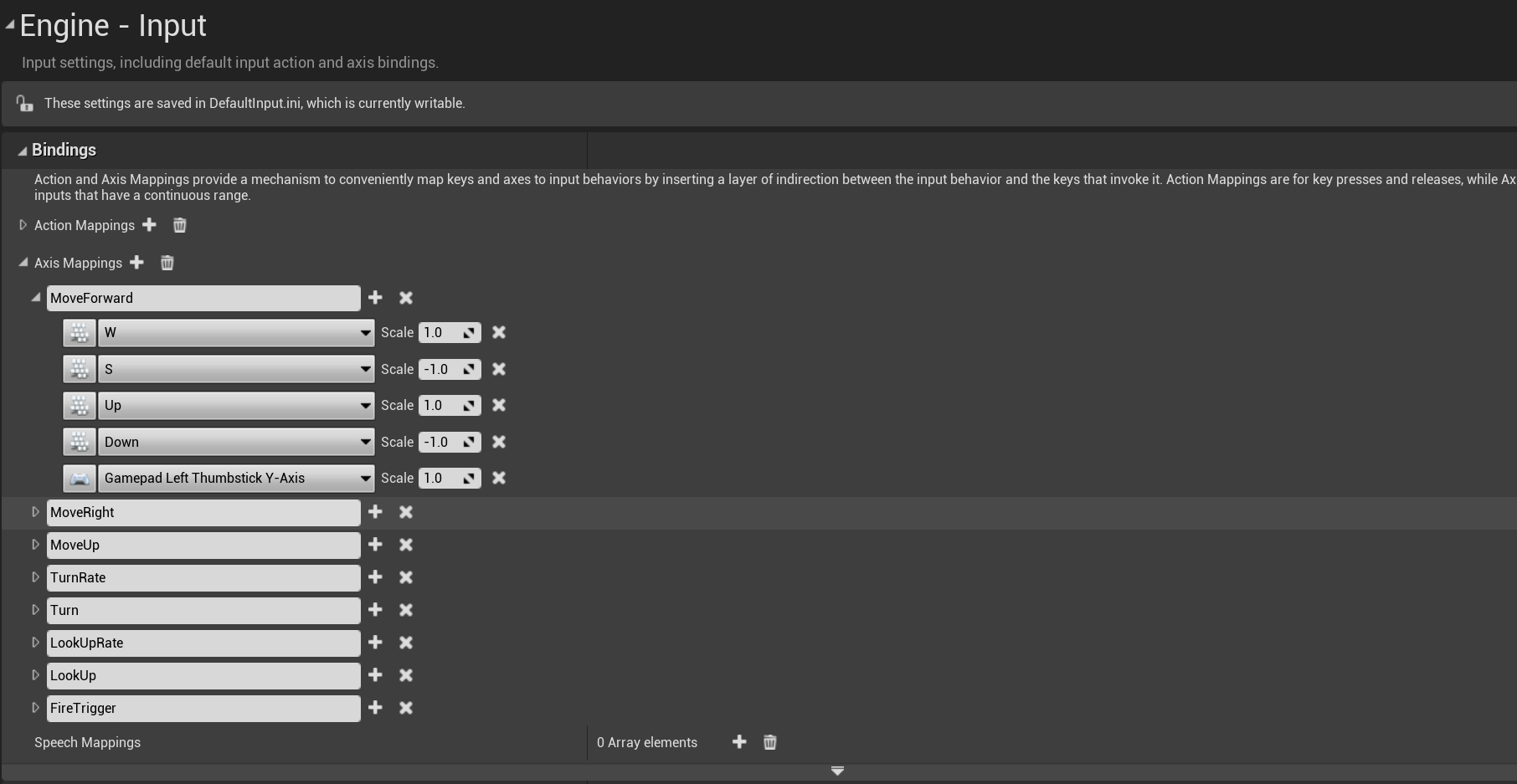
当输入事件触发时,如键盘事件,由 FSceneViewport::ProcessAccumulatedPointerInput传递给GameViewportClinet,中转到APlayerController后,再传给 PlayerInput。当一个Axis对应按键被按下时,对应的传递链为UGameViewportClient::InputAxis到APlayerController::InputAxis,最终PlayerInput::InputAxis这个函数将会被触发:
bool UPlayerInput::InputAxis(FKey Key, float Delta, float DeltaTime, int32 NumSamples, bool bGamepad )
{
	ensure((Key != EKeys::MouseX && Key != EKeys::MouseY) || NumSamples > 0);

	auto TestEventEdges = [this, &Delta](FKeyState& TestKeyState, float EdgeValue)
	{
		// look for event edges
		if (EdgeValue == 0.f && Delta != 0.f)
		{
			TestKeyState.EventAccumulator[IE_Pressed].Add(++EventCount);
		}
		else if (EdgeValue != 0.f && Delta == 0.f)
		{
			TestKeyState.EventAccumulator[IE_Released].Add(++EventCount);
		}
		else
		{
			TestKeyState.EventAccumulator[IE_Repeat].Add(++EventCount);
		}
	};

	{
		// first event associated with this key, add it to the map
		FKeyState& KeyState = KeyStateMap.FindOrAdd(Key);

		TestEventEdges(KeyState, KeyState.Value.X);

		// accumulate deltas until processed next
		KeyState.SampleCountAccumulator += NumSamples;
		KeyState.RawValueAccumulator.X += Delta;
	}
}
这里的实现相当于给当前Key对应的FKeyState进行了事件计数自增以及时间累积。在这个记录好之后,APlayerController::TickActor的函数里会调用APlayerController::TickPlayerInput并最终调用到APlayerController::ProcessPlayerInput,这个函数负责将记录好的按键数据推送到UInputComponent:
void APlayerController::ProcessPlayerInput(const float DeltaTime, const bool bGamePaused)
{
	static TArray<UInputComponent*> InputStack;

	// must be called non-recursively and on the game thread
	check(IsInGameThread() && !InputStack.Num());

	// process all input components in the stack, top down
	{
		SCOPE_CYCLE_COUNTER(STAT_PC_BuildInputStack);
		BuildInputStack(InputStack);
	}

	// process the desired components
	{
		SCOPE_CYCLE_COUNTER(STAT_PC_ProcessInputStack);
		PlayerInput->ProcessInputStack(InputStack, DeltaTime, bGamePaused);
	}

	InputStack.Reset();
}
这里的PlayerInput->ProcessInputStack内部实现很复杂,对于我们所期望的移动输入Axis来说,会遍历UInputComponent上注册的所有Axis构造要执行的函数的Callback数组:
// Run though game axis bindings and accumulate axis values
for (FInputAxisBinding& AB : IC->AxisBindings)
{
    AB.AxisValue = DetermineAxisValue(AB, bGamePaused, KeysToConsume);
    if (AB.AxisDelegate.IsBound())
    {
        AxisDelegates.Emplace(FAxisDelegateDetails(AB.AxisDelegate, AB.AxisValue));
    }
}
并最终驱动到之前设置好的相关AxisBinding,如AShooterCharacter::MoveForward:
void AShooterCharacter::MoveForward(float Val)
{
	if (Controller && Val != 0.f)
	{
		// Limit pitch when walking or falling
		const bool bLimitRotation = (GetCharacterMovement()->IsMovingOnGround() || GetCharacterMovement()->IsFalling());
		const FRotator Rotation = bLimitRotation ? GetActorRotation() : Controller->GetControlRotation();
		const FVector Direction = FRotationMatrix(Rotation).GetScaledAxis(EAxis::X);
		AddMovementInput(Direction, Val);
	}
}
这里的MoveForward其实就是简单的获取当前玩家在世界坐标里的的正向方向Direction和按键的累计时间Val,以这两个参数调用APawn::AddMovementInput:
void APawn::AddMovementInput(FVector WorldDirection, float ScaleValue, bool bForce /*=false*/)
{
	UPawnMovementComponent* MovementComponent = GetMovementComponent();
	if (MovementComponent)
	{
		MovementComponent->AddInputVector(WorldDirection * ScaleValue, bForce);
	}
	else
	{
		Internal_AddMovementInput(WorldDirection * ScaleValue, bForce);
	}
}
进一步转发到UPawnMovementComponent::AddInputVector,最后会累加到APawn::ControlInputVector上:
void UPawnMovementComponent::AddInputVector(FVector WorldAccel, bool bForce /*=false*/)
{
	if (PawnOwner)
	{
		PawnOwner->Internal_AddMovementInput(WorldAccel, bForce);
	}
}
void APawn::Internal_AddMovementInput(FVector WorldAccel, bool bForce /*=false*/)
{
	if (bForce || !IsMoveInputIgnored())
	{
		ControlInputVector += WorldAccel;
	}
}
可以看出这里所有的Axis计算出来的驱动向量都会累积到ControlInputVector,这个字段的读取与重置则在UCharacterMovementComponent::TickComponent中处理:
FVector APawn::Internal_ConsumeMovementInputVector()
{
	LastControlInputVector = ControlInputVector;
	ControlInputVector = FVector::ZeroVector;
	return LastControlInputVector;
}

FVector UPawnMovementComponent::ConsumeInputVector()
{
	return PawnOwner ? PawnOwner->Internal_ConsumeMovementInputVector() : FVector::ZeroVector;
}
void UCharacterMovementComponent::TickComponent(float DeltaTime, enum ELevelTick TickType, FActorComponentTickFunction *ThisTickFunction)
{
	SCOPED_NAMED_EVENT(UCharacterMovementComponent_TickComponent, FColor::Yellow);
	SCOPE_CYCLE_COUNTER(STAT_CharacterMovement);
	SCOPE_CYCLE_COUNTER(STAT_CharacterMovementTick);
	CSV_SCOPED_TIMING_STAT_EXCLUSIVE(CharacterMovement);
	const FVector InputVector = ConsumeInputVector();
	if (!HasValidData() || ShouldSkipUpdate(DeltaTime))
	{
		return;
	}

	Super::TickComponent(DeltaTime, TickType, ThisTickFunction);
    // 此处省略很多后续处理代码
}
在UCharacterMovementComponent::TickComponent的一开始就获取了之前累积的输入向量到InputVector,并清空了ControlInputVector之前累积的值,后续的输入处理只考虑这个InputVector了。
移动输入的模拟
这个InputVector不一定会参与后续的移动位置计算中,如果当前角色正在进行物理模拟,例如播放被击飞动画,此时位置的决定权完全在物理系统中,期间玩家的任何移动输入都将被忽略。
// See if we fell out of the world.
const bool bIsSimulatingPhysics = UpdatedComponent->IsSimulatingPhysics();
if (CharacterOwner->GetLocalRole() == ROLE_Authority && (!bCheatFlying || bIsSimulatingPhysics) && !CharacterOwner->CheckStillInWorld())
{
    return;
}

// We don't update if simulating physics (eg ragdolls).
if (bIsSimulatingPhysics)
{
    // Update camera to ensure client gets updates even when physics move him far away from point where simulation started
    if (CharacterOwner->GetLocalRole() == ROLE_AutonomousProxy && IsNetMode(NM_Client))
    {
        MarkForClientCameraUpdate();
    }

    ClearAccumulatedForces();
    return;
}
通过这个检查之后,再根据当前角色的LocalRole类型来决定走哪一个分支:
if (CharacterOwner->GetLocalRole() > ROLE_SimulatedProxy)
{
    SCOPE_CYCLE_COUNTER(STAT_CharacterMovementNonSimulated);

    // If we are a client we might have received an update from the server.
    const bool bIsClient = (CharacterOwner->GetLocalRole() == ROLE_AutonomousProxy && IsNetMode(NM_Client));
    if (bIsClient)
    {
        FNetworkPredictionData_Client_Character* ClientData = GetPredictionData_Client_Character();
        if (ClientData && ClientData->bUpdatePosition)
        {
            ClientUpdatePositionAfterServerUpdate();
        }
    }

    // Allow root motion to move characters that have no controller.
    if (CharacterOwner->IsLocallyControlled() || (!CharacterOwner->Controller && bRunPhysicsWithNoController) || (!CharacterOwner->Controller && CharacterOwner->IsPlayingRootMotion()))
    {
        ControlledCharacterMove(InputVector, DeltaTime);
    }
    else if (CharacterOwner->GetRemoteRole() == ROLE_AutonomousProxy)
    {
        // Server ticking for remote client.
        // Between net updates from the client we need to update position if based on another object,
        // otherwise the object will move on intermediate frames and we won't follow it.
        MaybeUpdateBasedMovement(DeltaTime);
        MaybeSaveBaseLocation();

        // Smooth on listen server for local view of remote clients. We may receive updates at a rate different than our own tick rate.
        if (CharacterMovementCVars::NetEnableListenServerSmoothing && !bNetworkSmoothingComplete && IsNetMode(NM_ListenServer))
        {
            SmoothClientPosition(DeltaTime);
        }
    }
}
else if (CharacterOwner->GetLocalRole() == ROLE_SimulatedProxy)
{
    if (bShrinkProxyCapsule)
    {
        AdjustProxyCapsuleSize();
    }
    SimulatedTick(DeltaTime);
}
这里的GetLocalRole涉及到Actor的Role状态,这是一个枚举类ENetRole,有如下四种取值:
ROLE_None:没有角色。ROLE_SimulatedProxy:表示该角色是客户端的代理角色,它通过网络从服务器上同步状态,但是客户端可以模拟该角色的行为。ROLE_Authority:表示该角色是服务器上的权威角色,它负责同步所有客户端的状态,并且具有最终的决策权。ROLE_AutonomousProxy: 客户端自己控制的角色。
同时每个Actor还有一个另外的字段RemoteRole代表这个角色在对端(客户端服务器角色互换)的状态。有了这两个属性,我们就可以知道:
- 谁拥有
actor的主控权 actor是否被复制- 复制模式
首先一件要确定的事,就是谁拥有特定actor的主控权。要确定当前运行的引擎实例是否有主控者,需要查看Role属性是否为ROLE_Authority。如果是,就表明这个运行中的 虚幻引擎 实例负责掌管此actor(决定其是否被复制)。
如果 Role 是 ROLE_Authority,RemoteRole 是 ROLE_SimulatedProxy 或 ROLE_AutonomousProxy,就说明这个引擎实例负责将此actor复制到远程连接。
对于不同的数值观察者,它们的Role和RemoteRole值可能发生对调。例如,如果您的服务器上有这样的配置:
Role == ROLE_AuthorityRemoteRole == ROLE_SimulatedProxy。
客户端会将其识别为以下形式:
Role == ROLE_SimulatedProxyRemoteRole == ROLE_Authority
移动指令的构造
当玩家的输入触发移动构造好InputVector之后,首先执行的代码为ControlledCharacterMove(InputVector, DeltaTime):
void UCharacterMovementComponent::ControlledCharacterMove(const FVector& InputVector, float DeltaSeconds)
{
	{
		SCOPE_CYCLE_COUNTER(STAT_CharUpdateAcceleration);

		// We need to check the jump state before adjusting input acceleration, to minimize latency
		// and to make sure acceleration respects our potentially new falling state.
		CharacterOwner->CheckJumpInput(DeltaSeconds);

		// apply input to acceleration
		Acceleration = ScaleInputAcceleration(ConstrainInputAcceleration(InputVector));
		AnalogInputModifier = ComputeAnalogInputModifier();
	}

	if (CharacterOwner->GetLocalRole() == ROLE_Authority)
	{
		PerformMovement(DeltaSeconds);
	}
	else if (CharacterOwner->GetLocalRole() == ROLE_AutonomousProxy && IsNetMode(NM_Client))
	{
		ReplicateMoveToServer(DeltaSeconds, Acceleration);
	}
}
这个函数首先处理跳跃状态,然后计算输入产生的加速度,之后会调用ReplicateMoveToServer函数,里面包括了移动数据发送和本地执行移动PeformMovement。在介绍这个复杂的函数之前,我们这里需要先引入一个类型定义FSavedMove_Character,由于这个类型内包含了太多的数据成员,此处只给出一些基本成员的声明:
/** FSavedMove_Character represents a saved move on the client that has been sent to the server and might need to be played back. */
class ENGINE_API FSavedMove_Character
{
public:
	FSavedMove_Character();
	virtual ~FSavedMove_Character();

	// UE_DEPRECATED_FORGAME(4.20)
	FSavedMove_Character(const FSavedMove_Character&);
	FSavedMove_Character(FSavedMove_Character&&);
	FSavedMove_Character& operator=(const FSavedMove_Character&);
	FSavedMove_Character& operator=(FSavedMove_Character&&);

	ACharacter* CharacterOwner;

	uint32 bPressedJump:1;
	uint32 bWantsToCrouch:1;
	uint32 bForceMaxAccel:1;

	/** If true, can't combine this move with another move. */
	uint32 bForceNoCombine:1;

	/** If true this move is using an old TimeStamp, before a reset occurred. */
	uint32 bOldTimeStampBeforeReset:1;

	uint32 bWasJumping:1;

	float TimeStamp;    // Time of this move.
	float DeltaTime;    // amount of time for this move
	float CustomTimeDilation;
	float JumpKeyHoldTime;
	float JumpForceTimeRemaining;
	int32 JumpMaxCount;
	int32 JumpCurrentCount;

	UE_DEPRECATED_FORGAME(4.20, "This property is deprecated, use StartPackedMovementMode or EndPackedMovementMode instead.")
	uint8 MovementMode;

	// Information at the start of the move
	uint8 StartPackedMovementMode;
	FVector StartLocation;
	FVector StartRelativeLocation;
	FVector StartVelocity;
	FFindFloorResult StartFloor;
	FRotator StartRotation;
	FRotator StartControlRotation;
	FQuat StartBaseRotation;	// rotation of the base component (or bone), only saved if it can move.
	float StartCapsuleRadius;
	float StartCapsuleHalfHeight;
	TWeakObjectPtr<UPrimitiveComponent> StartBase;
	FName StartBoneName;
	uint32 StartActorOverlapCounter;
	uint32 StartComponentOverlapCounter;
	TWeakObjectPtr<USceneComponent> StartAttachParent;
	FName StartAttachSocketName;
	FVector StartAttachRelativeLocation;
	FRotator StartAttachRelativeRotation;

	// Information after the move has been performed
	uint8 EndPackedMovementMode;
	FVector SavedLocation;
	FRotator SavedRotation;
	FVector SavedVelocity;
	FVector SavedRelativeLocation;
	FRotator SavedControlRotation;
	TWeakObjectPtr<UPrimitiveComponent> EndBase;
	FName EndBoneName;
	uint32 EndActorOverlapCounter;
	uint32 EndComponentOverlapCounter;
	TWeakObjectPtr<USceneComponent> EndAttachParent;
	FName EndAttachSocketName;
	FVector EndAttachRelativeLocation;
	FRotator EndAttachRelativeRotation;

	FVector Acceleration;
	float MaxSpeed;
    // 省略一些成员字段
}
对于常规的地面移动来说,我们主要关注下面的几个字段:
TimeStamp:这次移动发生的时间DeltaTime:这次移动使用的时间CustomTimeDilation:时间膨胀系数,可以用于快进和慢放StartPackedMovementMode:移动发生前的MovementModeStartLocation:移动发生前的位置StartVelocity:移动发生前的速度EndPackedMovementMode:移动发生后的MovementModeSavedLocation:移动发生后的位置SavedVelocity:移动发生后的速度Acceleration:移动所用加速度
UCharacterMovementComponent有个成员变量SavedMoves作为FSavedMove_Character的容器,保存了当前玩家本地已经做的移动:
/** Shared pointer for easy memory management of FSavedMove_Character, for accumulating and replaying network moves. */
typedef TSharedPtr<class FSavedMove_Character> FSavedMovePtr;
TArray<FSavedMovePtr> SavedMoves;		// Buffered moves pending position updates, orderd oldest to newest. Moves that have been acked by the server are removed.
FSavedMove_Character数据结构占用内存很大,笔者使用的4.27.2版本为688字节。这样大小的结构体不适合频繁创建和销毁,因此UE使用FreeMoves数组作为缓存池。缓存池初始长度由MaxFreeMoveCount属性控制,默认96,使用过程中如果耗尽也会立即新建补充。因此获取一个新的FSavedMove_Character需要调用CreateSavedMove接口,销毁则调用FreeMove接口,不要直接使用new和delete。
SavedMoves数组也有长度限制,由MaxSavedMoveCount控制,默认也为96,如果长度到达这个阈值,就说明玩家网络情况很差,会直接把SavedMoves清空。这会对移动被服务器拒绝后的客户端重放有一定影响。
FSavedMovePtr FNetworkPredictionData_Client_Character::CreateSavedMove()
{
	if (SavedMoves.Num() >= MaxSavedMoveCount)
	{
		UE_LOG(LogNetPlayerMovement, Warning, TEXT("CreateSavedMove: Hit limit of %d saved moves (timing out or very bad ping?)"), SavedMoves.Num());
		// Free all saved moves
		for (int32 i=0; i < SavedMoves.Num(); i++)
		{
			FreeMove(SavedMoves[i]);
		}
		SavedMoves.Reset();
	}

	if (FreeMoves.Num() == 0)
	{
		// No free moves, allocate a new one.
		FSavedMovePtr NewMove = AllocateNewMove();
		checkSlow(NewMove.IsValid());
		NewMove->Clear();
		return NewMove;
	}
	else
	{
		// Pull from the free pool
		const bool bAllowShrinking = false;
		FSavedMovePtr FirstFree = FreeMoves.Pop(bAllowShrinking);
		FirstFree->Clear();
		return FirstFree;
	}
}

void FNetworkPredictionData_Client_Character::FreeMove(const FSavedMovePtr& Move)
{
	if (Move.IsValid())
	{
		// Only keep a pool of a limited number of moves.
		if (FreeMoves.Num() < MaxFreeMoveCount)
		{
			FreeMoves.Push(Move);
		}

		// Shouldn't keep a reference to the move on the free list.
		if (PendingMove == Move)
		{
			PendingMove = NULL;
		}
		if( LastAckedMove == Move )
		{
			LastAckedMove = NULL;
		}
	}
}
Autonomous角色每次处理InputVector时都会生成一个FSavedMove_Character,放到这个数组的末尾,然后将这个新创建的FSavedMove_Character发送到服务器。此时SavedMoves相当于TCP通信中的未确认队列:
- 如果服务器认为这个客户端发送过来的这个角色的
FSavedMove_Character合法,则从SavedMoves的头部删除这个元素。 - 如果检查不通过,就执行异常处理流程
UCharacterMovementComponent::ReplicateMoveToServe的开头就是FSavedMove_Character的创建流程:
void UCharacterMovementComponent::ReplicateMoveToServer(float DeltaTime, const FVector& NewAcceleration)
{
	SCOPE_CYCLE_COUNTER(STAT_CharacterMovementReplicateMoveToServer);
	check(CharacterOwner != NULL);

	// Can only start sending moves if our controllers are synced up over the network, otherwise we flood the reliable buffer.
	APlayerController* PC = Cast<APlayerController>(CharacterOwner->GetController());
	if (PC && PC->AcknowledgedPawn != CharacterOwner)
	{
		return;
	}

	// Bail out if our character's controller doesn't have a Player. This may be the case when the local player
	// has switched to another controller, such as a debug camera controller.
	if (PC && PC->Player == nullptr)
	{
		return;
	}

	FNetworkPredictionData_Client_Character* ClientData = GetPredictionData_Client_Character();
	if (!ClientData)
	{
		return;
	}

	// Update our delta time for physics simulation.
	DeltaTime = ClientData->UpdateTimeStampAndDeltaTime(DeltaTime, *CharacterOwner, *this);

	// Find the oldest (unacknowledged) important move (OldMove).
	// Don't include the last move because it may be combined with the next new move.
	// A saved move is interesting if it differs significantly from the last acknowledged move
	FSavedMovePtr OldMove = NULL;
	if( ClientData->LastAckedMove.IsValid() )
	{
		const int32 NumSavedMoves = ClientData->SavedMoves.Num();
		for (int32 i=0; i < NumSavedMoves-1; i++)
		{
			const FSavedMovePtr& CurrentMove = ClientData->SavedMoves[i];
			if (CurrentMove->IsImportantMove(ClientData->LastAckedMove))
			{
				OldMove = CurrentMove;
				break;
			}
		}
	}

	// Get a SavedMove object to store the movement in.
	FSavedMovePtr NewMovePtr = ClientData->CreateSavedMove();
	FSavedMove_Character* const NewMove = NewMovePtr.Get();
	if (NewMove == nullptr)
	{
		return;
	}

	NewMove->SetMoveFor(CharacterOwner, DeltaTime, NewAcceleration, *ClientData);
	const UWorld* MyWorld = GetWorld();
    // 此处省略很多后续代码
}
注意上面的代码里引入了一个新的结构FNetworkPredictionData_Client_Character,这是一个客户端维持的角色状态预测管理,主要作用是客户端接受最近的移动输入之后进行位置预演,因为如果要等之前发送到服务器的SavedMove被确认之后再执行位置更新的话延迟太大了,所以主控客户端会以本地数据先执行移动模拟,当服务器拒绝了发送的SavedMove之后要根据服务器发送的最新数据来调整。FNetworkPredictionData_Client_Character内部主要有如下字段:
ClientUpdateTime:上次向服务器发送ServerMove()的时间戳。CurrentTimeStamp:每次累加DeltaTime,超过一定的数值后会重置。SavedMoves:客户端本地维护的移动缓存数组,按从最旧到最新顺序排列。里面存储的是客户端已模拟,但还没收到服务器ack的move数据。LastAckedMove:上次确认被发送的移动指针,FSavedMove_Character类型。PendingMove:用于存储延时发送给服务器的移动,等待与下一个移动结合,以减少客户端到服务器的带宽。(比如:一些没变化的移动包,会合并发送,以减少带宽)IsImportantMove():如果未收到服务器ack时,需要再次发送时,返回true;否则,返回false。(也就是说,一些比较重要的移动包,需要再次发送的,会在这里判断。MovementMode或Acceleration不同,都会标记为重要的move)
移动指令的时间戳
由于移动系统对时间戳有精度要求,而float随着数值增大,精度会逐渐降低。因此需要定期重置一下CurrentTimeStamp,这个重置周期由MinTimeBetweenTimeStampResets数值控制,默认240秒。这个值是要求大于两倍客户端timeout时间的,这样服务器在收到一个timestamp突然很小的rpc时,就能判定它的客户端已经重置了时间戳,而不是收到了一个很早产生的rpc。Server上对每个角色也存储了一些时间戳,在FNetworkPredictionData_Server_Character数据结构中有CurrentClientTimeStamp属性,表示最近处理的移动时间戳。服务端在接收到客户端发送过来的移动指令时会检查一下时间戳的有效性,这个时间戳判定函数为UCharacterMovementComponent::IsClientTimeStampValid
bool UCharacterMovementComponent::VerifyClientTimeStamp(float TimeStamp, FNetworkPredictionData_Server_Character& ServerData)
{
	bool bTimeStampResetDetected = false;
	bool bNeedsForcedUpdate = false;
	const bool bIsValid = IsClientTimeStampValid(TimeStamp, ServerData, bTimeStampResetDetected);
	// 先暂时省略后续代码
}
VerifyClientTimeStamp首先使用IsClientTimeStampValid来检查过来的时间戳的有效性:
bool UCharacterMovementComponent::IsClientTimeStampValid(float TimeStamp, const FNetworkPredictionData_Server_Character& ServerData, bool& bTimeStampResetDetected) const
{
	if (TimeStamp <= 0.f || !FMath::IsFinite(TimeStamp))
	{
		return false;
	}

	// Very large deltas happen around a TimeStamp reset.
	const float DeltaTimeStamp = (TimeStamp - ServerData.CurrentClientTimeStamp);
	if( FMath::Abs(DeltaTimeStamp) > (MinTimeBetweenTimeStampResets * 0.5f) )
	{
		// Client is resetting TimeStamp to increase accuracy.
		bTimeStampResetDetected = true;
		if( DeltaTimeStamp < 0.f )
		{
			// Validate that elapsed time since last reset is reasonable, otherwise client could be manipulating resets.
			if (GetWorld()->TimeSince(LastTimeStampResetServerTime) < (MinTimeBetweenTimeStampResets * 0.5f))
			{
				// Reset too recently
				return false;
			}
			else
			{
				// TimeStamp accepted with reset
				return true;
			}
		}
		else
		{
			// We already reset the TimeStamp, but we just got an old outdated move before the switch, not valid.
			return false;
		}
	}

	// If TimeStamp is in the past, move is outdated, not valid.
	if( TimeStamp <= ServerData.CurrentClientTimeStamp )
	{
		return false;
	}

	// Precision issues (or reordered timestamps from old moves) can cause very small or zero deltas which cause problems.
	if (DeltaTimeStamp < UCharacterMovementComponent::MIN_TICK_TIME)
	{
		return false;
	}

	// TimeStamp valid.
	return true;
}
这里先把传递过来的TimeStamp和本地存储的CurrentClientTimeStamp做比较,初步校验以下情况:
-
如果两个时间戳差异的绝对值大于
MinTimeBetweenTimeStampResets*0.5, 即大于timeout:- 如果差异小于零 代表出现了时间戳回滚 这里需要检查一下是否回滚的太频繁
- 如果差异大于零 则代表中间丢失了太多数据 拒绝当前移动指令
-
如果两个时间戳差异的绝对值小于
MinTimeBetweenTimeStampResets*0.5,则只需要判断传递过来的时间戳大于服务端记录的时间戳即可,另外需要排除一下相邻两次时间戳的差值小于UCharacterMovementComponent::MIN_TICK_TIME这种异常情况,因为单次客户端Tick只会发送一个数据上来
if (bIsValid)
{
	if (bTimeStampResetDetected)
	{
		UE_LOG(LogNetPlayerMovement, Log, TEXT("TimeStamp reset detected. CurrentTimeStamp: %f, new TimeStamp: %f"), ServerData.CurrentClientTimeStamp, TimeStamp);
		LastTimeStampResetServerTime = GetWorld()->GetTimeSeconds();
		OnClientTimeStampResetDetected();
		ServerData.CurrentClientTimeStamp -= MinTimeBetweenTimeStampResets;

		// Also apply the reset to any active root motions.
		CurrentRootMotion.ApplyTimeStampReset(MinTimeBetweenTimeStampResets);
	}
	else
	{
		UE_LOG(LogNetPlayerMovement, VeryVerbose, TEXT("TimeStamp %f Accepted! CurrentTimeStamp: %f"), TimeStamp, ServerData.CurrentClientTimeStamp);
		ProcessClientTimeStampForTimeDiscrepancy(TimeStamp, ServerData);
	}
}
else
{
	if (bTimeStampResetDetected)
	{
		UE_LOG(LogNetPlayerMovement, Log, TEXT("TimeStamp expired. Before TimeStamp Reset. CurrentTimeStamp: %f, TimeStamp: %f"), ServerData.CurrentClientTimeStamp, TimeStamp);
	}
	else
	{
		bNeedsForcedUpdate = (TimeStamp <= ServerData.LastReceivedClientTimeStamp);
	}
}

ServerData.LastReceivedClientTimeStamp = TimeStamp;
ServerData.bLastRequestNeedsForcedUpdates = bNeedsForcedUpdate;
return bIsValid;
校验完成之后,更新服务器存储的客户端移动时间戳。从上面的代码可以看出:无论移动校验是否通过,都会被更新,也会定期重置。
如果时间戳校验通过了,只能说明TimeStamp没有明显异常,还需要使用ProcessClientTimeStampForTimeDiscrepancy做进一步的绝对时间校验,处理客户端用加速软件等情况,毕竟不能完全以客户端时间为准。这个函数有200多行,只有在打开bMovementTimeDiscrepancyDetection设置才会执行真正的检查,默认关闭。这里就不再详细阐述了,大概介绍一下主要逻辑:服务器会记录一份收到rpc的服务器绝对时间,如果来自客户端的时间戳间隔与服务器绝对时间间隔差异过大,就会认为这个客户端有问题,OnTimeDiscrepancyDetected会被调用到,目前这个函数是个虚函数,默认实现只是打印一下日志:
void UCharacterMovementComponent::OnTimeDiscrepancyDetected(float CurrentTimeDiscrepancy, float LifetimeRawTimeDiscrepancy, float Lifetime, float CurrentMoveError)
{
	UE_LOG(LogNetPlayerMovement, Verbose, TEXT("Movement Time Discrepancy detected between client-reported time and server on character %s. CurrentTimeDiscrepancy: %f, LifetimeRawTimeDiscrepancy: %f, Lifetime: %f, CurrentMoveError %f"),
		CharacterOwner ? *CharacterOwner->GetHumanReadableName() : TEXT("<UNKNOWN>"),
		CurrentTimeDiscrepancy,
		LifetimeRawTimeDiscrepancy,
		Lifetime,
		CurrentMoveError);
}
执行完OnTimeDiscrepancyDetected再执行下面的这段代码来强制这个客户端更新到服务器位置:
if (ServerData.bResolvingTimeDiscrepancy)
{
	// Optionally force client corrections during time discrepancy resolution
	// This is useful when default project movement error checking is lenient or ClientAuthorativePosition is enabled
	// to ensure time discrepancy resolution is enforced
	if (GameNetworkManager->bMovementTimeDiscrepancyForceCorrectionsDuringResolution)
	{
		ServerData.bForceClientUpdate = true;
	}
}
移动指令的合并
实际上并不会将每个SavedMove都发送到服务器端,如果前后的两个SavedMove可以合并的话就可以省略当前新的SavedMove的发送,这样就可以大大的减少上行流量,特别是在地面平坦且移动输入保持一致的时候:
// see if the two moves could be combined
// do not combine moves which have different TimeStamps (before and after reset).
if (const FSavedMove_Character* PendingMove = ClientData->PendingMove.Get())
{
    if (PendingMove->CanCombineWith(NewMovePtr, CharacterOwner, ClientData->MaxMoveDeltaTime * CharacterOwner->GetActorTimeDilation(*MyWorld)))
    {
        //此处暂时省略一些代码
    }
    else
    {
        UE_LOG(LogNetPlayerMovement, Verbose, TEXT("Not combining move [not allowed by CanCombineWith()]"));
    }
}
bool FSavedMove_Character::CanCombineWith(const FSavedMovePtr& NewMovePtr, ACharacter* Character, float MaxDelta) const
合并的判定函数在FSavedMove_Character::CanCombineWith中,这个函数非常庞大将近200行,这里概括一下一些不能合并的条件:
- 任一个
move的bForceNoCombine为true - 包括
rootmotion的move - 加速度从大于
0变为0 - 两次移动
DeltaTime总和大于MaxMoveDeltaTime - 两个加速度点积超过
AccelDotThresholdCombine阈值 - 两个
move的StartVelocity,一个为0,一个不为0 - 两个
move的MaxSpeed差值大于MaxSpeedThresholdCombine - 两个
move的MaxSpeed一个为0,一个不为0 - 两个
move的JumpKeyHoldTime,一个为0,一个不为0 - 两个
move的bWasJumping状态、JumpCurrentCount、JumpMaxCount不一致 - 两个
move的JumpForceTimeRemaining一个为0,一个不为0 - 比较两个
move的CompressedFlags,包括了跳跃状态和下蹲状态,当然可以加自定义状态 - 两个
move站立的可移动表面不同 - 两个
move的开始MovementMode不同,或者结束MovementMode不同 - 两个
move的开始胶囊体半径不同,或者高度不同,一个例子是下蹲会改变胶囊体 - 两个
move的attach parent不同,或者attach socket不同 attach的相对位置改变了- 两个
move的overlap数量改变
如果这些基本条件都不满足,可以初步认为可以合并。但还有一种特殊条件需要判断,就是Pendingmove的回滚位置有碰撞,这也不能合并。
SCOPE_CYCLE_COUNTER(STAT_CharacterMovementCombineNetMove);

// Only combine and move back to the start location if we don't move back in to a spot that would make us collide with something new.
const FVector OldStartLocation = PendingMove->GetRevertedLocation();
const bool bAttachedToObject = (NewMovePtr->StartAttachParent != nullptr);
if (bAttachedToObject || !OverlapTest(OldStartLocation, PendingMove->StartRotation.Quaternion(), UpdatedComponent->GetCollisionObjectType(), GetPawnCapsuleCollisionShape(SHRINK_None), CharacterOwner))
{
	// Avoid updating Mesh bones to physics during the teleport back, since PerformMovement() will update it right away anyway below.
	// Note: this must be before the FScopedMovementUpdate below, since that scope is what actually moves the character and mesh.
	FScopedMeshBoneUpdateOverride ScopedNoMeshBoneUpdate(CharacterOwner->GetMesh(), EKinematicBonesUpdateToPhysics::SkipAllBones);

	// Accumulate multiple transform updates until scope ends.
	FScopedMovementUpdate ScopedMovementUpdate(UpdatedComponent, EScopedUpdate::DeferredUpdates);
	UE_LOG(LogNetPlayerMovement, VeryVerbose, TEXT("CombineMove: add delta %f + %f and revert from %f %f to %f %f"), DeltaTime, PendingMove->DeltaTime, UpdatedComponent->GetComponentLocation().X, UpdatedComponent->GetComponentLocation().Y, OldStartLocation.X, OldStartLocation.Y);

	NewMove->CombineWith(PendingMove, CharacterOwner, PC, OldStartLocation);

	if (PC)
	{
		// We reverted position to that at the start of the pending move (above), however some code paths expect rotation to be set correctly
		// before character movement occurs (via FaceRotation), so try that now. The bOrientRotationToMovement path happens later as part of PerformMovement() and PhysicsRotation().
		CharacterOwner->FaceRotation(PC->GetControlRotation(), NewMove->DeltaTime);
	}

	SaveBaseLocation();
	NewMove->SetInitialPosition(CharacterOwner);

	// Remove pending move from move list. It would have to be the last move on the list.
	if (ClientData->SavedMoves.Num() > 0 && ClientData->SavedMoves.Last() == ClientData->PendingMove)
	{
		const bool bAllowShrinking = false;
		ClientData->SavedMoves.Pop(bAllowShrinking);
	}
	ClientData->FreeMove(ClientData->PendingMove);
	ClientData->PendingMove = nullptr;
	PendingMove = nullptr; // Avoid dangling reference, it's deleted above.
}
else
{
	UE_LOG(LogNetPlayerMovement, Verbose, TEXT("Not combining move [would collide at start location]"));
}
合并首先需要把CharacterMovement的这一帧开始状态设置成PendingMove的开始状态,这会把UpdatedComponent的位置设成PendingMove的开始位置,包括Velocity、CurrentFloor,跳跃信息等也会设置为PendingMove状态,然后时间间隔DeltaTime会被设置为两个move之和。
void FSavedMove_Character::CombineWith(const FSavedMove_Character* OldMove, ACharacter* InCharacter, APlayerController* PC, const FVector& OldStartLocation)
{
	UCharacterMovementComponent* CharMovement = InCharacter->GetCharacterMovement();

	// to combine move, first revert pawn position to PendingMove start position, before playing combined move on client
	if (const USceneComponent* AttachParent = StartAttachParent.Get())
	{
		CharMovement->UpdatedComponent->SetRelativeLocationAndRotation(StartAttachRelativeLocation, StartAttachRelativeRotation, false, nullptr, CharMovement->GetTeleportType());
	}
	else
	{
		CharMovement->UpdatedComponent->SetWorldLocationAndRotation(OldStartLocation, OldMove->StartRotation, false, nullptr, CharMovement->GetTeleportType());
	}

	CharMovement->Velocity = OldMove->StartVelocity;

	CharMovement->SetBase(OldMove->StartBase.Get(), OldMove->StartBoneName);
	CharMovement->CurrentFloor = OldMove->StartFloor;

	// Now that we have reverted to the old position, prepare a new move from that position,
	// using our current velocity, acceleration, and rotation, but applied over the combined time from the old and new move.

	// Combine times for both moves
	DeltaTime += OldMove->DeltaTime;

	// Roll back jump force counters. SetInitialPosition() below will copy them to the saved move.
	InCharacter->JumpForceTimeRemaining = OldMove->JumpForceTimeRemaining;
	InCharacter->JumpKeyHoldTime = OldMove->JumpKeyHoldTime;
	InCharacter->JumpCurrentCountPreJump = OldMove->JumpCurrentCount;
}
之后就是修改这帧的Nove了,因为之前已经修改了Character和CharacterMovement的属性,因此再次调用SetInitialPosition函数,用Character重新初始化Move即可。至此,PendingMove就可以从SavedMoves数组中移除了。
移动指令的执行
在结束了这段合并流程之后,客户端本地会使用合并后的NewMove来预演位置:
// Acceleration should match what we send to the server, plus any other restrictions the server also enforces (see MoveAutonomous).
Acceleration = NewMove->Acceleration.GetClampedToMaxSize(GetMaxAcceleration());
AnalogInputModifier = ComputeAnalogInputModifier(); // recompute since acceleration may have changed.

// Perform the move locally
CharacterOwner->ClientRootMotionParams.Clear();
CharacterOwner->SavedRootMotion.Clear();
PerformMovement(NewMove->DeltaTime);

NewMove->PostUpdate(CharacterOwner, FSavedMove_Character::PostUpdate_Record);
这个PerformMovement函数有点大,将近400行,这里我们先贴一段移动组件官方文档中对于这个函数的介绍。
PerformMovement函数负责游戏世界场景中的角色物理移动。在非联网游戏中,UCharacterMovementComponent每次tick将直接调用一次PerformMovement。在联网游戏中,由专用函数为服务器和客户端调用PerformMovement,在玩家的本地机器上执行初始移动,或在远程机器上再现移动。
PerformMovement处理以下状况:
- 应用外部物理效果,例如脉冲、力和重力。
- 根据动画根运动和 根运动源 计算移动。
- 调用
StartNewPhysics,它基于角色使用的移动模式选择Phys*函数。每个移动模式都有各自的
Phys*函数,负责计算速度和加速度。举例而言PhysWalking决定角色在地面上移动时的移动物理效果,而PhysFalling决定在空中移动时的移动物理效果。若要调试这些行为的具体细节,需深入探究这些函数。若移动模式在一个
tick内发生变化(例如角色开始跌倒或撞到某个对象),Phys*函数会再次调用StartNewPhysics,在新移动模式中继续角色的运动。StartNewPhysics和Phys*函数各自通过已发生的StartNewPhysics迭代的次数。参数MaxSimulationIterations是此递归所允许的最大次数。
这个函数作为移动组件的最核心,涉及到了太多的物理查询以及RootMotion的细节,由于本书的重点在于服务端,所以此处就略过,有兴趣的读者可以参考知乎Jerish写的移动同步相关文章
不过我们这里只考虑输入向量触发位移的逻辑,省略掉RootMotion驱动位移的相关逻辑。
函数的开头首先计算当前是否需要检查是否在地面上的标志位bForceNextFloorCheck,
// Force floor update if we've moved outside of CharacterMovement since last update.
bForceNextFloorCheck |= (IsMovingOnGround() && UpdatedComponent->GetComponentLocation() != LastUpdateLocation);
IsMovingOnGround就是纯地面行走,对应的移动模式为MOVE_Walking或者MOVE_NavWalking:
bool UCharacterMovementComponent::IsMovingOnGround() const
{
	return ((MovementMode == MOVE_Walking) || (MovementMode == MOVE_NavWalking)) && UpdatedComponent;
}
然后再考虑当前是否在一个移动的平台上行走,例如船、大卡车、火车等载具平台上,这里调用的是MaybeUpdateBasedMovement:
MaybeUpdateBasedMovement(DeltaSeconds);
接下来先备份一下当前状态,然后根据总作用力来构造加速度:
OldVelocity = Velocity;
OldLocation = UpdatedComponent->GetComponentLocation();

ApplyAccumulatedForces(DeltaSeconds);
ApplyAccumulatedForces内部主要使用了PendingImpulseToApply和PendingForceToApply来计算新的速度,PendingImpulseToApply作为临时速度增加量,而PendingForceToApply作为临时加速度。这里还会额外处理一下重力方向的分量速度是否会引发脱离地面:
void UCharacterMovementComponent::ApplyAccumulatedForces(float DeltaSeconds)
{
	if (PendingImpulseToApply.Z != 0.f || PendingForceToApply.Z != 0.f)
	{
		// check to see if applied momentum is enough to overcome gravity
		if ( IsMovingOnGround() && (PendingImpulseToApply.Z + (PendingForceToApply.Z * DeltaSeconds) + (GetGravityZ() * DeltaSeconds) > SMALL_NUMBER))
		{
			SetMovementMode(MOVE_Falling);
		}
	}

	Velocity += PendingImpulseToApply + (PendingForceToApply * DeltaSeconds);

	// Don't call ClearAccumulatedForces() because it could affect launch velocity
	PendingImpulseToApply = FVector::ZeroVector;
	PendingForceToApply = FVector::ZeroVector;
}
计算好了速度之后,调用UpdateCharacterStateBeforeMovement(DeltaSeconds)来做位置更新的准备工作,这个函数是一个虚函数,默认实现里只处理了蹲下相关的逻辑:
void UCharacterMovementComponent::UpdateCharacterStateBeforeMovement(float DeltaSeconds)
{
	// Proxies get replicated crouch state.
	if (CharacterOwner->GetLocalRole() != ROLE_SimulatedProxy)
	{
		// Check for a change in crouch state. Players toggle crouch by changing bWantsToCrouch.
		const bool bIsCrouching = IsCrouching();
		if (bIsCrouching && (!bWantsToCrouch || !CanCrouchInCurrentState()))
		{
			UnCrouch(false);
		}
		else if (!bIsCrouching && bWantsToCrouch && CanCrouchInCurrentState())
		{
			Crouch(false);
		}
	}
}
如果当前在AI驱动寻路阶段,会检查是否已经可以安全的退出NavWalking:
if (MovementMode == MOVE_NavWalking && bWantsToLeaveNavWalking)
{
	TryToLeaveNavWalking();
}
这个函数会尝试找一个附近安全无阻挡落脚点,如果找不到的话则继续保持NavWalking状态:
bool UCharacterMovementComponent::TryToLeaveNavWalking()
{
	SetNavWalkingPhysics(false);

	bool bSucceeded = true;
	if (CharacterOwner)
	{
		FVector CollisionFreeLocation = UpdatedComponent->GetComponentLocation();
		bSucceeded = GetWorld()->FindTeleportSpot(CharacterOwner, CollisionFreeLocation, UpdatedComponent->GetComponentRotation());
		if (bSucceeded)
		{
			CharacterOwner->SetActorLocation(CollisionFreeLocation);
		}
		else
		{
			SetNavWalkingPhysics(true);
		}
	}

	if (MovementMode == MOVE_NavWalking && bSucceeded)
	{
		SetMovementMode(DefaultLandMovementMode != MOVE_NavWalking ? DefaultLandMovementMode.GetValue() : MOVE_Walking);
	}
	else if (MovementMode != MOVE_NavWalking && !bSucceeded)
	{
		SetMovementMode(MOVE_NavWalking);
	}

	bWantsToLeaveNavWalking = !bSucceeded;
	return bSucceeded;
}
接下来调用HandlePendingLaunch()来处理弹射起飞相关逻辑,切换为Falling状态:
bool UCharacterMovementComponent::HandlePendingLaunch()
{
	if (!PendingLaunchVelocity.IsZero() && HasValidData())
	{
		Velocity = PendingLaunchVelocity;
		SetMovementMode(MOVE_Falling);
		PendingLaunchVelocity = FVector::ZeroVector;
		bForceNextFloorCheck = true;
		return true;
	}

	return false;
}
HandlePendingLaunch之后使用ClearAccumulatedForces()来清除之前计算出来的各种力:
void UCharacterMovementComponent::ClearAccumulatedForces()
{
	PendingImpulseToApply = FVector::ZeroVector;
	PendingForceToApply = FVector::ZeroVector;
	PendingLaunchVelocity = FVector::ZeroVector;
}
但是其实PendingImpulseToApply和PendingForceToApply在前面的ApplyAccumulatedForces中已经清零了,所以这里的作用就是将PendingLaunchVelocity清零。
接下来省略一些RootMotion相关的代码,调用StartNewPhysics(DeltaSeconds, 0)来执行真正的位置计算与更新:
void UCharacterMovementComponent::StartNewPhysics(float deltaTime, int32 Iterations)
{
	if ((deltaTime < MIN_TICK_TIME) || (Iterations >= MaxSimulationIterations) || !HasValidData())
	{
		return;
	}

	if (UpdatedComponent->IsSimulatingPhysics())
	{
		UE_LOG(LogCharacterMovement, Log, TEXT("UCharacterMovementComponent::StartNewPhysics: UpdateComponent (%s) is simulating physics - aborting."), *UpdatedComponent->GetPathName());
		return;
	}

	const bool bSavedMovementInProgress = bMovementInProgress;
	bMovementInProgress = true;

	switch ( MovementMode )
	{
	case MOVE_None:
		break;
	case MOVE_Walking:
		PhysWalking(deltaTime, Iterations);
		break;
	case MOVE_NavWalking:
		PhysNavWalking(deltaTime, Iterations);
		break;
	case MOVE_Falling:
		PhysFalling(deltaTime, Iterations);
		break;
	case MOVE_Flying:
		PhysFlying(deltaTime, Iterations);
		break;
	case MOVE_Swimming:
		PhysSwimming(deltaTime, Iterations);
		break;
	case MOVE_Custom:
		PhysCustom(deltaTime, Iterations);
		break;
	default:
		UE_LOG(LogCharacterMovement, Warning, TEXT("%s has unsupported movement mode %d"), *CharacterOwner->GetName(), int32(MovementMode));
		SetMovementMode(MOVE_None);
		break;
	}

	bMovementInProgress = bSavedMovementInProgress;
	if ( bDeferUpdateMoveComponent )
	{
		SetUpdatedComponent(DeferredUpdatedMoveComponent);
	}
}
这函数只是作为一个转接函数来使用,正如之前PerformMovement官方文档所说的,根据具体的移动模式调用Phys*,这里我们只考虑PhysWalking。这个函数也比较大,下面是先临时简化的函数体:
const float UCharacterMovementComponent::MIN_TICK_TIME = 1e-6f;

if (deltaTime < MIN_TICK_TIME) // 函数调用间隔太短
{
	return;
}

if (!CharacterOwner || (!CharacterOwner->Controller && !bRunPhysicsWithNoController && !HasAnimRootMotion() && !CurrentRootMotion.HasOverrideVelocity() && (CharacterOwner->GetLocalRole() != ROLE_SimulatedProxy)))
{
	Acceleration = FVector::ZeroVector;
	Velocity = FVector::ZeroVector;
	return;
}

if (!UpdatedComponent->IsQueryCollisionEnabled()) // 没有开物理查询
{
	SetMovementMode(MOVE_Walking);
	return;
}
bJustTeleported = false;
bool bCheckedFall = false;
bool bTriedLedgeMove = false;
float remainingTime = deltaTime;

// Perform the move
while ( (remainingTime >= MIN_TICK_TIME) && (Iterations < MaxSimulationIterations) && CharacterOwner && (CharacterOwner->Controller || bRunPhysicsWithNoController || HasAnimRootMotion() || CurrentRootMotion.HasOverrideVelocity() || (CharacterOwner->GetLocalRole() == ROLE_SimulatedProxy)) )
{
	Iterations++;
	bJustTeleported = false;
	const float timeTick = GetSimulationTimeStep(remainingTime, Iterations);
	remainingTime -= timeTick;
	// 此处暂时省略循环迭代的具体内容
}
if (IsMovingOnGround())
{
	MaintainHorizontalGroundVelocity();
}
开头有三个快速退出检查,这些检查都通过之后执行一个循环迭代的逻辑,每次迭代占用一个大小为timeTick的时间片,迭代到传入的deltaTime被用光。最后的MaintainHorizontalGroundVelocity负责在地面移动的情况下将算出来的速度根据配置去抹掉与地面垂直的高度方向的分量。接下来我们来详细查看while循环内的更新逻辑。
这种使用时间片去驱动while循环来查询或更新物理系统的做法在游戏物理中有个专有名词叫做Sub-stepping。这样能够提升物理查询与模拟的准确度。因为游戏的物理世界一般都是使用离散时间来更新的,如果更新间隔过大可能就会出现隧穿现象:
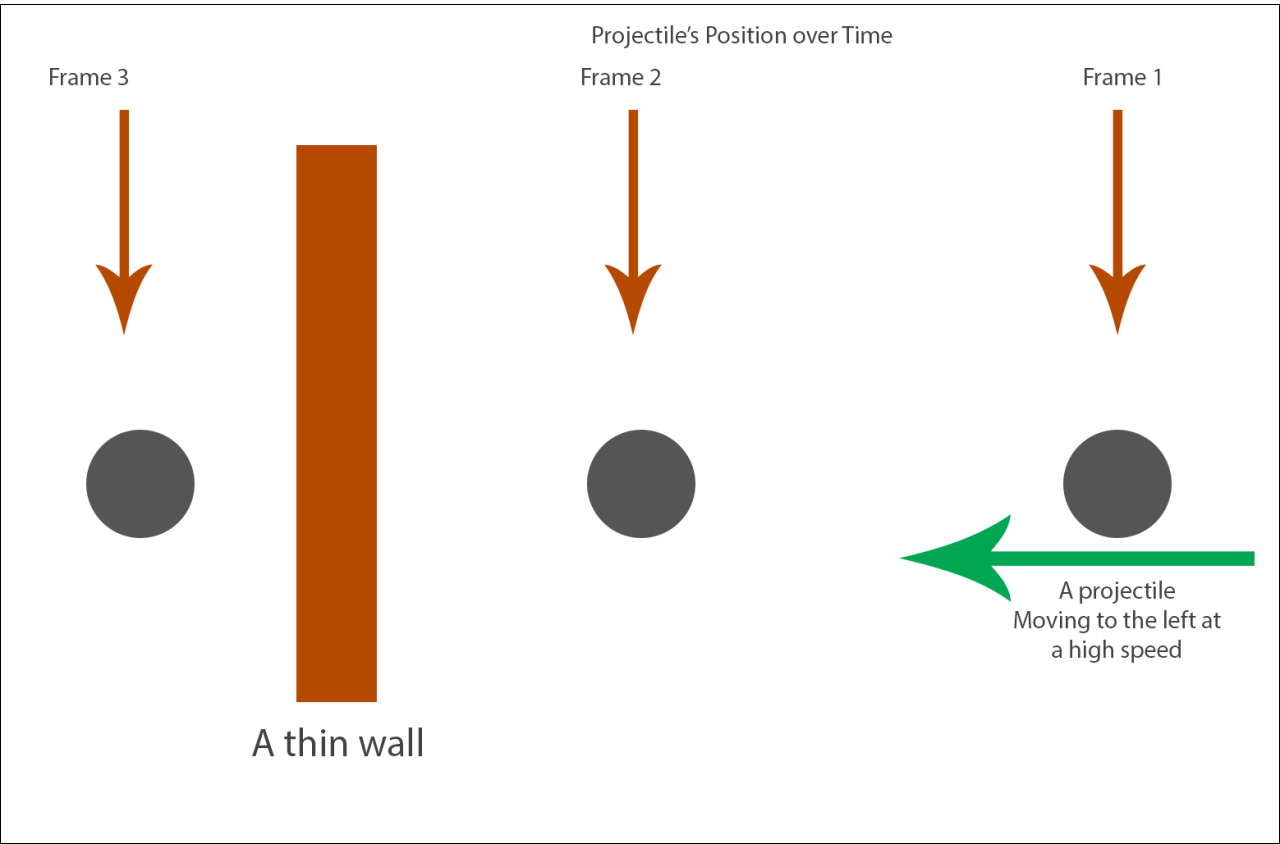
上图就是隧穿现象的实例,小球直线运动应该会撞到前方的薄木板,但是由于物理模拟的更新间隔过大,导致第二帧之后的模拟直接跳跃到了第三帧的位置,此时再执行查询发现小球与木板没有相撞。要彻底解决这种离散时间模拟的问题需要将使用基于Continuous Collision Detection的物理引擎,但是这种引擎的消耗太大了,所以一般退而求次选择一个比较小的固定间隔gap来作为模拟的时间单位,每次外部传入的deltaTime都会被切分为一个或多个不大于gap的时间片。然后对应的使用这些时间片循环的进行物理更新或者查询,每次迭代都相当于一次substep,这样就相当于提高了物理系统的离散时间精度。
在当前的substep开头,首先保存一下上一轮的结果:
// Save current values
UPrimitiveComponent * const OldBase = GetMovementBase();
const FVector PreviousBaseLocation = (OldBase != NULL) ? OldBase->GetComponentLocation() : FVector::ZeroVector;
const FVector OldLocation = UpdatedComponent->GetComponentLocation();
const FFindFloorResult OldFloor = CurrentFloor;

RestorePreAdditiveRootMotionVelocity();

// Ensure velocity is horizontal.
MaintainHorizontalGroundVelocity();
const FVector OldVelocity = Velocity;
Acceleration.Z = 0.f;
然后使用CalcVelocity来计算新的速度,这个函数内部主要处理最大加速度、最大速度、刹车减速、碰撞避免速度等逻辑。
// Apply acceleration
if( !HasAnimRootMotion() && !CurrentRootMotion.HasOverrideVelocity() )
{
	CalcVelocity(timeTick, GroundFriction, false, GetMaxBrakingDeceleration());
	devCode(ensureMsgf(!Velocity.ContainsNaN(), TEXT("PhysWalking: Velocity contains NaN after CalcVelocity (%s)\n%s"), *GetPathNameSafe(this), *Velocity.ToString()));
}
如果当前由RootMotion来驱动位移,则使用ApplyRootMotionToVelocity来替换最终的速度。ApplyRootMotionToVelocity如果算出来的新状态变成了Falling,则调用StartNewPhysics来执行换状态之后的物理查询,本次迭代作废,所以这里的剩余时间和迭代次数都会回滚:
ApplyRootMotionToVelocity(timeTick);
devCode(ensureMsgf(!Velocity.ContainsNaN(), TEXT("PhysWalking: Velocity contains NaN after Root Motion application (%s)\n%s"), *GetPathNameSafe(this), *Velocity.ToString()));
if( IsFalling() )
{
	// Root motion could have put us into Falling.
	// No movement has taken place this movement tick so we pass on full time/past iteration count
	StartNewPhysics(remainingTime+timeTick, Iterations-1);
	return;
}
如果没有走到上面的return的话,开始由这个速度来计算新的位置,并处理位置更新后导致的运动状态切换:
// Compute move parameters
const FVector MoveVelocity = Velocity;
const FVector Delta = timeTick * MoveVelocity;
const bool bZeroDelta = Delta.IsNearlyZero();
FStepDownResult StepDownResult;

if ( bZeroDelta )
{
	remainingTime = 0.f;
}
else
{
	// try to move forward
	MoveAlongFloor(MoveVelocity, timeTick, &StepDownResult);

	if ( IsFalling() )
	{
		// pawn decided to jump up
		const float DesiredDist = Delta.Size();
		if (DesiredDist > KINDA_SMALL_NUMBER)
		{
			const float ActualDist = (UpdatedComponent->GetComponentLocation() - OldLocation).Size2D();
			remainingTime += timeTick * (1.f - FMath::Min(1.f,ActualDist/DesiredDist));
		}
		StartNewPhysics(remainingTime,Iterations);
		return;
	}
	else if ( IsSwimming() ) //just entered water
	{
		StartSwimming(OldLocation, OldVelocity, timeTick, remainingTime, Iterations);
		return;
	}
}
上面的MoveAlongFloor就是正常的地面移动所执行的位置更新函数,其签名如下,相当于在此速度下计算出新位置对应的脚底信息FStepDownResult,其实就是一个地面查询结果FFindFloorResult:
/** Struct updated by StepUp() to return result of final step down, if applicable. */
struct FStepDownResult
{
	uint32 bComputedFloor:1;		// True if the floor was computed as a result of the step down.
	FFindFloorResult FloorResult;	// The result of the floor test if the floor was updated.

	FStepDownResult()
		: bComputedFloor(false)
	{
	}
};

void UCharacterMovementComponent::MoveAlongFloor(const FVector& InVelocity, float DeltaSeconds, FStepDownResult* OutStepDownResult)
这个函数内部其实也是很复杂,考虑了很多情况。开头就是直接先尝试简单的计算一下传入的速度下要移动的距离Delta,然后查询一下脚下的位置:
// Move along the current floor
const FVector Delta = FVector(InVelocity.X, InVelocity.Y, 0.f) * DeltaSeconds;
FHitResult Hit(1.f);
FVector RampVector = ComputeGroundMovementDelta(Delta, CurrentFloor.HitResult, CurrentFloor.bLineTrace);
SafeMoveUpdatedComponent(RampVector, UpdatedComponent->GetComponentQuat(), true, Hit);
float LastMoveTimeSlice = DeltaSeconds;
这里的ComputeGroundMovementDelta主要处理的是玩家在斜坡上行走时的位置更新。平常的移动输入向量只会有XY方向的值,为了在斜坡上移动我们需要构造相应的Z轴值。做法是将传入的移动速度抹掉之前计算出来的脚底平面法向量的分量,相当于强制将移动速度设置为与脚底平面平行:
FVector UCharacterMovementComponent::ComputeGroundMovementDelta(const FVector& Delta, const FHitResult& RampHit, const bool bHitFromLineTrace) const
{
	const FVector FloorNormal = RampHit.ImpactNormal;
	const FVector ContactNormal = RampHit.Normal;

	if (FloorNormal.Z < (1.f - KINDA_SMALL_NUMBER) && FloorNormal.Z > KINDA_SMALL_NUMBER && ContactNormal.Z > KINDA_SMALL_NUMBER && !bHitFromLineTrace && IsWalkable(RampHit))
	{
		// Compute a vector that moves parallel to the surface, by projecting the horizontal movement direction onto the ramp.
		const float FloorDotDelta = (FloorNormal | Delta);
		FVector RampMovement(Delta.X, Delta.Y, -FloorDotDelta / FloorNormal.Z);

		if (bMaintainHorizontalGroundVelocity)
		{
			return RampMovement;
		}
		else
		{
			return RampMovement.GetSafeNormal() * Delta.Size();
		}
	}

	return Delta;
}
这里有两个Normal,第一个FloorNormal代表地表的法线方向,第二个ContactNormal代表当前Character的碰撞体与这个地表接触点的法线方向。文字描述不好理解,可以看下图:
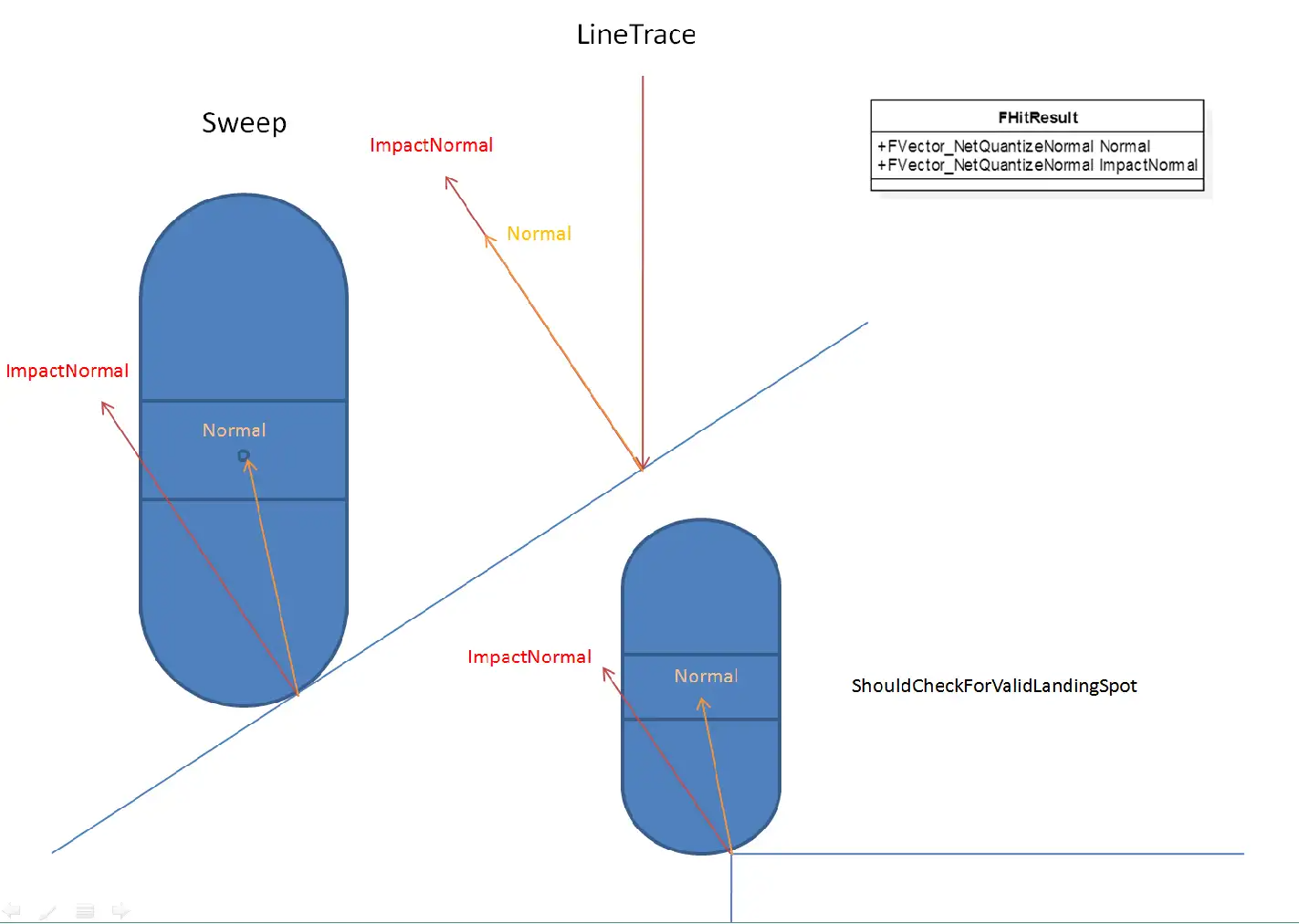
然后SafeMoveUpdatedComponent负责用这个算出来的移动向量Delta来对当前角色的体型进行平移。如果平移过程中遇到了物理阻挡,将这个阻挡信息填充到传入的FHitResult中。
后面再根据SafeMoveUpdatedComponent算出来的阻挡信息做后续的处理:
- 首先处理的是移动之前玩家就已经与阻挡物撞上的情况,即
Hit.bStartPenetrating为True,此时的对策是SlideAlongSurface,即保留当前移动方向平行于接触面的分量进行移动,相当于撞墙之后贴着墙壁走
if (Hit.bStartPenetrating)
{
	// Allow this hit to be used as an impact we can deflect off, otherwise we do nothing the rest of the update and appear to hitch.
	HandleImpact(Hit);
	SlideAlongSurface(Delta, 1.f, Hit.Normal, Hit, true);

	if (Hit.bStartPenetrating)
	{
		OnCharacterStuckInGeometry(&Hit);
	}
}
else if (Hit.IsValidBlockingHit())
{
	// 当前代码在后续分支继续讨论
}
- 如果后续才会撞到碰撞物,且目标碰撞物表面可以行走,则先移动到碰撞点,再沿着碰撞物表面进行移动,这里相当于处理正前方是斜坡时的上坡逻辑。这里上坡时可能会继续遇到碰撞,所以用
PercentTimeApplied代表第二次碰撞时间点。
// We impacted something (most likely another ramp, but possibly a barrier).
float PercentTimeApplied = Hit.Time;
if ((Hit.Time > 0.f) && (Hit.Normal.Z > KINDA_SMALL_NUMBER) && IsWalkable(Hit))
{
	// Another walkable ramp.
	const float InitialPercentRemaining = 1.f - PercentTimeApplied;
	RampVector = ComputeGroundMovementDelta(Delta * InitialPercentRemaining, Hit, false);
	LastMoveTimeSlice = InitialPercentRemaining * LastMoveTimeSlice;
	SafeMoveUpdatedComponent(RampVector, UpdatedComponent->GetComponentQuat(), true, Hit);

	const float SecondHitPercent = Hit.Time * InitialPercentRemaining;
	PercentTimeApplied = FMath::Clamp(PercentTimeApplied + SecondHitPercent, 0.f, 1.f);
}
if (Hit.IsValidBlockingHit())
{
	if (CanStepUp(Hit) || (CharacterOwner->GetMovementBase() != NULL && CharacterOwner->GetMovementBase()->GetOwner() == Hit.GetActor()))
	{
		// hit a barrier, try to step up
		// 此处先省略相关代码
	}
	else if ( Hit.Component.IsValid() && !Hit.Component.Get()->CanCharacterStepUp(CharacterOwner) )
	{
		HandleImpact(Hit, LastMoveTimeSlice, RampVector);
		SlideAlongSurface(Delta, 1.f - PercentTimeApplied, Hit.Normal, Hit, true);
	}

}
考虑完二次碰撞之后,再检查我们能否站到障碍物表面或者是不是与当前的占据的移动平台发生了碰撞。如果返回了false,则执行之前一样的沿着碰撞表面的移动;如果返回true,则需要调用StepUp函数来额外处理一下站上去的逻辑:
- 如果成功的站上去之后根据
bMaintainHorizontalGroundVelocity去抹除高度轴的速度; - 如果没有成功的站上去则复用之前的沿着阻挡体平面移动的逻辑
const FVector PreStepUpLocation = UpdatedComponent->GetComponentLocation();
const FVector GravDir(0.f, 0.f, -1.f);
if (!StepUp(GravDir, Delta * (1.f - PercentTimeApplied), Hit, OutStepDownResult))
{
	UE_LOG(LogCharacterMovement, Verbose, TEXT("- StepUp (ImpactNormal %s, Normal %s"), *Hit.ImpactNormal.ToString(), *Hit.Normal.ToString());
	HandleImpact(Hit, LastMoveTimeSlice, RampVector);
	SlideAlongSurface(Delta, 1.f - PercentTimeApplied, Hit.Normal, Hit, true);
}
else
{
	UE_LOG(LogCharacterMovement, Verbose, TEXT("+ StepUp (ImpactNormal %s, Normal %s"), *Hit.ImpactNormal.ToString(), *Hit.Normal.ToString());
	if (!bMaintainHorizontalGroundVelocity)
	{
		// Don't recalculate velocity based on this height adjustment, if considering vertical adjustments. Only consider horizontal movement.
		bJustTeleported = true;
		const float StepUpTimeSlice = (1.f - PercentTimeApplied) * DeltaSeconds;
		if (!HasAnimRootMotion() && !CurrentRootMotion.HasOverrideVelocity() && StepUpTimeSlice >= KINDA_SMALL_NUMBER)
		{
			Velocity = (UpdatedComponent->GetComponentLocation() - PreStepUpLocation) / StepUpTimeSlice;
			Velocity.Z = 0;
		}
	}
}
这里StepUp能否成功依赖主要依赖这三个因素:
- 配置的角色最大提升高度
MaxStepHeight - 目标平台是否支持玩家可以站在上面
- 抬升时角色头顶不会碰到障碍物
具体的执行逻辑其实挺复杂的,大概就是将角色胶囊体先抬升MaxStepHeight,然后移动之前计算的Delta向量,然后再下降MaxStepHeight+MAX_FLOOR_DIST*2.f的距离来查看能否接触到地面,如果接触不到地面则进入Falling状态。
到这里MoveAlongFloor的逻辑才彻底走完,我们再看一下PhysWalking的后续流程。接下来需要计算一下当前脚下的地面,使用的是FindFloor函数,不过如果在MoveAlongFloor里执行过StepDown流程的话所需要的地板数据已经计算好了,就不再需要计算地板了:
// Update floor.
// StepUp might have already done it for us.
if (StepDownResult.bComputedFloor)
{
	CurrentFloor = StepDownResult.FloorResult;
}
else
{
	FindFloor(UpdatedComponent->GetComponentLocation(), CurrentFloor, bZeroDelta, NULL);
}
FindFloor本质上就是通过胶囊体的Sweep检测来找到脚下的被配置为与Pawn的进行阻挡的Actor。这里与常规的使用LineTrace寻找地面的时候有很大的不同。LineTrace只考虑脚下位置附近的,而忽略掉腰部附近的物体;而Sweep用的是胶囊体而不是射线检测,方便处理斜面移动,计算可站立半径等。在这两种地面检测时,返回结果里的两个法向向量的设置有很大的不同,参考下图:
如果查询到的地面是不可行走的且角色被配置为不能走出平台,则尝试调用GetLedgeMove来沿着之前平台的边缘移动:
// check for ledges here
const bool bCheckLedges = !CanWalkOffLedges();
if ( bCheckLedges && !CurrentFloor.IsWalkableFloor() )
{
	// calculate possible alternate movement
	const FVector GravDir = FVector(0.f,0.f,-1.f);
	const FVector NewDelta = bTriedLedgeMove ? FVector::ZeroVector : GetLedgeMove(OldLocation, Delta, GravDir);
	if ( !NewDelta.IsZero() )
	{
		// first revert this move
		RevertMove(OldLocation, OldBase, PreviousBaseLocation, OldFloor, false);

		// avoid repeated ledge moves if the first one fails
		bTriedLedgeMove = true;

		// Try new movement direction
		Velocity = NewDelta/timeTick;
		remainingTime += timeTick;
		continue;
	}
	else
	{
		// see if it is OK to jump
		// @todo collision : only thing that can be problem is that oldbase has world collision on
		bool bMustJump = bZeroDelta || (OldBase == NULL || (!OldBase->IsQueryCollisionEnabled() && MovementBaseUtility::IsDynamicBase(OldBase)));
		if ( (bMustJump || !bCheckedFall) && CheckFall(OldFloor, CurrentFloor.HitResult, Delta, OldLocation, remainingTime, timeTick, Iterations, bMustJump) )
		{
			return;
		}
		bCheckedFall = true;

		// revert this move
		RevertMove(OldLocation, OldBase, PreviousBaseLocation, OldFloor, true);
		remainingTime = 0.f;
		break;
	}
}
这里的GetLedgeMove其实就是对当前移动方向做一次左转90度,然后查询这个方向上移动是否会遇到障碍物,如果遇到了障碍物则切换为右转90度再做一次障碍物查询。如果任意方向可行则返回的NewDelta就是此方向上的移动向量,如果都不行则返回的NewDelta就全是0。执行完LedgeMove成功后会以这个NewDelta来计算新的速度,失败后则会尝试执行跳跃。
如果上面代码的准入条件判断为false,则执行下面的逻辑
else
{
	// Validate the floor check
	if (CurrentFloor.IsWalkableFloor())
	{
		if (ShouldCatchAir(OldFloor, CurrentFloor))
		{
			HandleWalkingOffLedge(OldFloor.HitResult.ImpactNormal, OldFloor.HitResult.Normal, OldLocation, timeTick);
			if (IsMovingOnGround())
			{
				// If still walking, then fall. If not, assume the user set a different mode they want to keep.
				StartFalling(Iterations, remainingTime, timeTick, Delta, OldLocation);
			}
			return;
		}

		AdjustFloorHeight();
		SetBase(CurrentFloor.HitResult.Component.Get(), CurrentFloor.HitResult.BoneName);
	}
	else if (CurrentFloor.HitResult.bStartPenetrating && remainingTime <= 0.f)
	{
		// The floor check failed because it started in penetration
		// We do not want to try to move downward because the downward sweep failed, rather we'd like to try to pop out of the floor.
		FHitResult Hit(CurrentFloor.HitResult);
		Hit.TraceEnd = Hit.TraceStart + FVector(0.f, 0.f, MAX_FLOOR_DIST);
		const FVector RequestedAdjustment = GetPenetrationAdjustment(Hit);
		ResolvePenetration(RequestedAdjustment, Hit, UpdatedComponent->GetComponentQuat());
		bForceNextFloorCheck = true;
	}

	// check if just entered water
	if ( IsSwimming() )
	{
		StartSwimming(OldLocation, Velocity, timeTick, remainingTime, Iterations);
		return;
	}

	// See if we need to start falling.
	if (!CurrentFloor.IsWalkableFloor() && !CurrentFloor.HitResult.bStartPenetrating)
	{
		const bool bMustJump = bJustTeleported || bZeroDelta || (OldBase == NULL || (!OldBase->IsQueryCollisionEnabled() && MovementBaseUtility::IsDynamicBase(OldBase)));
		if ((bMustJump || !bCheckedFall) && CheckFall(OldFloor, CurrentFloor.HitResult, Delta, OldLocation, remainingTime, timeTick, Iterations, bMustJump) )
		{
			return;
		}
		bCheckedFall = true;
	}
}
ShouldCatchAir代表是否需要处理切换Floor时的Jump切换,默认配置为false。如果新的Floor是不可行走的且没有剩余时间去解决胶囊体与Floor的穿透问题,则直接回弹一段距离并标记为下一次重新检查地表。
最后剩的一点代码就是计算这次迭代期间的移动速度并抹除地面的法向分量。
// Allow overlap events and such to change physics state and velocity
if (IsMovingOnGround())
{
	// Make velocity reflect actual move
	if( !bJustTeleported && !HasAnimRootMotion() && !CurrentRootMotion.HasOverrideVelocity() && timeTick >= MIN_TICK_TIME)
	{
		// TODO-RootMotionSource: Allow this to happen during partial override Velocity, but only set allowed axes?
		Velocity = (UpdatedComponent->GetComponentLocation() - OldLocation) / timeTick;
		MaintainHorizontalGroundVelocity();
	}
}

// If we didn't move at all this iteration then abort (since future iterations will also be stuck).
if (UpdatedComponent->GetComponentLocation() == OldLocation)
{
	remainingTime = 0.f;
	break;
}
预演之后NewMove里的一些字段就会得到填充,例如新的位置朝向、底下的平台等信息。
移动指令的延时发送
一个Move可以被延迟一会儿,与后面的Move合并后再发往服务器,减少带宽。因此新建的Move被发往服务器前会先判断是否可以延迟发送。
首先会判断当前是否开启了NetEnableMoveCombining,以及当前Move是否能被延迟发送,会检查该Move前后MovementMode是否改变。简单的理解就是这次move是否有显著改变,比如玩家长时间向着一个方向匀速移动,那么中间的move信息其实不需要全部发往服务器,服务器可以把之前收到move中的速度作为之后的速度计算,结果应该是一样的。
然后会计算当前预期的移动更新时间间隔,有一个可配置基准值ClientNetSendMoveDeltaTime,同时根据当前网速、玩家数量、玩家是否静止等信息在基准值上做调整,得到最终间隔。如果两次Tick间隔小于更新间隔,就会延迟发送这个Move,把它存储到PendingMove属性中,留着以后处理。
// Add NewMove to the list
if (CharacterOwner->IsReplicatingMovement())
{
	check(NewMove == NewMovePtr.Get());
	ClientData->SavedMoves.Push(NewMovePtr);

	const bool bCanDelayMove = (CharacterMovementCVars::NetEnableMoveCombining != 0) && CanDelaySendingMove(NewMovePtr);

	if (bCanDelayMove && ClientData->PendingMove.IsValid() == false)
	{
		// Decide whether to hold off on move
		const float NetMoveDelta = FMath::Clamp(GetClientNetSendDeltaTime(PC, ClientData, NewMovePtr), 1.f/120.f, 1.f/5.f);

		if ((MyWorld->TimeSeconds - ClientData->ClientUpdateTime) * MyWorld->GetWorldSettings()->GetEffectiveTimeDilation() < NetMoveDelta)
		{
			// Delay sending this move.
			ClientData->PendingMove = NewMovePtr;
			return;
		}
	}
	// 后续省略一些代码

}
移动指令的数据打包
当延时发送的判定没有通过时,需要立即发送当前的NewMove信息,调用到CallServerMove函数:
ClientData->ClientUpdateTime = MyWorld->TimeSeconds;

UE_CLOG(CharacterOwner && UpdatedComponent, LogNetPlayerMovement, VeryVerbose, TEXT("ClientMove Time %f Acceleration %s Velocity %s Position %s Rotation %s DeltaTime %f Mode %s MovementBase %s.%s (Dynamic:%d) DualMove? %d"),
	NewMove->TimeStamp, *NewMove->Acceleration.ToString(), *Velocity.ToString(), *UpdatedComponent->GetComponentLocation().ToString(), *UpdatedComponent->GetComponentRotation().ToCompactString(), NewMove->DeltaTime, *GetMovementName(),
	*GetNameSafe(NewMove->EndBase.Get()), *NewMove->EndBoneName.ToString(), MovementBaseUtility::IsDynamicBase(NewMove->EndBase.Get()) ? 1 : 0, ClientData->PendingMove.IsValid() ? 1 : 0);


bool bSendServerMove = true;

// 此处省略一些测试用的代码


// Send move to server if this character is replicating movement
if (bSendServerMove)
{
	SCOPE_CYCLE_COUNTER(STAT_CharacterMovementCallServerMove);
	if (ShouldUsePackedMovementRPCs())
	{
		CallServerMovePacked(NewMove, ClientData->PendingMove.Get(), OldMove.Get());
	}
	else
	{
		CallServerMove(NewMove, OldMove.Get());
	}
}
这里的CallServerMove函数接受两个参数,一个是刚创建的Move,另一个是之前获取的ImportantMove,ImportantMove可能为空。不需要把Move整个都发往服务器,只需要位置、旋转、加速度等关键信息,而且这些信息会经过压缩。
void UCharacterMovementComponent::CallServerMove
	(
	const FSavedMove_Character* NewMove,
	const FSavedMove_Character* OldMove
	)
{
	check(NewMove != nullptr);

	// Compress rotation down to 5 bytes
	uint32 ClientYawPitchINT = 0;
	uint8 ClientRollBYTE = 0;
	NewMove->GetPackedAngles(ClientYawPitchINT, ClientRollBYTE);

	// Determine if we send absolute or relative location
	UPrimitiveComponent* ClientMovementBase = NewMove->EndBase.Get();
	const FName ClientBaseBone = NewMove->EndBoneName;
	const FVector SendLocation = MovementBaseUtility::UseRelativeLocation(ClientMovementBase) ? NewMove->SavedRelativeLocation : FRepMovement::RebaseOntoZeroOrigin(NewMove->SavedLocation, this);


}
首先,UE把旋转中的Yaw和Pitch压缩到一个uint32中,各自占一个uint16,此时这两个字段的精度为0.06度。同时把Roll压缩到一个uint8中,此时的精度为0.7。这样把原本的三个float的12字节压缩到了5字节,大部分情况下玩家也察觉不到这种程度的精度损失。
FORCEINLINE uint16 FRotator::CompressAxisToShort( float Angle )
{
	// map [0->360) to [0->65536) and mask off any winding
	return FMath::RoundToInt(Angle * 65536.f / 360.f) & 0xFFFF;
}

FORCEINLINE uint8 FRotator::CompressAxisToByte( float Angle )
{
	// map [0->360) to [0->256) and mask off any winding
	return FMath::RoundToInt(Angle * 256.f / 360.f) & 0xFF;
}

FORCEINLINE uint32 UCharacterMovementComponent::PackYawAndPitchTo32(const float Yaw, const float Pitch)
{
	const uint32 YawShort = FRotator::CompressAxisToShort(Yaw);
	const uint32 PitchShort = FRotator::CompressAxisToShort(Pitch);
	const uint32 Rotation32 = (YawShort << 16) | PitchShort;
	return Rotation32;
}

void FSavedMove_Character::GetPackedAngles(uint32& YawAndPitchPack, uint8& RollPack) const
{
	// Compress rotation down to 5 bytes
	YawAndPitchPack = UCharacterMovementComponent::PackYawAndPitchTo32(SavedControlRotation.Yaw, SavedControlRotation.Pitch);
	RollPack = FRotator::CompressAxisToByte(SavedControlRotation.Roll);
}
之后,如果存在ImportantMove,会调用ServerMoveOld,把ImportantMove发送到服务器,但只会发送时间戳、加速度和CompressFlags信息。可以先简单理解为一种冗余保险措施。
// send old move if it exists
if (OldMove)
{
	ServerMoveOld(OldMove->TimeStamp, OldMove->Acceleration, OldMove->GetCompressedFlags());
}
最后如果存在PendingMove,说明两个Move无法合并,需要调用ServerMoveDual函数一次发送两个连续的Move。这里有一个特例:如果PendingMove没有RootMotion但是NewMove有RootMotion则调用ServerMoveDualHybridRootMotion来同时发送这两个SavedMove。如果不存在PendingMove,说明发送间隔较大或已经合并了PendingMove,就调用ServerMove发送这个Move。
FNetworkPredictionData_Client_Character* ClientData = GetPredictionData_Client_Character();
if (const FSavedMove_Character* const PendingMove = ClientData->PendingMove.Get())
{
	uint32 OldClientYawPitchINT = 0;
	uint8 OldClientRollBYTE = 0;
	ClientData->PendingMove->GetPackedAngles(OldClientYawPitchINT, OldClientRollBYTE);

	// If we delayed a move without root motion, and our new move has root motion, send these through a special function, so the server knows how to process them.
	if ((PendingMove->RootMotionMontage == NULL) && (NewMove->RootMotionMontage != NULL))
	{
		// send two moves simultaneously
		ServerMoveDualHybridRootMotion(
			// 此处省略很多参数
			);
	}
	else
	{
		// send two moves simultaneously
		ServerMoveDual(
			// 此处省略所有参数
			);
	}
}
else
{
	ServerMove(
		// 此处省略所有参数
		);
}
移动指令的服务端模拟
这里我们就只考虑上面提到的ServerMove:
void UCharacterMovementComponent::ServerMove(float TimeStamp, FVector_NetQuantize10 InAccel, FVector_NetQuantize100 ClientLoc, uint8 CompressedMoveFlags, uint8 ClientRoll, uint32 View, UPrimitiveComponent* ClientMovementBase, FName ClientBaseBoneName, uint8 ClientMovementMode)
{
	if (MovementBaseUtility::IsDynamicBase(ClientMovementBase))
	{
		//UE_LOG(LogCharacterMovement, Log, TEXT("ServerMove: base %s"), *ClientMovementBase->GetName());
		CharacterOwner->ServerMove(TimeStamp, InAccel, ClientLoc, CompressedMoveFlags, ClientRoll, View, ClientMovementBase, ClientBaseBoneName, ClientMovementMode);
	}
	else
	{
		//UE_LOG(LogCharacterMovement, Log, TEXT("ServerMoveNoBase"));
		CharacterOwner->ServerMoveNoBase(TimeStamp, InAccel, ClientLoc, CompressedMoveFlags, ClientRoll, View, ClientMovementMode);
	}
}
这里根据玩家脚底下的物体是否是可移动的切分为了两个分支,分别走ServerMove和ServerMoveNoBase。对于移动平台的处理目前不是我们的重点,而且移动平台的移动UE的实现也是不怎么完美,此处就先略过,我们只看不可移动的地面上的简单移动ServerMoveNoBase。
/**
	* Replicated function sent by client to server. Saves bandwidth over ServerMove() by implying that ClientMovementBase and ClientBaseBoneName are null.
	* Passes through to CharacterMovement->ServerMove_Implementation() with null base params.
	*/
DEPRECATED_CHARACTER_MOVEMENT_RPC(ServerMoveNoBase, ServerMovePacked)
UFUNCTION(unreliable, server, WithValidation)
void ServerMoveNoBase(float TimeStamp, FVector_NetQuantize10 InAccel, FVector_NetQuantize100 ClientLoc, uint8 CompressedMoveFlags, uint8 ClientRoll, uint32 View, uint8 ClientMovementMode);
DEPRECATED_CHARACTER_MOVEMENT_RPC(ServerMoveNoBase_Implementation, ServerMovePacked_Implementation)
void ServerMoveNoBase_Implementation(float TimeStamp, FVector_NetQuantize10 InAccel, FVector_NetQuantize100 ClientLoc, uint8 CompressedMoveFlags, uint8 ClientRoll, uint32 View, uint8 ClientMovementMode);
bool ServerMoveNoBase_Validate(float TimeStamp, FVector_NetQuantize10 InAccel, FVector_NetQuantize100 ClientLoc, uint8 CompressedMoveFlags, uint8 ClientRoll, uint32 View, uint8 ClientMovementMode);
这里我们惊奇的发现这个ServerMoveNoBase居然是一个unreliable的rpc,不过想来也是有其道理,因为移动位置同步与语音同步一样,要求的实时性非常高,延迟过大的数据根本没有多少价值,反而会更加的劣化用户体验。当某个客户端弱网的情况下,最好的处理方法是直接拒绝掉这个弱网客户端的上行同步,避免在其他客户端出现各种匪夷所思的拉扯问题。所以有些时候为了减少丢包乱序导致的移动同步问题,UE提供了一次性发更多的信息到服务器,即CallServerMovePacked。CallServerMovePacked会将NewMove、PendingMove和OldMove都打包成一个数据流,然后通过一个RPC发送到服务器,尽可能的减少非可靠RPC的丢包、乱序带来的影响:
SCOPE_CYCLE_COUNTER(STAT_CharacterMovementCallServerMove);
if (ShouldUsePackedMovementRPCs())
{
	CallServerMovePacked(NewMove, ClientData->PendingMove.Get(), OldMove.Get());
}
else
{
	CallServerMove(NewMove, OldMove.Get());
}
Character::ServerMove的实现就是直接转发到UCharacterMovementComponent::ServerMove_Implementation上:
void UCharacterMovementComponent::ServerMove_Implementation(
	float TimeStamp,
	FVector_NetQuantize10 InAccel,
	FVector_NetQuantize100 ClientLoc,
	uint8 MoveFlags,
	uint8 ClientRoll,
	uint32 View,
	UPrimitiveComponent* ClientMovementBase,
	FName ClientBaseBoneName,
	uint8 ClientMovementMode)
这个函数的开头首先检查客户端发送过来的数据时间戳是不是过期太久:
SCOPE_CYCLE_COUNTER(STAT_CharacterMovementServerMove);
CSV_SCOPED_TIMING_STAT(CharacterMovement, CharacterMovementServerMove);

if (!HasValidData() || !IsActive())
{
	return;
}

FNetworkPredictionData_Server_Character* ServerData = GetPredictionData_Server_Character();
check(ServerData);

if( !VerifyClientTimeStamp(TimeStamp, *ServerData) )
{
	const float ServerTimeStamp = ServerData->CurrentClientTimeStamp;
	// This is more severe if the timestamp has a large discrepancy and hasn't been recently reset.
	if (ServerTimeStamp > 1.0f && FMath::Abs(ServerTimeStamp - TimeStamp) > CharacterMovementCVars::NetServerMoveTimestampExpiredWarningThreshold)
	{
		UE_LOG(LogNetPlayerMovement, Warning, TEXT("ServerMove: TimeStamp expired: %f, CurrentTimeStamp: %f, Character: %s"), TimeStamp, ServerTimeStamp, *GetNameSafe(CharacterOwner));
	}
	else
	{
		UE_LOG(LogNetPlayerMovement, Log, TEXT("ServerMove: TimeStamp expired: %f, CurrentTimeStamp: %f, Character: %s"), TimeStamp, ServerTimeStamp, *GetNameSafe(CharacterOwner));
	}
	return;
}
当时间戳检查通过之后,服务器开始使用这份输入数据执行一下移动模拟:
bool bServerReadyForClient = true;
APlayerController* PC = Cast<APlayerController>(CharacterOwner->GetController());
if (PC)
{
	bServerReadyForClient = PC->NotifyServerReceivedClientData(CharacterOwner, TimeStamp);
	if (!bServerReadyForClient)
	{
		InAccel = FVector::ZeroVector;
	}
}

// View components
const uint16 ViewPitch = (View & 65535);
const uint16 ViewYaw = (View >> 16);

const FVector Accel = InAccel;

const UWorld* MyWorld = GetWorld();
const float DeltaTime = ServerData->GetServerMoveDeltaTime(TimeStamp, CharacterOwner->GetActorTimeDilation(*MyWorld));

ServerData->CurrentClientTimeStamp = TimeStamp;
ServerData->ServerAccumulatedClientTimeStamp += DeltaTime;
ServerData->ServerTimeStamp = MyWorld->GetTimeSeconds();
ServerData->ServerTimeStampLastServerMove = ServerData->ServerTimeStamp;
FRotator ViewRot;
ViewRot.Pitch = FRotator::DecompressAxisFromShort(ViewPitch);
ViewRot.Yaw = FRotator::DecompressAxisFromShort(ViewYaw);
ViewRot.Roll = FRotator::DecompressAxisFromByte(ClientRoll);

if (PC)
{
	PC->SetControlRotation(ViewRot);
}

if (!bServerReadyForClient)
{
	return;
}

// Perform actual movement
if ((MyWorld->GetWorldSettings()->GetPauserPlayerState() == NULL) && (DeltaTime > 0.f))
{
	if (PC)
	{
		PC->UpdateRotation(DeltaTime);
	}

	MoveAutonomous(TimeStamp, DeltaTime, MoveFlags, Accel);
}
上面的MoveAutonomous就是最终执行模拟的函数,其函数核心就是调用PerformMovement,之前客户端本地预演时也是用PerformMovement来更新位置的:
void UCharacterMovementComponent::MoveAutonomous
	(
	float ClientTimeStamp,
	float DeltaTime,
	uint8 CompressedFlags,
	const FVector& NewAccel
	)
{
	if (!HasValidData())
	{
		return;
	}

	UpdateFromCompressedFlags(CompressedFlags);
	CharacterOwner->CheckJumpInput(DeltaTime);

	Acceleration = ConstrainInputAcceleration(NewAccel);
	Acceleration = Acceleration.GetClampedToMaxSize(GetMaxAcceleration());
	AnalogInputModifier = ComputeAnalogInputModifier();

	const FVector OldLocation = UpdatedComponent->GetComponentLocation();
	const FQuat OldRotation = UpdatedComponent->GetComponentQuat();

	const bool bWasPlayingRootMotion = CharacterOwner->IsPlayingRootMotion();

	PerformMovement(DeltaTime);

	// Check if data is valid as PerformMovement can mark character for pending kill
	if (!HasValidData())
	{
		return;
	}

	// If not playing root motion, tick animations after physics. We do this here to keep events, notifies, states and transitions in sync with client updates.
	if( CharacterOwner && !CharacterOwner->bClientUpdating && !CharacterOwner->IsPlayingRootMotion() && CharacterOwner->GetMesh() )
	{
		if (!bWasPlayingRootMotion) // If we were playing root motion before PerformMovement but aren't anymore, we're on the last frame of anim root motion and have already ticked character
		{
			TickCharacterPose(DeltaTime);
		}
		// TODO: SaveBaseLocation() in case tick moves us?

		// Trigger Events right away, as we could be receiving multiple ServerMoves per frame.
		CharacterOwner->GetMesh()->ConditionallyDispatchQueuedAnimEvents();
	}

	if (CharacterOwner && UpdatedComponent)
	{
		// Smooth local view of remote clients on listen servers
		if (CharacterMovementCVars::NetEnableListenServerSmoothing &&
			CharacterOwner->GetRemoteRole() == ROLE_AutonomousProxy &&
			IsNetMode(NM_ListenServer))
		{
			SmoothCorrection(OldLocation, OldRotation, UpdatedComponent->GetComponentLocation(), UpdatedComponent->GetComponentQuat());
		}
	}
}
模拟完成之后再使用SmoothCorrection将UpdatedComponent的最新位置信息平滑的设置过去。位置更新结束之后,使用ServerMoveHandleClientError来判断模拟之后的位置信息是否与客户端传递过来的位置信息相匹配:
UE_CLOG(CharacterOwner && UpdatedComponent, LogNetPlayerMovement, VeryVerbose, TEXT("ServerMove Time %f Acceleration %s Velocity %s Position %s Rotation %s DeltaTime %f Mode %s MovementBase %s.%s (Dynamic:%d)"),
		TimeStamp, *Accel.ToString(), *Velocity.ToString(), *UpdatedComponent->GetComponentLocation().ToString(), *UpdatedComponent->GetComponentRotation().ToCompactString(), DeltaTime, *GetMovementName(),
		*GetNameSafe(GetMovementBase()), *CharacterOwner->GetBasedMovement().BoneName.ToString(), MovementBaseUtility::IsDynamicBase(GetMovementBase()) ? 1 : 0);

ServerMoveHandleClientError(TimeStamp, DeltaTime, Accel, ClientLoc, ClientMovementBase, ClientBaseBoneName, ClientMovementMode);
这个函数里面有两个分支,一个分支处理运动状态需要重置的情况,一个分支处理模拟吻合的情况。这里的重置有两种情况:客户端请求强制重置或者服务端模拟之后发现差异过大需要重置:
// Compute the client error from the server's position
// If client has accumulated a noticeable positional error, correct them.
bNetworkLargeClientCorrection = ServerData->bForceClientUpdate;
if (ServerData->bForceClientUpdate || ServerCheckClientError(ClientTimeStamp, DeltaTime, Accel, ClientLoc, RelativeClientLoc, ClientMovementBase, ClientBaseBoneName, ClientMovementMode))
{
	UPrimitiveComponent* MovementBase = CharacterOwner->GetMovementBase();
	ServerData->PendingAdjustment.NewVel = Velocity;
	ServerData->PendingAdjustment.NewBase = MovementBase;
	ServerData->PendingAdjustment.NewBaseBoneName = CharacterOwner->GetBasedMovement().BoneName;
	ServerData->PendingAdjustment.NewLoc = FRepMovement::RebaseOntoZeroOrigin(UpdatedComponent->GetComponentLocation(), this);
	ServerData->PendingAdjustment.NewRot = UpdatedComponent->GetComponentRotation();

	ServerData->PendingAdjustment.bBaseRelativePosition = MovementBaseUtility::UseRelativeLocation(MovementBase);
	if (ServerData->PendingAdjustment.bBaseRelativePosition)
	{
		// Relative location
		ServerData->PendingAdjustment.NewLoc = CharacterOwner->GetBasedMovement().Location;

		// TODO: this could be a relative rotation, but all client corrections ignore rotation right now except the root motion one, which would need to be updated.
		//ServerData->PendingAdjustment.NewRot = CharacterOwner->GetBasedMovement().Rotation;
	}
	ServerData->LastUpdateTime = GetWorld()->TimeSeconds;
	ServerData->PendingAdjustment.DeltaTime = DeltaTime;
	ServerData->PendingAdjustment.TimeStamp = ClientTimeStamp;
	ServerData->PendingAdjustment.bAckGoodMove = false;
	ServerData->PendingAdjustment.MovementMode = PackNetworkMovementMode();
}
else
{
	if (ServerShouldUseAuthoritativePosition(ClientTimeStamp, DeltaTime, Accel, ClientLoc, RelativeClientLoc, ClientMovementBase, ClientBaseBoneName, ClientMovementMode))
	{
		const FVector LocDiff = UpdatedComponent->GetComponentLocation() - ClientLoc; //-V595
		if (!LocDiff.IsZero() || ClientMovementMode != PackNetworkMovementMode() || GetMovementBase() != ClientMovementBase || (CharacterOwner && CharacterOwner->GetBasedMovement().BoneName != ClientBaseBoneName))
		{
			// Just set the position. On subsequent moves we will resolve initially overlapping conditions.
			UpdatedComponent->SetWorldLocation(ClientLoc, false); //-V595

			// Trust the client's movement mode.
			ApplyNetworkMovementMode(ClientMovementMode);

			// Update base and floor at new location.
			SetBase(ClientMovementBase, ClientBaseBoneName);
			UpdateFloorFromAdjustment();

			// Even if base has not changed, we need to recompute the relative offsets (since we've moved).
			SaveBaseLocation();

			LastUpdateLocation = UpdatedComponent ? UpdatedComponent->GetComponentLocation() : FVector::ZeroVector;
			LastUpdateRotation = UpdatedComponent ? UpdatedComponent->GetComponentQuat() : FQuat::Identity;
			LastUpdateVelocity = Velocity;
		}
	}

	// acknowledge receipt of this successful servermove()
	ServerData->PendingAdjustment.TimeStamp = ClientTimeStamp;
	ServerData->PendingAdjustment.bAckGoodMove = true;
}
在这两种情况下ServerData->PendingAdjustment.bAckGoodMove分别设置成为了false和true
移动指令的客户端确认
在服务端也计算完成新位置之后,需要向发起移动的客户端反馈这个NewMove是否合法,是否需要修正,这个反馈的时机在UNetDriver::ServerReplicateActors中,会遍历所有的PlayerController调用SendClientAdjustment:
void APlayerController::SendClientAdjustment()
{
	if (AcknowledgedPawn != GetPawn() && !GetSpectatorPawn())
	{
		return;
	}

	// Server sends updates.
	// Note: we do this for both the pawn and spectator in case an implementation has a networked spectator.
	APawn* RemotePawn = GetPawnOrSpectator();
	if (RemotePawn && (RemotePawn->GetRemoteRole() == ROLE_AutonomousProxy) && !IsNetMode(NM_Client))
	{
		INetworkPredictionInterface* NetworkPredictionInterface = Cast<INetworkPredictionInterface>(RemotePawn->GetMovementComponent());
		if (NetworkPredictionInterface)
		{
			NetworkPredictionInterface->SendClientAdjustment();
		}
	}
}
这里会区分客户端传递过来的SavedMove是否匹配服务端的模拟结果:
void UCharacterMovementComponent::SendClientAdjustment()
{
	if (!HasValidData())
	{
		return;
	}

	FNetworkPredictionData_Server_Character* ServerData = GetPredictionData_Server_Character();
	check(ServerData);

	if (ServerData->PendingAdjustment.TimeStamp <= 0.f)
	{
		return;
	}

	const float CurrentTime = GetWorld()->GetTimeSeconds();
	if (ServerData->PendingAdjustment.bAckGoodMove)
	{
		// just notify client this move was received
		if (CurrentTime - ServerLastClientGoodMoveAckTime > NetworkMinTimeBetweenClientAckGoodMoves)
		{
			ServerLastClientGoodMoveAckTime = CurrentTime;
			if (ShouldUsePackedMovementRPCs())
			{
				ServerSendMoveResponse(ServerData->PendingAdjustment);
			}
			else
			{
				ClientAckGoodMove(ServerData->PendingAdjustment.TimeStamp);
			}
		}
	}
	else
	{
		// 省略一些异常处理代码
	}
}
如果匹配了,则调用ClientAckGoodMove:
void UCharacterMovementComponent::ClientAckGoodMove_Implementation(float TimeStamp)
{
	if (!HasValidData() || !IsActive())
	{
		return;
	}

	FNetworkPredictionData_Client_Character* ClientData = GetPredictionData_Client_Character();
	check(ClientData);

	// Ack move if it has not expired.
	int32 MoveIndex = ClientData->GetSavedMoveIndex(TimeStamp);
	if( MoveIndex == INDEX_NONE )
	{
		if( ClientData->LastAckedMove.IsValid() )
		{
			UE_LOG(LogNetPlayerMovement, Log, TEXT("ClientAckGoodMove_Implementation could not find Move for TimeStamp: %f, LastAckedTimeStamp: %f, CurrentTimeStamp: %f"), TimeStamp, ClientData->LastAckedMove->TimeStamp, ClientData->CurrentTimeStamp);
		}
		return;
	}

	ClientData->AckMove(MoveIndex, *this);
}
ClientAckMove的参数只有一个,就是PendingAdjustment的TimeStamp。Autonomous客户端收到rpc后,根据TimeStamp从SavedMoves数组里找到对应的Move,把它作为当前的LastAckedMove,然后把SavedMoves中TimeStamp之前的Move都删除,表示之前的Move都被Ack了。
void FNetworkPredictionData_Client_Character::AckMove(int32 AckedMoveIndex, UCharacterMovementComponent& CharacterMovementComponent)
{
	// It is important that we know the move exists before we go deleting outdated moves.
	// Timestamps are not guaranteed to be increasing order all the time, since they can be reset!
	if( AckedMoveIndex != INDEX_NONE )
	{
		// Keep reference to LastAckedMove
		const FSavedMovePtr& AckedMove = SavedMoves[AckedMoveIndex];
		UE_LOG(LogNetPlayerMovement, VeryVerbose, TEXT("AckedMove Index: %2d (%2d moves). TimeStamp: %f, CurrentTimeStamp: %f"), AckedMoveIndex, SavedMoves.Num(), AckedMove->TimeStamp, CurrentTimeStamp);
		if( LastAckedMove.IsValid() )
		{
			FreeMove(LastAckedMove);
		}
		LastAckedMove = AckedMove;

		// Free expired moves.
		for(int32 MoveIndex=0; MoveIndex<AckedMoveIndex; MoveIndex++)
		{
			const FSavedMovePtr& Move = SavedMoves[MoveIndex];
			FreeMove(Move);
		}

		// And finally cull all of those, so only the unacknowledged moves remain in SavedMoves.
		const bool bAllowShrinking = false;
		SavedMoves.RemoveAt(0, AckedMoveIndex + 1, bAllowShrinking);
	}

	if (const UWorld* const World = CharacterMovementComponent.GetWorld())
	{
		LastReceivedAckRealTime = World->GetRealTimeSeconds();
	}
}
移动指令的客户端纠正
如果服务器校验失败,则会走一些异常处理代码,这里有好几个分支,最简单的分支往客户端发送强行设置的rpc,其接口为ClientAdjustPosition,这里会带上重设的时间戳和新的位置速度等信息:
ClientAdjustPosition
(
	ServerData->PendingAdjustment.TimeStamp,
	ServerData->PendingAdjustment.NewLoc,
	ServerData->PendingAdjustment.NewVel,
	ServerData->PendingAdjustment.NewBase,
	ServerData->PendingAdjustment.NewBaseBoneName,
	ServerData->PendingAdjustment.NewBase != NULL,
	ServerData->PendingAdjustment.bBaseRelativePosition,
	PackNetworkMovementMode()
);
客户端接收到这个强制重设rpc时候,把这个时间戳之前的Move都作废,然后根据传递过来的数据执行位置速度强行设置,切换MoveMode和MoveBase等:
void UCharacterMovementComponent::ClientAdjustPosition_Implementation
	(
	float TimeStamp,
	FVector NewLocation,
	FVector NewVelocity,
	UPrimitiveComponent* NewBase,
	FName NewBaseBoneName,
	bool bHasBase,
	bool bBaseRelativePosition,
	uint8 ServerMovementMode
	)
{
	if (!HasValidData() || !IsActive())
	{
		return;
	}


	FNetworkPredictionData_Client_Character* ClientData = GetPredictionData_Client_Character();
	check(ClientData);

	// Make sure the base actor exists on this client.
	const bool bUnresolvedBase = bHasBase && (NewBase == NULL);
	if (bUnresolvedBase)
	{
		if (bBaseRelativePosition)
		{
			UE_LOG(LogNetPlayerMovement, Warning, TEXT("ClientAdjustPosition_Implementation could not resolve the new relative movement base actor, ignoring server correction! Client currently at world location %s on base %s"),
				*UpdatedComponent->GetComponentLocation().ToString(), *GetNameSafe(GetMovementBase()));
			return;
		}
		else
		{
			UE_LOG(LogNetPlayerMovement, Verbose, TEXT("ClientAdjustPosition_Implementation could not resolve the new absolute movement base actor, but WILL use the position!"));
		}
	}

	// Ack move if it has not expired.
	int32 MoveIndex = ClientData->GetSavedMoveIndex(TimeStamp);
	if( MoveIndex == INDEX_NONE )
	{
		if( ClientData->LastAckedMove.IsValid() )
		{
			UE_LOG(LogNetPlayerMovement, Log,  TEXT("ClientAdjustPosition_Implementation could not find Move for TimeStamp: %f, LastAckedTimeStamp: %f, CurrentTimeStamp: %f"), TimeStamp, ClientData->LastAckedMove->TimeStamp, ClientData->CurrentTimeStamp);
		}
		return;
	}

	ClientData->AckMove(MoveIndex, *this);

	FVector WorldShiftedNewLocation;
	//  Received Location is relative to dynamic base
	if (bBaseRelativePosition)
	{
		FVector BaseLocation;
		FQuat BaseRotation;
		MovementBaseUtility::GetMovementBaseTransform(NewBase, NewBaseBoneName, BaseLocation, BaseRotation); // TODO: error handling if returns false
		WorldShiftedNewLocation = NewLocation + BaseLocation;
	}
	else
	{
		WorldShiftedNewLocation = FRepMovement::RebaseOntoLocalOrigin(NewLocation, this);
	}


	// Trigger event
	OnClientCorrectionReceived(*ClientData, TimeStamp, WorldShiftedNewLocation, NewVelocity, NewBase, NewBaseBoneName, bHasBase, bBaseRelativePosition, ServerMovementMode);

	// Trust the server's positioning.
	if (UpdatedComponent)
	{
		UpdatedComponent->SetWorldLocation(WorldShiftedNewLocation, false, nullptr, ETeleportType::TeleportPhysics);
	}
	Velocity = NewVelocity;

	// Trust the server's movement mode
	UPrimitiveComponent* PreviousBase = CharacterOwner->GetMovementBase();
	ApplyNetworkMovementMode(ServerMovementMode);

	// Set base component
	UPrimitiveComponent* FinalBase = NewBase;
	FName FinalBaseBoneName = NewBaseBoneName;
	if (bUnresolvedBase)
	{
		check(NewBase == NULL);
		check(!bBaseRelativePosition);

		// We had an unresolved base from the server
		// If walking, we'd like to continue walking if possible, to avoid falling for a frame, so try to find a base where we moved to.
		if (PreviousBase && UpdatedComponent)
		{
			FindFloor(UpdatedComponent->GetComponentLocation(), CurrentFloor, false);
			if (CurrentFloor.IsWalkableFloor())
			{
				FinalBase = CurrentFloor.HitResult.Component.Get();
				FinalBaseBoneName = CurrentFloor.HitResult.BoneName;
			}
			else
			{
				FinalBase = nullptr;
				FinalBaseBoneName = NAME_None;
			}
		}
	}
	SetBase(FinalBase, FinalBaseBoneName);

	// Update floor at new location
	UpdateFloorFromAdjustment();
	bJustTeleported = true;

	// Even if base has not changed, we need to recompute the relative offsets (since we've moved).
	SaveBaseLocation();

	LastUpdateLocation = UpdatedComponent ? UpdatedComponent->GetComponentLocation() : FVector::ZeroVector;
	LastUpdateRotation = UpdatedComponent ? UpdatedComponent->GetComponentQuat() : FQuat::Identity;
	LastUpdateVelocity = Velocity;

	UpdateComponentVelocity();
	ClientData->bUpdatePosition = true;
}
最后会设置一下bUpdatePosition这个字段为true,来触发后续的Move的重新模拟。在Autonomous客户端执行TickComponent时,会检查bUpdatePosition是否为true。如果是,就要重播当前SavedMoves中的所有Move,重播时这些移动不需要再发送servermove rpc了。重播结束后,玩家已经在被纠正位置的基础上把后续输入都重演了一遍,后续位置可能会和服务器算的保持一致。接着客户端继续接受输入并正常移动,可能还会收到服务器纠正位置消息,因为这些Move在重播前已经发了ServerMove,这些Rpc里Location也是错的,服务器会继续纠正,但角色后续客户端位置与服务器位置误差会逐渐变小,并最终保持一致。这里选择重播而不是直接全丢弃是为了避免出现矫正之后的大幅度拉扯,因为丢弃的话后续的Move不再模拟,会让玩家感觉到最近一段时间内的输入完全不起作用,带来了严重的卡顿感。
移动同步的广播
前面介绍的内容处理的是自主客户端发起的移动经过服务器验证之后的确认流程。对于不是自主客户端而言就不能使用前述的同步机制了,需要使用其他机制来同步运动信息。Actor自身就支持移动同步,由bReplicateMovement开关来控制:
/** Called on client when updated bReplicateMovement value is received for this actor. */
UFUNCTION()
virtual void OnRep_ReplicateMovement();

private:
/**
	* If true, replicate movement/location related properties.
	* Actor must also be set to replicate.
	* @see SetReplicates()
	* @see https://docs.unrealengine.com/latest/INT/Gameplay/Networking/Replication/
	*/
UPROPERTY(ReplicatedUsing=OnRep_ReplicateMovement, Category=Replication, EditDefaultsOnly)
uint8 bReplicateMovement:1;
打开bReplicateMovement开关后,当Actor的RootComponent位置、转向等数据发生变化时,就会把数据同步给Simulate客户端。同步的数据结构为FRepMovement,当Simulate Actor收到ReplicatedMovement的更新时,RepNotify函数OnRep_ReplicatedMovement 将解压缩存储的移动数据,并相应地更新Actor的位置和速度。
USTRUCT()
struct ENGINE_API FRepMovement
{
	GENERATED_BODY()

	/** Velocity of component in world space */
	UPROPERTY(Transient)
	FVector LinearVelocity;

	/** Velocity of rotation for component */
	UPROPERTY(Transient)
	FVector AngularVelocity;

	/** Location in world space */
	UPROPERTY(Transient)
	FVector Location;

	/** Current rotation */
	UPROPERTY(Transient)
	FRotator Rotation;

	/** If set, RootComponent should be sleeping. */
	UPROPERTY(Transient)
	uint8 bSimulatedPhysicSleep : 1;

	/** If set, additional physic data (angular velocity) will be replicated. */
	UPROPERTY(Transient)
	uint8 bRepPhysics : 1;

	/** Allows tuning the compression level for the replicated location vector. You should only need to change this from the default if you see visual artifacts. */
	UPROPERTY(EditDefaultsOnly, Category=Replication, AdvancedDisplay)
	EVectorQuantization LocationQuantizationLevel;

	/** Allows tuning the compression level for the replicated velocity vectors. You should only need to change this from the default if you see visual artifacts. */
	UPROPERTY(EditDefaultsOnly, Category=Replication, AdvancedDisplay)
	EVectorQuantization VelocityQuantizationLevel;

	/** Allows tuning the compression level for replicated rotation. You should only need to change this from the default if you see visual artifacts. */
	UPROPERTY(EditDefaultsOnly, Category=Replication, AdvancedDisplay)
	ERotatorQuantization RotationQuantizationLevel;

	bool NetSerialize(FArchive& Ar, class UPackageMap* Map, bool& bOutSuccess);
};

/** Used for replication of our RootComponent's position and velocity */
UPROPERTY(EditDefaultsOnly, ReplicatedUsing=OnRep_ReplicatedMovement, Category=Replication, AdvancedDisplay)
struct FRepMovement ReplicatedMovement;
这个结构体在AActor::GatherCurrentMovement()函数中被填充,填充时机则在每次Actor::PreReplication中,即每次Netderiver::Tick触发Actor的同步时。
这里的FRepMovement为了减少同步时的流量消耗,自己实现了一下NetSerialize这个网络数据打包函数,这个函数的重点就在于FRepMovement::NetSerialize对于FVector使用了一个有损的流量压缩方案SerializeQuantizedVector,来编码其中的位置、速度、角速度这四个字段,然后对于朝向字段则使用了以前介绍的数据压缩方法。
bool SerializeQuantizedVector(FArchive& Ar, FVector& Vector, EVectorQuantization QuantizationLevel)
{
	// Since FRepMovement used to use FVector_NetQuantize100, we're allowing enough bits per component
	// regardless of the quantization level so that we can still support at least the same maximum magnitude
	// (2^30 / 100, or ~10 million).
	// This uses no inherent extra bandwidth since we're still using the same number of bits to store the
	// bits-per-component value. Of course, larger magnitudes will still use more bandwidth,
	// as has always been the case.
	switch(QuantizationLevel)
	{
		case EVectorQuantization::RoundTwoDecimals:
		{
			return SerializePackedVector<100, 30>(Vector, Ar);
		}

		case EVectorQuantization::RoundOneDecimal:
		{
			return SerializePackedVector<10, 27>(Vector, Ar);
		}

		default:
		{
			return SerializePackedVector<1, 24>(Vector, Ar);
		}
	}
}
bool NetSerialize(FArchive& Ar, class UPackageMap* Map, bool& bOutSuccess)
{
	// pack bitfield with flags
	uint8 Flags = (bSimulatedPhysicSleep << 0) | (bRepPhysics << 1);
	Ar.SerializeBits(&Flags, 2);
	bSimulatedPhysicSleep = ( Flags & ( 1 << 0 ) ) ? 1 : 0;
	bRepPhysics = ( Flags & ( 1 << 1 ) ) ? 1 : 0;

	bOutSuccess = true;

	// update location, rotation, linear velocity
	bOutSuccess &= SerializeQuantizedVector( Ar, Location, LocationQuantizationLevel );

	switch(RotationQuantizationLevel)
	{
		case ERotatorQuantization::ByteComponents:
		{
			Rotation.SerializeCompressed( Ar );
			break;
		}

		case ERotatorQuantization::ShortComponents:
		{
			Rotation.SerializeCompressedShort( Ar );
			break;
		}
	}

	bOutSuccess &= SerializeQuantizedVector( Ar, LinearVelocity, VelocityQuantizationLevel );

	// update angular velocity if required
	if ( bRepPhysics )
	{
		bOutSuccess &= SerializeQuantizedVector( Ar, AngularVelocity, VelocityQuantizationLevel );
	}

	return true;
}
这里的SerializePackedVector是一个模板函数,将FVector转换为Bit表示,其转化流程如下:
FVector乘以ScaleFactor,进行放大- 把
float转换成int - 计算表示
(x,y,z)三个分量int绝对值+1(正数)所需最大位数,记为Bits,在MaxBitsPerComponent处截断 - 计算偏移
Bias=1<<(Bits+1),然后把三个int都加上Bias,这是为了把负数都变成正数传输,这样才能用自适应Bit流 - 计算上限
Max=1<<(Bits+2),并用Max-1对int数值进行截断 - 先向数据流写入
Bits,表示后续数字的最大位数,再依次写入三个int值,每个int值要求所用bit位数相同,不满的用0填充,完成序列化
移动同步的插值平滑
当这个数据同步下来之后,对应的属性同步回调会调用到下面的函数:
void ACharacter::PostNetReceiveLocationAndRotation()
{
	if(GetLocalRole() == ROLE_SimulatedProxy)
	{
		// Don't change transform if using relative position (it should be nearly the same anyway, or base may be slightly out of sync)
		if (!ReplicatedBasedMovement.HasRelativeLocation())
		{
			const FRepMovement& ConstRepMovement = GetReplicatedMovement();
			const FVector OldLocation = GetActorLocation();
			const FVector NewLocation = FRepMovement::RebaseOntoLocalOrigin(ConstRepMovement.Location, this);
			const FQuat OldRotation = GetActorQuat();

			CharacterMovement->bNetworkSmoothingComplete = false;
			CharacterMovement->bJustTeleported |= (OldLocation != NewLocation);
			CharacterMovement->SmoothCorrection(OldLocation, OldRotation, NewLocation, ConstRepMovement.Rotation.Quaternion());
			OnUpdateSimulatedPosition(OldLocation, OldRotation);
		}
		CharacterMovement->bNetworkUpdateReceived = true;
	}
}
Character主要有两个组件,Capsule和Mesh,Capsule是Character的RootComponent,用于处理碰撞,它的位置代表了Character当前的位置,但它是看不见的。Mesh用于角色模型的显示,玩家能看到的是Mesh。如果我们直接使用同步下来的FRepMovement强制设置Capsule位置后再同样的设置Mesh的位置,这么做可以实现简单的Mesh位置同步。但由于移动同步走的是属性同步的方案,其很容易受属性同步Actor的流量控制策略影响,导致同步的间隔时间不确定。因此当Actor执行一段连续的移动,Simulate Actor位置可能会发生间歇性闪现。此外本地机器的渲染速率比网络发送数据速率更快,客户端可能以240 Hz刷新率渲染显示器来显示Mesh,而复制的移动可能仅以30 Hz发送。当渲染帧率远大于位置同步帧率是也会有明显的不流畅体验。因此客户端需要对Simulate Actor的Mesh位置做一些平滑处理,让Simulate角色移动在与服务器一致的情况下,尽量显得平滑自然。
上面这段代码中的SmoothCorrection函数负责执行一些位置平滑的参数设置。
float	NetworkMaxSmoothUpdateDistance = 256.f;
float	NetworkNoSmoothUpdateDistance = 384.f;


// The mesh doesn't move, but the capsule does so we have a new offset.
FVector NewToOldVector = (OldLocation - NewLocation);
if (bIsNavWalkingOnServer && FMath::Abs(NewToOldVector.Z) < NavWalkingFloorDistTolerance)
{
	// ignore smoothing on Z axis
	// don't modify new location (local simulation result), since it's probably more accurate than server data
	// and shouldn't matter as long as difference is relatively small
	NewToOldVector.Z = 0;
}

const float DistSq = NewToOldVector.SizeSquared();
if (DistSq > FMath::Square(ClientData->MaxSmoothNetUpdateDist))
{
	ClientData->MeshTranslationOffset = (DistSq > FMath::Square(ClientData->NoSmoothNetUpdateDist))
		? FVector::ZeroVector
		: ClientData->MeshTranslationOffset + ClientData->MaxSmoothNetUpdateDist * NewToOldVector.GetSafeNormal();
}
else
{
	ClientData->MeshTranslationOffset = ClientData->MeshTranslationOffset + NewToOldVector;
}

UE_LOG(LogCharacterNetSmoothing, Verbose, TEXT("Proxy %s SmoothCorrection(%.2f)"), *GetNameSafe(CharacterOwner), FMath::Sqrt(DistSq));
服务器同步下来Actor位置与本地Actor位置极大概率是不同的,把它们间距离记为NewToOldVector。然后Simulate客户端维护了一个MeshTranslationOffset向量,表示当前Simulate上Mesh位置与服务器同步Capsule位置的相对差异,会把NewToOldVector累加上去,之后平滑处理的目的就是让这个值逐渐变小。如果NewToOldVector太大,超过了平滑失效距离ClientData->MaxSmoothNetUpdateDist=NetworkNoSmoothUpdateDistance,就把MeshTranslationOffset归零,表示这次不做平滑了,Mesh直接设置到新的位置,尽快与服务器位置同步。
然后再根据平滑模式来做后续的操作。UE中支持了多种平滑模式:
/** Smoothing approach used by network interpolation for Characters. */
UENUM(BlueprintType)
enum class ENetworkSmoothingMode : uint8
{
	/** No smoothing, only change position as network position updates are received. */
	Disabled		UMETA(DisplayName="Disabled"),

	/** Linear interpolation from source to target. */
	Linear			UMETA(DisplayName="Linear"),

	/** Exponential. Faster as you are further from target. */
	Exponential		UMETA(DisplayName="Exponential"),

	/** Special linear interpolation designed specifically for replays. Not intended as a selectable mode in-editor. */
	Replay			UMETA(Hidden, DisplayName="Replay"),
};
Replay只有在录像回放时使用,所以起作用的只有线性平滑和指数平滑:
- 对于
Linear平滑,会记录下当前本地rotation和服务器新同步的rotation,之后会在它们之间做插值处理。然后把Capsule位置更新到新同步位置,mesh不动。 - 对于
Expontial平滑,会记录下rotation的变化差异,然后把Capsule位置和rotation都更新到新同步的,mesh也不动
这里我们只展示线性平滑部分的逻辑,设置当前Capsule的位置,注意此时不会改变Capsule的朝向,同时也不会改变Mesh的位置
if (NetworkSmoothingMode == ENetworkSmoothingMode::Linear)
{
	ClientData->OriginalMeshTranslationOffset	= ClientData->MeshTranslationOffset;

	// Remember the current and target rotation, we're going to lerp between them
	ClientData->OriginalMeshRotationOffset		= OldRotation;
	ClientData->MeshRotationOffset				= OldRotation;
	ClientData->MeshRotationTarget				= NewRotation;

	// Move the capsule, but not the mesh.
	// Note: we don't change rotation, we lerp towards it in SmoothClientPosition.
	if (NewLocation != OldLocation)
	{
		const FScopedPreventAttachedComponentMove PreventMeshMove(CharacterOwner->GetMesh());
		UpdatedComponent->SetWorldLocation(NewLocation, false, nullptr, GetTeleportType());
	}
}
然后在设置一些平滑处理相关的时间戳:
//////////////////////////////////////////////////////////////////////////
// Update smoothing timestamps

// If running ahead, pull back slightly. This will cause the next delta to seem slightly longer, and cause us to lerp to it slightly slower.
if (ClientData->SmoothingClientTimeStamp > ClientData->SmoothingServerTimeStamp)
{
	const double OldClientTimeStamp = ClientData->SmoothingClientTimeStamp;
	ClientData->SmoothingClientTimeStamp = FMath::LerpStable(ClientData->SmoothingServerTimeStamp, OldClientTimeStamp, 0.5);

	UE_LOG(LogCharacterNetSmoothing, VeryVerbose, TEXT("SmoothCorrection: Pull back client from ClientTimeStamp: %.6f to %.6f, ServerTimeStamp: %.6f for %s"),
		OldClientTimeStamp, ClientData->SmoothingClientTimeStamp, ClientData->SmoothingServerTimeStamp, *GetNameSafe(CharacterOwner));
}

// Using server timestamp lets us know how much time actually elapsed, regardless of packet lag variance.
double OldServerTimeStamp = ClientData->SmoothingServerTimeStamp;
if (bIsSimulatedProxy)
{
	// This value is normally only updated on the server, however some code paths might try to read it instead of the replicated value so copy it for proxies as well.
	ServerLastTransformUpdateTimeStamp = CharacterOwner->GetReplicatedServerLastTransformUpdateTimeStamp();
}
ClientData->SmoothingServerTimeStamp = ServerLastTransformUpdateTimeStamp;

// Initial update has no delta.
if (ClientData->LastCorrectionTime == 0)
{
	ClientData->SmoothingClientTimeStamp = ClientData->SmoothingServerTimeStamp;
	OldServerTimeStamp = ClientData->SmoothingServerTimeStamp;
}

// Don't let the client fall too far behind or run ahead of new server time.
const double ServerDeltaTime = ClientData->SmoothingServerTimeStamp - OldServerTimeStamp;
const double MaxOffset = ClientData->MaxClientSmoothingDeltaTime;
const double MinOffset = FMath::Min(double(ClientData->SmoothNetUpdateTime), MaxOffset);

// MaxDelta is the farthest behind we're allowed to be after receiving a new server time.
const double MaxDelta = FMath::Clamp(ServerDeltaTime * 1.25, MinOffset, MaxOffset);
ClientData->SmoothingClientTimeStamp = FMath::Clamp(ClientData->SmoothingClientTimeStamp, ClientData->SmoothingServerTimeStamp - MaxDelta, ClientData->SmoothingServerTimeStamp);

// Compute actual delta between new server timestamp and client simulation.
ClientData->LastCorrectionDelta = ClientData->SmoothingServerTimeStamp - ClientData->SmoothingClientTimeStamp;
ClientData->LastCorrectionTime = MyWorld->GetTimeSeconds();

UE_LOG(LogCharacterNetSmoothing, VeryVerbose, TEXT("SmoothCorrection: WorldTime: %.6f, ServerTimeStamp: %.6f, ClientTimeStamp: %.6f, Delta: %.6f for %s"),
	MyWorld->GetTimeSeconds(), ClientData->SmoothingServerTimeStamp, ClientData->SmoothingClientTimeStamp, ClientData->LastCorrectionDelta, *GetNameSafe(CharacterOwner));
这部分的逻辑在校正时间戳,通过SmoothingServerTimeStamp和SmoothingClientTimeStamp,计算时间轴的差值。然后对SmoothingClientTimeStamp做校正,使得超前或落后都在指定范围内:
- 当
client超前时,将client时间戳修正为两个时间戳的中间值。结果就是把时间轴向过去拉了一点,表现是后续几帧移动会变慢,因为客户端与服务端之间的时间戳差值变大了。 - 当
client落后太多,则将client时间戳修正为离server时间戳差值小于MaxDelta的值,相当于缩短了时间差,表现上后续几帧移动会加快。
调整完时间戳之后这个SmoothCorrection的逻辑就结束了,看上去这段代码并没有真正的处理位置平滑的部分,其实平滑的逻辑实际上在Tick中执行的。当UCharacterMovementComponent在模拟代理上运行TickComponent时,将调用SimulatedTick来处理模拟平滑移动的逻辑。Simulate客户端收到的移动数据,相比移动刚发生时,理论上位置已经延迟了一个RTT,收到即落后。如果在此基础上进行平滑移动,平滑目标相对于服务器最新位置又落后了一个平滑周期的时间。为了使Simulate客户端上角色更接近游戏实时状态,对于不是由RootMotion控制的移动,会调用SimulateMovement函数来执行移动预测。SimulateMovement会以服务端同步的最新速度进行一个非常简单的移动预测,以获取当前时间戳下这个角色在服务器的大概位置:
if (CharacterOwner->IsReplicatingMovement() && UpdatedComponent)
{
	USkeletalMeshComponent* Mesh = CharacterOwner->GetMesh();
	const FVector SavedMeshRelativeLocation = Mesh ? Mesh->GetRelativeLocation() : FVector::ZeroVector;
	const FQuat SavedCapsuleRotation = UpdatedComponent->GetComponentQuat();
	const bool bPreventMeshMovement = !bNetworkSmoothingComplete;

	// Avoid moving the mesh during movement if SmoothClientPosition will take care of it.
	{
		const FScopedPreventAttachedComponentMove PreventMeshMovement(bPreventMeshMovement ? Mesh : nullptr);
		if (CharacterOwner->IsMatineeControlled() || CharacterOwner->IsPlayingRootMotion())
		{
			PerformMovement(DeltaSeconds);
		}
		else
		{
			SimulateMovement(DeltaSeconds);
		}
	}

	// With Linear smoothing we need to know if the rotation changes, since the mesh should follow along with that (if it was prevented above).
	// This should be rare that rotation changes during simulation, but it can happen when ShouldRemainVertical() changes, or standing on a moving base.
	const bool bValidateRotation = bPreventMeshMovement && (NetworkSmoothingMode == ENetworkSmoothingMode::Linear);
	if (bValidateRotation && UpdatedComponent)
	{
		// Same mesh with different rotation?
		const FQuat NewCapsuleRotation = UpdatedComponent->GetComponentQuat();
		if (Mesh == CharacterOwner->GetMesh() && !NewCapsuleRotation.Equals(SavedCapsuleRotation, 1e-6f) && ClientPredictionData)
		{
			// Smoothing should lerp toward this new rotation target, otherwise it will just try to go back toward the old rotation.
			ClientPredictionData->MeshRotationTarget = NewCapsuleRotation;
			Mesh->SetRelativeLocationAndRotation(SavedMeshRelativeLocation, CharacterOwner->GetBaseRotationOffset());
		}
	}
}
SimulateMovement结束之后,再使用SmoothClientPosition执行最终的Mesh位置平滑:
// Smooth mesh location after moving the capsule above.
if (!bNetworkSmoothingComplete)
{
	SCOPE_CYCLE_COUNTER(STAT_CharacterMovementSmoothClientPosition);
	SmoothClientPosition(DeltaSeconds);
}
else
{
	UE_LOG(LogCharacterNetSmoothing, Verbose, TEXT("Skipping network smoothing for %s."), *GetNameSafe(CharacterOwner));
}
SmoothClientPosition将插值平滑功能转发到SmoothClientPosition_Interpolate去执行,这个SmoothClientPosition_Interpolate内部根据NetworkSmoothingMode的值来采取不同的平滑策略,这里我们只考虑线性插值的情况:
const UWorld* MyWorld = GetWorld();

// Increment client position.
ClientData->SmoothingClientTimeStamp += DeltaSeconds;

float LerpPercent = 0.f;
const float LerpLimit = 1.15f;
const float TargetDelta = ClientData->LastCorrectionDelta;
if (TargetDelta > SMALL_NUMBER)
{
	// Don't let the client get too far ahead (happens on spikes). But we do want a buffer for variable network conditions.
	const float MaxClientTimeAheadPercent = 0.15f;
	const float MaxTimeAhead = TargetDelta * MaxClientTimeAheadPercent;
	ClientData->SmoothingClientTimeStamp = FMath::Min<float>(ClientData->SmoothingClientTimeStamp, ClientData->SmoothingServerTimeStamp + MaxTimeAhead);

	// Compute interpolation alpha based on our client position within the server delta. We should take TargetDelta seconds to reach alpha of 1.
	const float RemainingTime = ClientData->SmoothingServerTimeStamp - ClientData->SmoothingClientTimeStamp;
	const float CurrentSmoothTime = TargetDelta - RemainingTime;
	LerpPercent = FMath::Clamp(CurrentSmoothTime / TargetDelta, 0.0f, LerpLimit);

	UE_LOG(LogCharacterNetSmoothing, VeryVerbose, TEXT("Interpolate: WorldTime: %.6f, ServerTimeStamp: %.6f, ClientTimeStamp: %.6f, Elapsed: %.6f, Alpha: %.6f for %s"),
		MyWorld->GetTimeSeconds(), ClientData->SmoothingServerTimeStamp, ClientData->SmoothingClientTimeStamp, CurrentSmoothTime, LerpPercent, *GetNameSafe(CharacterOwner));
}
else
{
	LerpPercent = 1.0f;
}
插值的的核心就是计算出LerpPercent,即插值百分比。最简单的计算方法就是SmoothingClientTimeStamp/SmoothingServerTimeStamp,计算前需要对SmoothingClientTimeStamp加上当前的DeltaTime。但是加完这个DeltaTime之后SmoothingClientTimeStamp可能会超过SmoothingServerTimeStamp,所以这里又有一个机制来限制超过的值不能大于MaxTimeAhead,避免过于超前导致后续出现强制位置矫正。
在获取了LerpPercent之后,开始执行真正的Mesh的位置、朝向插值:
if (LerpPercent >= 1.0f - KINDA_SMALL_NUMBER)
{
	if (Velocity.IsNearlyZero())
	{
		ClientData->MeshTranslationOffset = FVector::ZeroVector;
		ClientData->SmoothingClientTimeStamp = ClientData->SmoothingServerTimeStamp;
		bNetworkSmoothingComplete = true;
	}
	else
	{
		// Allow limited forward prediction.
		ClientData->MeshTranslationOffset = FMath::LerpStable(ClientData->OriginalMeshTranslationOffset, FVector::ZeroVector, LerpPercent);
		bNetworkSmoothingComplete = (LerpPercent >= LerpLimit);
	}

	ClientData->MeshRotationOffset = ClientData->MeshRotationTarget;
}
else
{
	ClientData->MeshTranslationOffset = FMath::LerpStable(ClientData->OriginalMeshTranslationOffset, FVector::ZeroVector, LerpPercent);
	ClientData->MeshRotationOffset = FQuat::FastLerp(ClientData->OriginalMeshRotationOffset, ClientData->MeshRotationTarget, LerpPercent).GetNormalized();
}
这里插值算出来的都是Offset,最后需要算出真正的位置与朝向出来,不仅设置了Mesh的位置与朝向,还同时设置了Capsule的朝向。:
void UCharacterMovementComponent::SmoothClientPosition_UpdateVisuals()
{
	SCOPE_CYCLE_COUNTER(STAT_CharacterMovementSmoothClientPosition_Visual);
	FNetworkPredictionData_Client_Character* ClientData = GetPredictionData_Client_Character();
	USkeletalMeshComponent* Mesh = CharacterOwner->GetMesh();
	if (ClientData && Mesh && !Mesh->IsSimulatingPhysics())
	{
		if (NetworkSmoothingMode == ENetworkSmoothingMode::Linear)
		{
			// Adjust capsule rotation and mesh location. Optimized to trigger only one transform chain update.
			// If we know the rotation is changing that will update children, so it's sufficient to set RelativeLocation directly on the mesh.
			const FVector NewRelLocation = ClientData->MeshRotationOffset.UnrotateVector(ClientData->MeshTranslationOffset) + CharacterOwner->GetBaseTranslationOffset();
			if (!UpdatedComponent->GetComponentQuat().Equals(ClientData->MeshRotationOffset, 1e-6f))
			{
				const FVector OldLocation = Mesh->GetRelativeLocation();
				const FRotator OldRotation = UpdatedComponent->GetRelativeRotation();
				Mesh->SetRelativeLocation_Direct(NewRelLocation);
				UpdatedComponent->SetWorldRotation(ClientData->MeshRotationOffset);

				// If we did not move from SetWorldRotation, we need to at least call SetRelativeLocation since we were relying on the UpdatedComponent to update the transform of the mesh
				if (UpdatedComponent->GetRelativeRotation() == OldRotation)
				{
					Mesh->SetRelativeLocation_Direct(OldLocation);
					Mesh->SetRelativeLocation(NewRelLocation, false, nullptr, GetTeleportType());
				}
			}
			else
			{
				Mesh->SetRelativeLocation(NewRelLocation, false, nullptr, GetTeleportType());
			}
		}
	}
}
这里有个优化,即朝向变化不大时只处理位置改变,可以看出FastPath相对于另外一个分支节省了好几次函数调用。