Unreal Engine 的寻路系统
Unreal Engine的寻路系统也是基于RecastNavigation,不过为了隐藏具体的实现,提供了一个NavigationSystemBase的基类作为接口类,提供了获取当前寻路数据的相关接口:
class ENGINE_API UNavigationSystemBase : public UObject
{
	GENERATED_BODY()

public:
	virtual ~UNavigationSystemBase(){}
		/**
	 *	If you're using NavigationSysstem module consider calling
	 *	FNavigationSystem::GetCurrent<UNavigationSystemV1>()->GetDefaultNavDataInstance
	 *	instead.
	 */
	virtual INavigationDataInterface* GetMainNavData() const { return nullptr; }

	UE_DEPRECATED(4.20, "GetMainNavData is deprecated. Use FNavigationSystem::GetCurrent<UNavigationSystemV1>()->GetDefaultNavDataInstance instead")
	INavigationDataInterface* GetMainNavData(int) { return nullptr; }
};
这里的INavigationDataInterface其实也是一个接口类,不承担实现:
class INavigationDataInterface
{
	GENERATED_IINTERFACE_BODY()
public:
	/**	Tries to move current nav location towards target constrained to navigable area.
	 *	@param OutLocation if successful this variable will be filed with result
	 *	@return true if successful, false otherwise
	 */
	virtual bool FindMoveAlongSurface(const FNavLocation& StartLocation, const FVector& TargetPosition, FNavLocation& OutLocation, FSharedConstNavQueryFilter Filter = nullptr, const UObject* Querier = nullptr) const PURE_VIRTUAL(INavigationDataInterface::FindMoveAlongSurface, return false;);

	/**	Tries to project given Point to this navigation type, within given Extent.
	*	@param OutLocation if successful this variable will be filed with result
	*	@return true if successful, false otherwise
	*/
	virtual bool ProjectPoint(const FVector& Point, FNavLocation& OutLocation, const FVector& Extent, FSharedConstNavQueryFilter Filter = nullptr, const UObject* Querier = nullptr) const PURE_VIRTUAL(INavigationDataInterface::ProjectPoint, return false;);

	/** Determines whether the specified NavNodeRef is still valid
	*   @param NodeRef the NavNodeRef to test for validity
	*   @return true if valid, false otherwise
	*/
	virtual bool IsNodeRefValid(NavNodeRef NodeRef) const PURE_VIRTUAL(INavigationDataInterface::IsNodeRefValid, return true;);
};
实际使用中的NavigationSystem实例是UNavigationSystemV1这个类型:
class NAVIGATIONSYSTEM_API UNavigationSystemV1 : public UNavigationSystemBase
{
	GENERATED_BODY()

	friend UNavigationSystemModuleConfig;

public:
	UNavigationSystemV1(const FObjectInitializer& ObjectInitializer = FObjectInitializer::Get());
	virtual ~UNavigationSystemV1();

	UPROPERTY(Transient)
	ANavigationData* MainNavData;

	/** special navigation data for managing direct paths, not part of NavDataSet! */
	UPROPERTY(Transient)
	ANavigationData* AbstractNavData;
};
这里存储的ANavigationData就是存储的寻路数据,继承自前面的INavigationDataInterface:
class NAVIGATIONSYSTEM_API ANavigationData : public AActor, public INavigationDataInterface
但是这个类型其实也是一个接口类,提供了一些路径查询的接口声明,真正的实现类在ARecastNavMesh上:
class NAVIGATIONSYSTEM_API ARecastNavMesh : public ANavigationData
{
private:
	/**
	 * This is a pimpl-style arrangement used to tightly hide the Recast internals from the rest of the engine.
	 * Using this class should *not* require the inclusion of the private RecastNavMesh.h
	 *	@NOTE: if we switch over to C++11 this should be unique_ptr
	 *	@TODO since it's no secret we're using recast there's no point in having separate implementation class. FPImplRecastNavMesh should be merged into ARecastNavMesh
	 */
	FPImplRecastNavMesh* RecastNavMeshImpl;
};
而这个ARecastNavMesh其实只是接口转发类,所有的寻路查询都会以Pimpl的形式转发到上面的RecastNavMeshImpl指针上,这个FPImplRecastNavMesh才会真正的拥有我们之前介绍的dtNavMesh、dtNavMeshQuery以及存储了动态体素数据的dtTileCache:
/** Engine Private! - Private Implementation details of ARecastNavMesh */
class NAVIGATIONSYSTEM_API FPImplRecastNavMesh
{
public:

	/** Constructor */
	FPImplRecastNavMesh(ARecastNavMesh* Owner);

	/** Dtor */
	~FPImplRecastNavMesh();
public:
	dtNavMesh const* GetRecastMesh() const { return DetourNavMesh; };
	dtNavMesh* GetRecastMesh() { return DetourNavMesh; };
private:
	ARecastNavMesh* NavMeshOwner;

	/** Recast's runtime navmesh data that we can query against */
	dtNavMesh* DetourNavMesh;

	/** Compressed layers data, can be reused for tiles generation */
	TMap<FIntPoint, TArray<FNavMeshTileData> > CompressedTileCacheLayers;

#if RECAST_INTERNAL_DEBUG_DATA
	TMap<FIntPoint, FRecastInternalDebugData> DebugDataMap;
#endif

	/** query used for searching data on game thread */
	mutable dtNavMeshQuery SharedNavQuery;
};
这样的四层转发的结构设计,能够很方便的分离接口与实现,避免了代码之间的强耦合,有助于降低工程的编译时间(虽然还是很慢)。很多UE的寻路数据导出插件都以下面的方式直接获取内部实现dtNavMesh的指针:
ANavigationData* NavData = FNavigationSystem::GetCurrent<UNavigationSystemV1>()->GetDefaultNavDataInstance();
ARecastNavMesh* RecastNavMesh = Cast<ARecastNavMesh>(NavData);
const dtNavMesh* DtNavMesh = RecastNavMesh->GetRecastMesh();
UE4的NavMesh数据生成
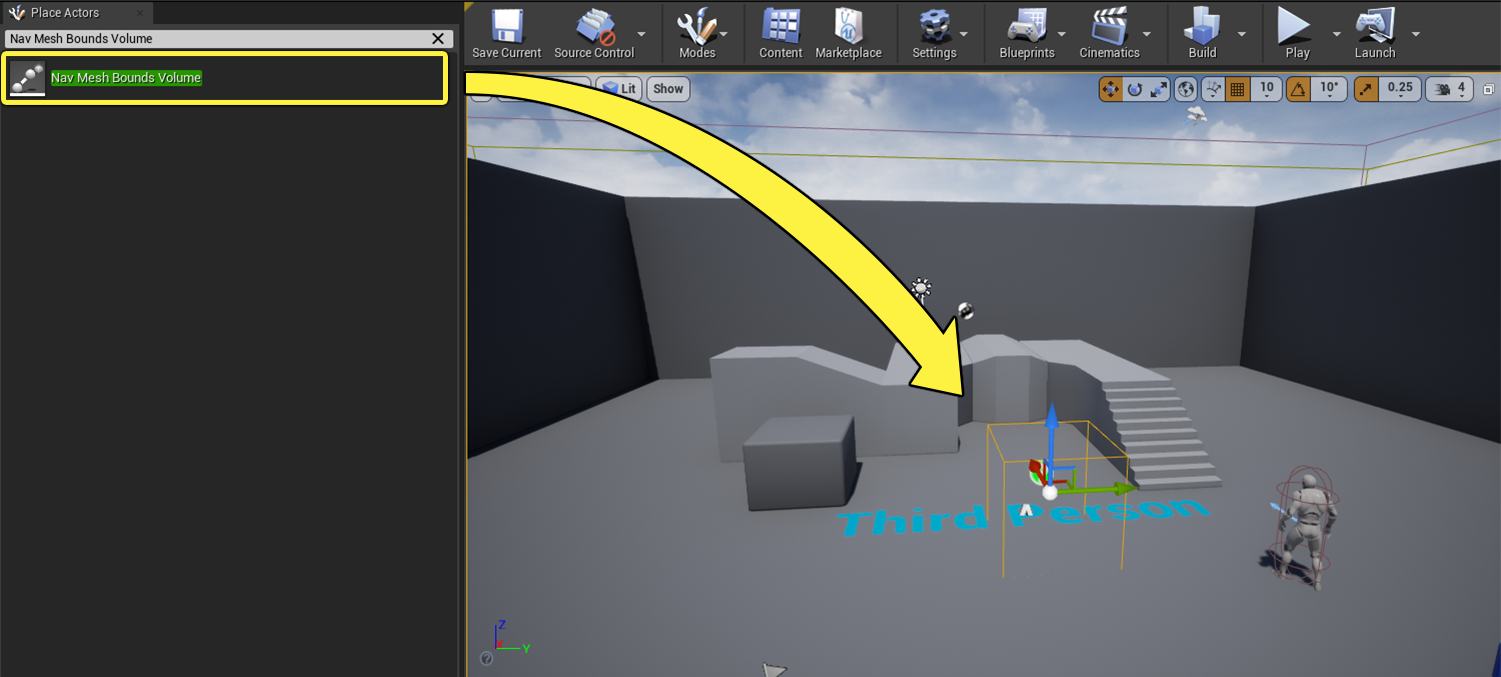
实际上这三行简单的代码可能在第三行就Crash了,爆出空指针错误,因为当前场景里可能压根没有创建NavigationData。如果需要创建NavigationData来支持寻路请求,需要将寻路网格体边界体积(Nav Mesh Bounds Volume)这样的长方体放置到场景中,并调节这个长方体的大小以覆盖需要生成寻路数据的区域:
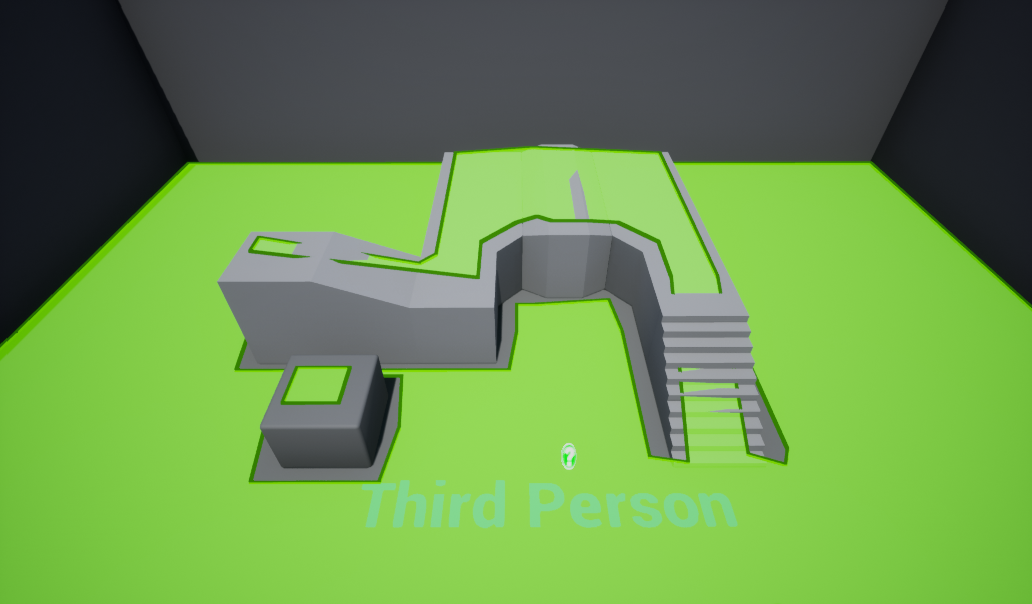
被这个长方体覆盖的区域就会生成寻路数据,在UE渲染窗口的Show按钮中勾选Navigation复选框(或者使用键盘输入字母P)即可开启寻路数据的渲染,生成的NavMesh里的多边形会以绿色的形式进行呈现,不过多边形的高度会增加DrawOffset,以避免与地形完全重合:
如果要配置生成NavMesh时的各种参数,则需要在当前场景里找到ARecastNavData对应的Actor,修改其暴露的一些属性字段:
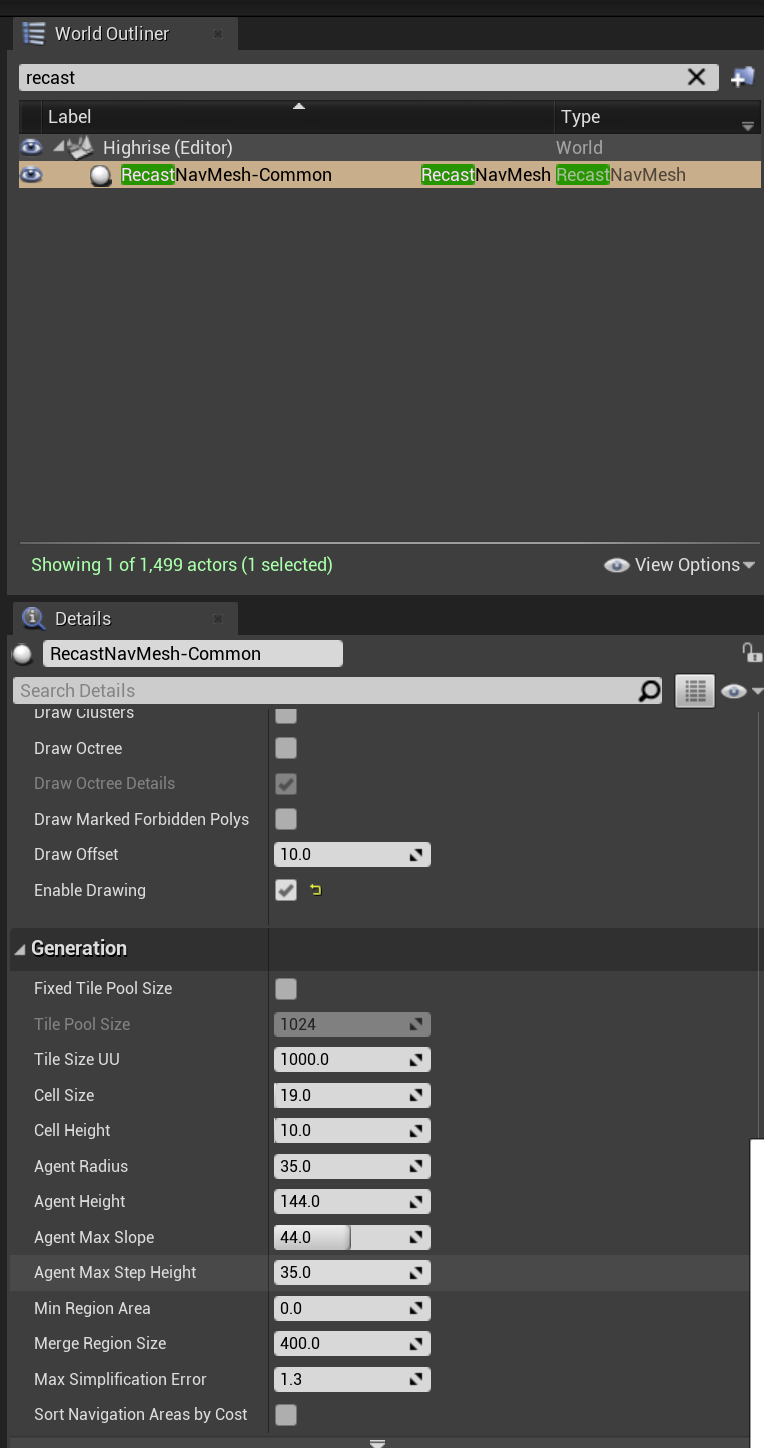
上述字段基本可以与原生的rcConfig对应起来,唯一需要注意的是UE使用的长度单位是CM,而常规的RecastDemo使用的长度单位为M,调整相关参数的时候需要注意这个数量级的差别。
当场景里的寻路网格体边界体积被修改或者寻路数据生成配置被修改之后,会触发场景内寻路数据的重新构建,通过层层转发之后,最后会落到这个函数上:
bool FRecastNavMeshGenerator::RebuildAll()
{
	DestNavMesh->UpdateNavVersion();

	// Recreate recast navmesh
	DestNavMesh->GetRecastNavMeshImpl()->ReleaseDetourNavMesh();

	RcNavMeshOrigin = Unreal2RecastPoint(DestNavMesh->NavMeshOriginOffset);

	ConstructTiledNavMesh();

	if (MarkNavBoundsDirty() == false)
	{
		// There are no navigation bounds to build, probably navmesh was resized and we just need to update debug draw
		DestNavMesh->RequestDrawingUpdate();
	}

	return true;
}
这里的FRecastNavMeshGenerator负责管理从场景中的几何体中收集寻路相关的网格数据并最终生成dtNavMesh,由于Recast使用的坐标系与UE使用的坐标系不一样,所以两者之间的坐标需要使用Unreal2RecastPoint,Recast2UnrealPoint这两个函数来互相转换。UE使用的NavMesh格式为TileMesh,所以上面会调用ConstructTiledNavMesh来初始化TileMesh,然后MarkNavBoundsDirty负责收集场景里的NavMeshBoundVoume来计算所有的Tile:
bool FRecastNavMeshGenerator::MarkNavBoundsDirty()
{
	// if rebuilding all no point in keeping "old" invalidated areas
	TArray<FNavigationDirtyArea> DirtyAreas;
	for (FBox AreaBounds : InclusionBounds)
	{
		FNavigationDirtyArea DirtyArea(AreaBounds, ENavigationDirtyFlag::All | ENavigationDirtyFlag::NavigationBounds);
		DirtyAreas.Add(DirtyArea);
	}

	if (DirtyAreas.Num())
	{
		MarkDirtyTiles(DirtyAreas);
		return true;
	}
	return false;
}
这里的MarkDirtyTiles负责收集所有需要重新生成NavMesh的Tile,然后按照离当前玩家距离进行排序,构造生成Tile具体数据的优先级:
void FRecastNavMeshGenerator::MarkDirtyTiles(const TArray<FNavigationDirtyArea>& DirtyAreas)
{
	// 省略一大堆由volume计算tile的代码

	// Append remaining new dirty tile elements
	PendingDirtyTiles.Reserve(PendingDirtyTiles.Num() + DirtyTiles.Num());
	for(const FPendingTileElement& Element : DirtyTiles)
	{
		PendingDirtyTiles.Add(Element);
	}

	// Sort tiles by proximity to players
	if (NumTilesMarked > 0)
	{
		SortPendingBuildTiles();
	}
}
所以整个RebuildAll函数执行完成之后,Tile数据并没有得到更新,只是创建了FPendingTileElement数组,作为生成Tile的任务队列,整个寻路数据的更新其实是异步的。然后驱动所有的异步寻路网格生成任务的入口函数为:void FRecastNavMeshGenerator::TickAsyncBuild(float DeltaSeconds), 这个函数又会调用ProcessTileTasks来调用同步或者异步的ProcessTileTasksSync, ProcessTileTasksAsync, ProcessTileTasksSyncTimeSliced来执行执行更新任务。 下面是ProcessTileTasksAsync,的核心代码:
int32 NumProcessedTasks = 0;
// Submit pending tile elements
for (int32 ElementIdx = PendingDirtyTiles.Num()-1; ElementIdx >= 0 && NumProcessedTasks < NumTasksToProcess; ElementIdx--)
{
	QUICK_SCOPE_CYCLE_COUNTER(STAT_RecastNavMeshGenerator_ProcessTileTasks_NewTasks);

	FPendingTileElement& PendingElement = PendingDirtyTiles[ElementIdx];
	FRunningTileElement RunningElement(PendingElement.Coord);

	// Make sure that we are not submitting generator for grid cell that is currently being regenerated
	if (!RunningDirtyTiles.Contains(RunningElement))
	{
		// Spawn async task
		TUniquePtr<FRecastTileGeneratorTask> TileTask = MakeUnique<FRecastTileGeneratorTask>(CreateTileGenerator(PendingElement.Coord, PendingElement.DirtyAreas));

		// Start it in background in case it has something to build
		if (TileTask->GetTask().TileGenerator->HasDataToBuild())
		{
			RunningElement.AsyncTask = TileTask.Release();

			if (!GNavmeshSynchronousTileGeneration)
			{
				RunningElement.AsyncTask->StartBackgroundTask();
			}
			else
			{
				RunningElement.AsyncTask->StartSynchronousTask();
			}

			RunningDirtyTiles.Add(RunningElement);
		}
		else if (!bGameStaticNavMesh)
		{
			RemoveLayers(PendingElement.Coord, UpdatedTiles);
		}

		// Remove submitted element from pending list
		PendingDirtyTiles.RemoveAt(ElementIdx, 1, /*bAllowShrinking=*/false);
		NumProcessedTasks++;
	}
}
上面的核心就是使用CreateTileGenerator创建一个FRecastTileGenerator, 并以这个TileGenerator创建一个异步任务FRecastTileGeneratorTask,然后调用StartBackgroundTask来将任务进行投递到线程池,当这个Task被执行时,会执行到FRecastTileGenerator::DoWork函数:
struct NAVIGATIONSYSTEM_API FRecastTileGeneratorWrapper : public FNonAbandonableTask
{
	TSharedRef<FRecastTileGenerator> TileGenerator;

	FRecastTileGeneratorWrapper(TSharedRef<FRecastTileGenerator> InTileGenerator)
		: TileGenerator(InTileGenerator)
	{
	}

	void DoWork()
	{
		TileGenerator->DoWork();
	}

	FORCEINLINE TStatId GetStatId() const
	{
		RETURN_QUICK_DECLARE_CYCLE_STAT(FRecastTileGenerator, STATGROUP_ThreadPoolAsyncTasks);
	}
};
这个FRecastTileGenerator::DoWork函数会收集场景中与当前Tile区域相交的影响寻路的几何体信息:
bool FRecastTileGenerator::DoWork()
{
	SCOPE_CYCLE_COUNTER(STAT_Navigation_DoWork);

	TSharedPtr<FNavDataGenerator, ESPMode::ThreadSafe> ParentGenerator = ParentGeneratorWeakPtr.Pin();
	bool bSucceess = true;

	if (ParentGenerator.IsValid())
	{
		if (InclusionBounds.Num())
		{
			GatherGeometryFromSources();
		}

		bSucceess = GenerateTile();

		DumpAsyncData();
	}

	return bSucceess;
}
这里的GenerateTile会先使用体素化方法生成当前Tile的TileCache数据,然后再生成Tile数据:
bool FRecastTileGenerator::GenerateTile()
{
	FNavMeshBuildContext BuildContext(*this);
	bool bSuccess = true;

	if (bRegenerateCompressedLayers)
	{
		CompressedLayers.Reset();

		bSuccess = GenerateCompressedLayers(BuildContext);

		if (bSuccess)
		{
			// Mark all layers as dirty
			DirtyLayers.Init(true, CompressedLayers.Num());
		}
	}

	if (bSuccess)
	{
		bSuccess = GenerateNavigationData(BuildContext);
	}

	// it's possible to have valid generation with empty resulting tile (no navigable geometry in tile)
	return bSuccess;
}
完全生成了新的NavData之后,执行下面的一行来加入到最后的NavigationData数组里:
GenerationContext.NavigationData.Add(FNavMeshTileData(NavData, NavDataSize, LayerIdx, CompressedData.LayerBBox));
这行执行完成之后,最后的数据会进入FRecastTileGenerator::NavigationData里。但是由于dtNavMesh的更新是多线程不安全的,所以此时异步线程池生成的TileData不能加入到dtNavMesh中。主线程中执行的FRecastNavMeshGenerator::ProcessTileTasksAsync的后半部分代码负责收集执行完成的TileGenerate任务,然后再执行AddGeneratedTiles加入到dtNavMesh里:
// Collect completed tasks and apply generated data to navmesh
for (int32 Idx = RunningDirtyTiles.Num() - 1; Idx >=0; --Idx)
{
	QUICK_SCOPE_CYCLE_COUNTER(STAT_RecastNavMeshGenerator_ProcessTileTasks_FinishedTasks);

	FRunningTileElement& Element = RunningDirtyTiles[Idx];
	check(Element.AsyncTask);

	if (Element.AsyncTask->IsDone())
	{
		// Add generated tiles to navmesh
		if (!Element.bShouldDiscard)
		{
			FRecastTileGenerator& TileGenerator = *(Element.AsyncTask->GetTask().TileGenerator);
			TArray<uint32> UpdatedTileIndices = AddGeneratedTiles(TileGenerator);
			UpdatedTiles.Append(UpdatedTileIndices);

			StoreCompressedTileCacheLayers(TileGenerator, Element.Coord.X, Element.Coord.Y);

#if RECAST_INTERNAL_DEBUG_DATA
			StoreDebugData(TileGenerator, Element.Coord.X, Element.Coord.Y);
#endif
		}

		{
			QUICK_SCOPE_CYCLE_COUNTER(STAT_RecastNavMeshGenerator_TileGeneratorRemoval);

			// Destroy tile generator task
			delete Element.AsyncTask;
			Element.AsyncTask = nullptr;
			// Remove completed tile element from a list of running tasks
			RunningDirtyTiles.RemoveAtSwap(Idx, 1, false);
		}
	}
}
AddGeneratedTiles里面的核心调用就是熟悉的addTile:
// let navmesh know it's tile generator who owns the data
status = DetourMesh->addTile(LayerData.GetData(), LayerData.DataSize, DT_TILE_FREE_DATA, OldTileRef, &ResultTileRef);

// if tile index was already taken by other layer try adding it on first free entry (salt was already updated by whatever took that spot)
if (dtStatusFailed(status) && dtStatusDetail(status, DT_OUT_OF_MEMORY) && OldTileRef)
{
    OldTileRef = 0;
    status = DetourMesh->addTile(LayerData.GetData(), LayerData.DataSize, DT_TILE_FREE_DATA, OldTileRef, &ResultTileRef);
}
每次TickBuild之后,如果有数据更新,会调用DestNavMesh->RequestDrawingUpdate()来加入异步渲染队列,这样就能及时刷新NavMesh的渲染状态:
FSimpleDelegateGraphTask::CreateAndDispatchWhenReady(
    FSimpleDelegateGraphTask::FDelegate::CreateUObject(this, &ARecastNavMesh::UpdateDrawing),
    GET_STATID(STAT_FSimpleDelegateGraphTask_RequestingNavmeshRedraw), NULL, ENamedThreads::GameThread);
上面介绍的就是UE使用多线程来执行NavMesh生成的全流程,不过这里有一个很重要的细节没有介绍:如何收集一个Tile相重叠的影响寻路的几何体,也就是前面引用到的GatherGeometryFromSources函数。这个函数自身代码其实很简单,就是遍历当前的FRecastTileGenerator内存储的NavigationRelevantData数组来收集FNavigationRelevantData:
void FRecastTileGenerator::GatherGeometryFromSources()
{
	QUICK_SCOPE_CYCLE_COUNTER(STAT_RecastNavMeshGenerator_GatherGeometryFromSources);

	UNavigationSystemV1* NavSys = NavSystem.Get();
	if (NavSys == nullptr)
	{
		return;
	}

	for (TSharedRef<FNavigationRelevantData, ESPMode::ThreadSafe>& ElementData : NavigationRelevantData)
	{
		if (ElementData->GetOwner() == nullptr)
		{
			UE_LOG(LogNavigation, Warning, TEXT("%s: skipping an element with no longer valid Owner"), ANSI_TO_TCHAR(__FUNCTION__));
			continue;
		}

		GatherNavigationDataGeometry(ElementData, *NavSys, NavDataConfig, bUpdateGeometry);
	}
}
NavigationRelevantData数据在开始的准备阶段就填充好了,寻路系统使用了一个八叉树来存储场景内的所有FNavigationRelevantData, 所以计算当前Tile相交的寻路数据只需要调用一下八叉树提供的BoundingBox查询接口即可:
void FRecastTileGenerator::PrepareGeometrySources(const FRecastNavMeshGenerator& ParentGenerator, bool bGeometryChanged)
{
	QUICK_SCOPE_CYCLE_COUNTER(STAT_RecastNavMeshGenerator_PrepareGeometrySources);

	UNavigationSystemV1* NavSys = FNavigationSystem::GetCurrent<UNavigationSystemV1>(ParentGenerator.GetWorld());
	FNavigationOctree* NavOctreeInstance = NavSys ? NavSys->GetMutableNavOctree() : nullptr;
	check(NavOctreeInstance);
	NavigationRelevantData.Reset();
	NavSystem = NavSys;
	bUpdateGeometry = bGeometryChanged;

	NavOctreeInstance->FindElementsWithBoundsTest(ParentGenerator.GrowBoundingBox(TileBB, /*bIncludeAgentHeight*/ false), [this, bGeometryChanged](const FNavigationOctreeElement& Element)
	{
		const bool bShouldUse = Element.ShouldUseGeometry(NavDataConfig);
		if (bShouldUse)
		{
			const bool bExportGeometry = bGeometryChanged && (Element.Data->HasGeometry() || Element.Data->IsPendingLazyGeometryGathering());
			if (bExportGeometry ||
				Element.Data->NeedAnyPendingLazyModifiersGathering() ||
				Element.Data->Modifiers.HasMetaAreas() == true ||
				Element.Data->Modifiers.IsEmpty() == false)
			{
				NavigationRelevantData.Add(Element.Data);
			}
		}
	});
}
所有在碰撞设置里勾选了CanEverAffectNavigation的UActorComponent和继承了INavRelevantInterface的UActorComponent都会在创建完成之后自动的将当前的形状注册到这个全局的八叉树之中。
void USceneComponent::PropagateTransformUpdate(bool bTransformChanged, EUpdateTransformFlags UpdateTransformFlags, ETeleportType Teleport)
{
	// 省略很多代码
	// Refresh navigation
	if (bNavigationRelevant && bRegistered)
	{
		UpdateNavigationData();
	}
	// 省略很多代码
}

void USceneComponent::UpdateNavigationData()
{
	SCOPE_CYCLE_COUNTER(STAT_ComponentUpdateNavData);

	if (IsRegistered())
	{
		UWorld* MyWorld = GetWorld();
		if ((MyWorld != nullptr) && (!MyWorld->IsGameWorld() || !MyWorld->IsNetMode(ENetMode::NM_Client)))
		{
			// use propagated component's transform update in editor OR server game with additional navsys check
			FNavigationSystem::UpdateComponentData(*this);
		}
	}
}

void UNavigationSystemV1::UpdateComponentInNavOctree(UActorComponent& Comp)
{
	SCOPE_CYCLE_COUNTER(STAT_DebugNavOctree);

	if (ShouldUpdateNavOctreeOnComponentChange() == false)
	{
		return;
	}

	// special case for early out: use cached nav relevancy
	if (Comp.bNavigationRelevant == true)
	{
		AActor* OwnerActor = Comp.GetOwner();
		if (OwnerActor)
		{
			INavRelevantInterface* NavElement = Cast<INavRelevantInterface>(&Comp);
			if (NavElement)
			{
				UNavigationSystemV1* NavSys = FNavigationSystem::GetCurrent<UNavigationSystemV1>(OwnerActor->GetWorld());
				if (NavSys)
				{
					if (OwnerActor->IsComponentRelevantForNavigation(&Comp))
					{
						NavSys->UpdateNavOctreeElement(&Comp, NavElement, FNavigationOctreeController::OctreeUpdate_Default);
					}
					else
					{
						NavSys->UnregisterNavOctreeElement(&Comp, NavElement, FNavigationOctreeController::OctreeUpdate_Default);
					}
				}
			}
		}
	}
	else if (Comp.CanEverAffectNavigation())
	{
		// could have been relevant before and not it isn't. Need to check if there's an octree element ID for it
		INavRelevantInterface* NavElement = Cast<INavRelevantInterface>(&Comp);
		if (NavElement)
		{
			AActor* OwnerActor = Comp.GetOwner();
			if (OwnerActor)
			{
				UNavigationSystemV1* NavSys = FNavigationSystem::GetCurrent<UNavigationSystemV1>(OwnerActor->GetWorld());
				if (NavSys)
				{
					NavSys->UnregisterNavOctreeElement(&Comp, NavElement, FNavigationOctreeController::OctreeUpdate_Default);
				}
			}
		}
	}
}
对NavigationRelevantData中的每个几何体都会执行GatherNavigationDataGeometry, 并最终会调用到FRecastTileGenerator::AppendGeometry函数,这个函数会真正的执行获取当前几何体的碰撞数据并转化为一个GeometryElement数据加入到当前Tile的几何体数组RawGeometry之中:
void FRecastTileGenerator::AppendGeometry(const FNavigationRelevantData& DataRef, const FCompositeNavModifier& InModifier, const FNavDataPerInstanceTransformDelegate& InTransformsDelegate)
{
	const TNavStatArray<uint8>& RawCollisionCache = DataRef.CollisionData;
	if (RawCollisionCache.Num() == 0)
	{
		return;
	}

	FRecastRawGeometryElement GeometryElement;

	// To prevent navmesh generation under the geometry, set the RC_PROJECT_TO_BOTTOM flag to true.
	// This rasterize triangles as filled columns down to the HF lower bound.
	GeometryElement.RasterizationFlags = InModifier.GetFillCollisionUnderneathForNavmesh() ? RC_PROJECT_TO_BOTTOM : rcRasterizationFlags(0);

	FRecastGeometryCache CollisionCache(RawCollisionCache.GetData());

	// Gather per instance transforms
	if (InTransformsDelegate.IsBound())
	{
		InTransformsDelegate.Execute(TileBBExpandedForAgent, GeometryElement.PerInstanceTransform);
		if (GeometryElement.PerInstanceTransform.Num() == 0)
		{
			return;
		}
	}

	const int32 NumCoords = CollisionCache.Header.NumVerts * 3;
	const int32 NumIndices = CollisionCache.Header.NumFaces * 3;
	if (NumIndices > 0)
	{
		UE_LOG(LogNavigationDataBuild, VeryVerbose, TEXT("%s adding %i vertices from %s."), ANSI_TO_TCHAR(__FUNCTION__), CollisionCache.Header.NumVerts, *GetFullNameSafe(DataRef.GetOwner()));

		GeometryElement.GeomCoords.SetNumUninitialized(NumCoords);
		GeometryElement.GeomIndices.SetNumUninitialized(NumIndices);
		// 复制原来的碰撞体数据到GeometryElement中
		FMemory::Memcpy(GeometryElement.GeomCoords.GetData(), CollisionCache.Verts, sizeof(float) * NumCoords);
		FMemory::Memcpy(GeometryElement.GeomIndices.GetData(), CollisionCache.Indices, sizeof(int32) * NumIndices);
		// 这里的RawGeometry就是当前Tile的Mesh集合
		RawGeometry.Add(MoveTemp(GeometryElement));
	}
}
这个几何体数组RawGeometry在体素化三角形的时候会被使用到:
void FRecastTileGenerator::RasterizeTriangles(FNavMeshBuildContext& BuildContext, FTileRasterizationContext& RasterContext)
{
	// Rasterize geometry
	SCOPE_CYCLE_COUNTER(STAT_Navigation_RecastRasterizeTriangles)

	for (int32 RawGeomIdx = 0; RawGeomIdx < RawGeometry.Num(); ++RawGeomIdx)
	{
		const FRecastRawGeometryElement& Element = RawGeometry[RawGeomIdx];
		if (Element.PerInstanceTransform.Num() > 0)
		{
			for (const FTransform& InstanceTransform : Element.PerInstanceTransform)
			{
				// 如果采取了相对坐标系 则先执行到世界坐标系的变换再调用RasterizeGeometryRecast
				RasterizeGeometry(BuildContext, Element.GeomCoords, Element.GeomIndices, InstanceTransform, Element.RasterizationFlags, RasterContext);
			}
		}
		else
		{
			RasterizeGeometryRecast(BuildContext, Element.GeomCoords, Element.GeomIndices, Element.RasterizationFlags, RasterContext);
		}
	}
}
上面的RasterizeGeometry其实就是一个对RasterizeGeometryRecast的简单封装,处理了一下有些几何体并没有使用世界坐标系的问题。而RasterizeGeometryRecast则负责调用Recast提供的相关接口来创建高度场数据:
void FRecastTileGenerator::RasterizeGeometryRecast(FNavMeshBuildContext& BuildContext, const TArray<float>& Coords, const TArray<int32>& Indices, const rcRasterizationFlags RasterizationFlags, FTileRasterizationContext& RasterContext)
{
	QUICK_SCOPE_CYCLE_COUNTER(STAT_Navigation_RasterizeGeometryRecast);

	const int32 NumFaces = Indices.Num() / 3;
	const int32 NumVerts = Coords.Num() / 3;

	RasterizeGeomRecastTriAreas.AddZeroed(NumFaces);

	{
		QUICK_SCOPE_CYCLE_COUNTER(STAT_Navigation_MarkWalkableTriangles);

		rcMarkWalkableTriangles(&BuildContext, TileConfig.walkableSlopeAngle,
			Coords.GetData(), NumVerts, Indices.GetData(), NumFaces,
			RasterizeGeomRecastTriAreas.GetData());
	}

	{
		QUICK_SCOPE_CYCLE_COUNTER(STAT_Navigation_RasterizeGeomRecastRasterizeTriangles);

		TInlineMaskArray::ElementType* MaskArray = RasterContext.RasterizationMasks.Num() > 0 ? RasterContext.RasterizationMasks.GetData() : nullptr;
		rcRasterizeTriangles(&BuildContext,
			Coords.GetData(), NumVerts,
			Indices.GetData(), RasterizeGeomRecastTriAreas.GetData(), NumFaces,
			*RasterContext.SolidHF, TileConfig.walkableClimb, RasterizationFlags, MaskArray);
	}

	RasterizeGeomRecastTriAreas.Reset();
}
初始化好了高度场数据之后,后续的流程就与原版的RacastNavigation一样了,有需要的读者可以去回顾一下Recast生成NavMesh的相关内容。
UE4的寻路数据使用
UE中客户端控制的玩家的位移都是输入驱动的,只有被AIController控制的Actor才会使用基于NavMesh驱动的位置更新。在AIBlueprintLibrary这个类型上提供了两个用来驱动位置更新的接口:
UFUNCTION(BlueprintCallable, Category = "AI|Navigation")
static void SimpleMoveToActor(AController* Controller, const AActor* Goal);

UFUNCTION(BlueprintCallable, Category = "AI|Navigation")
static void SimpleMoveToLocation(AController* Controller, const FVector& Goal);
SimpleMoveToActor负责移动到另外一个Actor附近,而SimpleMoveToLocation则负责到指定点的移动。这两个接口其实都不负责具体的业务逻辑,只是将相关的请求转发到UPathFollowingComponent上,下面的就是移除了一些异常状况处理的SimpleMoveToLocation核心代码:
void UAIBlueprintHelperLibrary::SimpleMoveToLocation(AController* Controller, const FVector& GoalLocation)
{
	UPathFollowingComponent* PFollowComp = InitNavigationControl(*Controller);

	const FVector AgentNavLocation = Controller->GetNavAgentLocation();
	const ANavigationData* NavData = NavSys->GetNavDataForProps(Controller->GetNavAgentPropertiesRef(), AgentNavLocation);
	if (NavData)
	{
		FPathFindingQuery Query(Controller, *NavData, AgentNavLocation, GoalLocation);
		FPathFindingResult Result = NavSys->FindPathSync(Query);
		if (Result.IsSuccessful())
		{
			PFollowComp->RequestMove(FAIMoveRequest(GoalLocation), Result.Path);
		}
		else if (PFollowComp->GetStatus() != EPathFollowingStatus::Idle)
		{
			PFollowComp->RequestMoveWithImmediateFinish(EPathFollowingResult::Invalid);
		}
	}
}
上面的代码中首先以目标位置进行路径查询,如果路径有效则调用UPathFollowingComponent::RequestMove开启一个寻路移动请求FAIMoveRequest。FindPathSync最终会中转到ARecastNavMesh::FindPath上去执行路径查询,最后调用的是DetourNavMeshQuery提供的路径搜索接口:
Result.Result = RecastNavMesh->RecastNavMeshImpl->FindPath(Query.StartLocation, AdjustedEndLocation, Query.CostLimit, *NavMeshPath, *NavFilter, Query.Owner.Get());
所以查询路径这里执行的是一个完整的A*路径搜索,也就是说使用UAIBlueprintHelperLibrary将不会被群体寻路管理器管理,也就没有了分帧驱动路径查询完成的逻辑,可能会造成卡帧。
SimpleMoveToActor的代码与SimpleMoveToLocation基本一致,只有在调用RequestMove的升级后传递的参数有点不一样:
Result.Path->SetGoalActorObservation(*Goal, 100.0f);
PFollowComp->RequestMove(FAIMoveRequest(Goal), Result.Path);
这里的SetGoalActorObservation的第二个参数代表当目标Actor的最新位置与之前记录的位置大于这个值时,尝试去更新之前查询的路径结果。这个距离差值的检查在ANavigationData::TickActor中对所有的趋近寻路统一执行:
void ANavigationData::TickActor(float DeltaTime, enum ELevelTick TickType, FActorTickFunction& ThisTickFunction)
{
	Super::TickActor(DeltaTime, TickType, ThisTickFunction);

	PurgeUnusedPaths();

	INC_DWORD_STAT_BY(STAT_Navigation_ObservedPathsCount, ObservedPaths.Num());

	if (NextObservedPathsTickInSeconds >= 0.f)
	{
		NextObservedPathsTickInSeconds -= DeltaTime;
		if (NextObservedPathsTickInSeconds <= 0.f)
		{
			RepathRequests.Reserve(ObservedPaths.Num());

			for (int32 PathIndex = ObservedPaths.Num() - 1; PathIndex >= 0; --PathIndex)
			{
				if (ObservedPaths[PathIndex].IsValid())
				{
					FNavPathSharedPtr SharedPath = ObservedPaths[PathIndex].Pin();
					FNavigationPath* Path = SharedPath.Get();
					// 下面这个接口会检查goal的最新位置与历史记录位置差值是否大于了阈值
					EPathObservationResult::Type Result = Path->TickPathObservation();
					switch (Result)
					{
					case EPathObservationResult::NoLongerObserving:
						ObservedPaths.RemoveAtSwap(PathIndex, 1, /*bAllowShrinking=*/false);
						break;

					case EPathObservationResult::NoChange:
						// do nothing
						break;

					case EPathObservationResult::RequestRepath: // 这个分支代表大于了阈值 准备更新之前计算好的路径
						RepathRequests.Add(FNavPathRecalculationRequest(SharedPath, ENavPathUpdateType::GoalMoved));
						break;

					default:
						check(false && "unhandled EPathObservationResult::Type in ANavigationData::TickActor");
						break;
					}
				}
				else
				{
					ObservedPaths.RemoveAtSwap(PathIndex, 1, /*bAllowShrinking=*/false);
				}
			}

			if (ObservedPaths.Num() > 0)
			{
				NextObservedPathsTickInSeconds = ObservedPathsTickInterval;
			}
		}
	}
	// 省略一些代码
}
TickActor后面会选取RepathRequests中头部的MaxProcessedRequests个元素进行路径更新操作。这个路径更新会直接重算起点到终点的连通路径,是一个同步调用,其实挺浪费性能的,可以参考dtCrowd中Corridor的目标位置微调来拼接现有的路径,以复用之前计算的部分结果。
算出来到目标点的路径之后再执行UPathFollowingComponent::RequestMove,其内部代码没有什么逻辑,主要是计算路径中离起点位置最近的点是哪一个,要么是第一个点,要么是第二个点:
// determine with path segment should be followed
const uint32 CurrentSegment = DetermineStartingPathPoint(InPath.Get());
SetMoveSegment(CurrentSegment);
那UPathFollowingComponent如何驱动位置更新呢,答案在UPathFollowingComponent::TickComponent中:
void UPathFollowingComponent::TickComponent(float DeltaTime, enum ELevelTick TickType, FActorComponentTickFunction *ThisTickFunction)
{
	Super::TickComponent(DeltaTime, TickType, ThisTickFunction);

	if (Status == EPathFollowingStatus::Moving)
	{
		// check finish conditions, update current segment if needed
		UpdatePathSegment();
	}

	if (Status == EPathFollowingStatus::Moving)
	{
		// follow current path segment
		FollowPathSegment(DeltaTime);
	}
};
这里的UpdatePathSegment主要逻辑就是检查当前Actor是否已经到达了下一个临时目标点,也就是前面设置好的CurrentSegment。如果到达了这个CurrentSegment且计算好的路径中后面还有若干点,则执行CurrentSegment++。这样保证当前的临时目标点一定是Path[CurrentSegment],这样才能配合后面的FollowPathSegment,这个函数负责以当前Actor朝向临时目标点Path[CurrentSegment]的方向来模拟移动输入,并以这个移动输入来驱动位置更新:
void UPathFollowingComponent::FollowPathSegment(float DeltaTime)
{
	if (!Path.IsValid() || MovementComp == nullptr)
	{
		return;
	}

	const FVector CurrentLocation = MovementComp->GetActorFeetLocation();
	const FVector CurrentTarget = GetCurrentTargetLocation();

	// set to false by default, we will set set this back to true if appropriate
	bIsDecelerating = false;
	// 这个bool代表是否采取有加速度限制的路径跟随
	const bool bAccelerationBased = MovementComp->UseAccelerationForPathFollowing();
	if (bAccelerationBased)
	{
		// 计算当前点与临时目标点之间的向量 并单位化
		CurrentMoveInput = (CurrentTarget - CurrentLocation).GetSafeNormal();

		if (MoveSegmentStartIndex >= DecelerationSegmentIndex) // 快接近目标点的时候要开启减速
		{
			const FVector PathEnd = Path->GetEndLocation();
			const float DistToEndSq = FVector::DistSquared(CurrentLocation, PathEnd);
			const bool bShouldDecelerate = DistToEndSq < FMath::Square(CachedBrakingDistance);
			if (bShouldDecelerate)
			{
				bIsDecelerating = true; // 减速开启

				const float SpeedPct = FMath::Clamp(FMath::Sqrt(DistToEndSq) / CachedBrakingDistance, 0.0f, 1.0f);
				CurrentMoveInput *= SpeedPct;
			}
		}

		PostProcessMove.ExecuteIfBound(this, CurrentMoveInput);
		MovementComp->RequestPathMove(CurrentMoveInput); // 将这个向量作为移动输入传递到移动组件
	}
	else // 否则直接以最大速度向前冲
	{
		FVector MoveVelocity = (CurrentTarget - CurrentLocation) / DeltaTime;

		const int32 LastSegmentStartIndex = Path->GetPathPoints().Num() - 2;
		const bool bNotFollowingLastSegment = (MoveSegmentStartIndex < LastSegmentStartIndex);

		PostProcessMove.ExecuteIfBound(this, MoveVelocity);
		MovementComp->RequestDirectMove(MoveVelocity, bNotFollowingLastSegment);
	}
}
虽然这里的MovementComp类型是UNavMovementComponent,但是其提供的RequestDirectMove和RequestPathMove都是非常简单的虚函数:
/** 通过直接设置速度的方式去驱动位移 */
virtual void RequestDirectMove(const FVector& MoveVelocity, bool bForceMaxSpeed);

/**通过模拟输入的方式去驱动位移 */
virtual void RequestPathMove(const FVector& MoveInput);

void UNavMovementComponent::RequestDirectMove(const FVector& MoveVelocity, bool bForceMaxSpeed)
{
	Velocity = MoveVelocity;
}

void UNavMovementComponent::RequestPathMove(const FVector& MoveInput)
{
	// empty in base class, requires at least PawnMovementComponent for input related operations
}
真正执行移动相关逻辑都在其子类UPawnMovementComponent和UCharacterMovementComponent中:
void UPawnMovementComponent::RequestPathMove(const FVector& MoveInput)
{
	if (PawnOwner)
	{
		PawnOwner->Internal_AddMovementInput(MoveInput); // 真正的模拟了移动输入 与客户端键盘驱动移动一致了
	}
}

void UCharacterMovementComponent::RequestDirectMove(const FVector& MoveVelocity, bool bForceMaxSpeed)
{
	if (MoveVelocity.SizeSquared() < KINDA_SMALL_NUMBER)
	{
		return;
	}

	if (ShouldPerformAirControlForPathFollowing()) // 这里居然有飞行寻路管理
	{
		const FVector FallVelocity = MoveVelocity.GetClampedToMaxSize(GetMaxSpeed());
		PerformAirControlForPathFollowing(FallVelocity, FallVelocity.Z);
		return;
	}

	RequestedVelocity = MoveVelocity;
	bHasRequestedVelocity = true;
	bRequestedMoveWithMaxSpeed = bForceMaxSpeed;

	if (IsMovingOnGround()) // 地面寻路状态则删除高度轴的速度分量
	{
		RequestedVelocity.Z = 0.0f;
	}
}
UE4的群体寻路管理
纵观整个使用NavMesh寻路并驱动位置更新的流程,其核心逻辑就是计算出到目标点的路径,并不断的切换临时目标点去走完整条路径。限制其在地表和避免与其他Actor进行碰撞的部分都由移动组件的物理模拟部分负责,这部分的负担太重了,如果可以使用DetourCrowd则可以减少很多物理上的工作量。因此UE提供了UCrowdFollowingComponent来实现带群体寻路避障功能的寻路。UCrowdFollowingComponent主要通过重写SetMoveSegment这个UPathFollowingComponent提供的接口来将查询好的路径提供给全局的群体寻路管理器,下面是简化后的核心代码实现:
void UCrowdFollowingComponent::SetMoveSegment(int32 SegmentStartIndex)
{
	if (!IsCrowdSimulationEnabled()) // 如果没有启用群体寻路 则恢复到父类的实现
	{
		Super::SetMoveSegment(SegmentStartIndex);
		return;
	}
	FVector CurrentTargetPt = Path->GetPathPoints().Last().Location; // 这个变量存储当前寻路的目标点

	FNavMeshPath* NavMeshPath = Path->CastPath<FNavMeshPath>();
	UCrowdManager* CrowdManager = UCrowdManager::GetCurrent(GetWorld());

	const int32 PathPartSize = 15;
	const int32 LastPolyIdx = NavMeshPath->PathCorridor.Num() - 1;
	// 下面的操作会选择原来计算的路径的开头15个poly组成的路径当作临时路径 相当于把可能的长路径先截断
	int32 PathPartEndIdx = FMath::Min(PathStartIndex + PathPartSize, LastPolyIdx);
	bool bFinalPathPart = (PathPartEndIdx == LastPolyIdx);

	CrowdAgentMoveDirection = FVector::ZeroVector;
	MoveSegmentDirection = FVector::ZeroVector;

	CurrentDestination.Set(Path->GetBaseActor(), CurrentTargetPt); //记录最终路径
	RecastNavData->GetPolyCenter(NavMeshPath->PathCorridor[PathPartEndIdx], CurrentTargetPt); // 计算截断后的路径的最后一个点

	LogPathPartHelper(GetOwner(), NavMeshPath, PathStartIndex, PathPartEndIdx);
	UE_VLOG_SEGMENT(GetOwner(), LogCrowdFollowing, Log, MovementComp->GetActorFeetLocation(), CurrentTargetPt, FColor::Red, TEXT("path part"));
	UE_VLOG(GetOwner(), LogCrowdFollowing, Log, TEXT("SetMoveSegment, from:%d segments:%d%s"),
		PathStartIndex, (PathPartEndIdx - PathStartIndex)+1, bFinalPathPart ? TEXT(" (final)") : TEXT(""));
	// 将这个截断后的临时路径提交到群体寻路管理器中
	CrowdManager->SetAgentMovePath(this, NavMeshPath, PathStartIndex, PathPartEndIdx, CurrentTargetPt);
}
这里的UCrowdManager其实就是一个对DetourCrowd的简单封装,上面的寻路请求提交接口SetAgentMovePath最终会调用到DetourCrowd::requestMoveTarget上:
bool UCrowdManager::SetAgentMovePath(const UCrowdFollowingComponent* AgentComponent, const FNavMeshPath* Path,
	int32 PathSectionStart, int32 PathSectionEnd, const FVector& PathSectionEndLocation) const
{
	SCOPE_CYCLE_COUNTER(STAT_AI_Crowd_AgentUpdateTime);

	bool bSuccess = false;

#if WITH_RECAST
	const FCrowdAgentData* AgentData = ActiveAgents.Find(AgentComponent);
	ARecastNavMesh* RecastNavData = Cast<ARecastNavMesh>(MyNavData);
	if (AgentData && AgentData->bIsSimulated && AgentData->IsValid() &&
		DetourCrowd && RecastNavData &&
		Path && (Path->GetPathPoints().Num() > 1) &&
		Path->PathCorridor.IsValidIndex(PathSectionStart) && Path->PathCorridor.IsValidIndex(PathSectionEnd))
	{
		FVector TargetPos = PathSectionEndLocation;
		if (PathSectionEnd < (Path->PathCorridor.Num() - 1))
		{
			RecastNavData->GetPolyCenter(Path->PathCorridor[PathSectionEnd], TargetPos);
		}

		TArray<dtPolyRef> PathRefs;
		for (int32 Idx = PathSectionStart; Idx <= PathSectionEnd; Idx++)
		{
			PathRefs.Add(Path->PathCorridor[Idx]);
		}

		const INavigationQueryFilterInterface* NavFilter = Path->GetFilter().IsValid() ? Path->GetFilter()->GetImplementation() : MyNavData->GetDefaultQueryFilterImpl();
		const dtQueryFilter* DetourFilter = ((const FRecastQueryFilter*)NavFilter)->GetAsDetourQueryFilter();
		DetourCrowd->updateAgentFilter(AgentData->AgentIndex, DetourFilter);
		DetourCrowd->updateAgentState(AgentData->AgentIndex, false);

		const FVector RcTargetPos = Unreal2RecastPoint(TargetPos);
		bSuccess = DetourCrowd->requestMoveTarget(AgentData->AgentIndex, PathRefs.Last(), &RcTargetPos.X);
		if (bSuccess)
		{
			bSuccess = DetourCrowd->setAgentCorridor(AgentData->AgentIndex, PathRefs.GetData(), PathRefs.Num());
		}
	}
#endif

	return bSuccess;
}
由于发起寻路的时候已经通过FindPathSync来算出来了初始的寻路路径,所以上面的代码中会复制传入的FNavMeshPath,以初始化这个dtAgent的Corridor,这样就可以避免再次执行一次非常耗时的寻路计算。
当寻路请求被提交到了UCrowdManager之后,UCrowdManager::Tick会来驱动内部的dtCrowd的更新,更新完成之后会将所有active的Agent的速度设置回对应的Actor上:
void UCrowdManager::Tick(float DeltaTime)
{
	// 这里省略执行detourcrowd的所有更新步骤的相关代码

	// velocity updates
	{
		SCOPE_CYCLE_COUNTER(STAT_AI_Crowd_StepMovementTime);
		for (auto It = ActiveAgents.CreateIterator(); It; ++It)
		{
			const FCrowdAgentData& AgentData = It.Value();
			if (AgentData.bIsSimulated && AgentData.IsValid())
			{
				UCrowdFollowingComponent* CrowdComponent = Cast<UCrowdFollowingComponent>(It.Key());
				if (CrowdComponent && CrowdComponent->IsCrowdSimulationEnabled())
				{
					ApplyVelocity(CrowdComponent, AgentData.AgentIndex);
				}
			}
		}
	}
}

void UCrowdManager::ApplyVelocity(UCrowdFollowingComponent* AgentComponent, int32 AgentIndex) const
{
	const dtCrowdAgent* ag = DetourCrowd->getAgent(AgentIndex);
	const dtCrowdAgentAnimation* anims = DetourCrowd->getAgentAnims();

	const FVector NewVelocity = Recast2UnrealPoint(ag->nvel);
	const float* RcDestCorner = anims[AgentIndex].active ? anims[AgentIndex].endPos :
		ag->ncorners ? &ag->cornerVerts[0] : &ag->npos[0];

	const bool bIsNearEndOfPath = (ag->ncorners == 1) && ((ag->cornerFlags[0] & DT_STRAIGHTPATH_OFFMESH_CONNECTION) == 0);

	const FVector DestPathCorner = Recast2UnrealPoint(RcDestCorner);
	AgentComponent->ApplyCrowdAgentVelocity(NewVelocity, DestPathCorner, anims[AgentIndex].active != 0, bIsNearEndOfPath);

	if (bResolveCollisions)
	{
		const FVector NewPosition = Recast2UnrealPoint(ag->npos);
		AgentComponent->ApplyCrowdAgentPosition(NewPosition);
	}
}
ApplyVelocity这个函数负责获取dtCrowdAgent计算出来的速度nvel通过ApplyCrowdAgentVelocity接口设置回移动组件。这个ApplyCrowdAgentVelocity的实现与之前分析过的UPathFollowingComponent::FollowPathSegment逻辑类似,都是将计算好的速度通过移动组件的RequestPathMove或者RequestDirectMove接口来驱动移动组件的内部位置更新逻辑:
void UCrowdFollowingComponent::ApplyCrowdAgentVelocity(const FVector& NewVelocity, const FVector& DestPathCorner, bool bTraversingLink, bool bIsNearEndOfPath)
{
	bCanCheckMovingTooFar = !bTraversingLink && bIsNearEndOfPath;
	if (IsCrowdSimulationEnabled() && Status == EPathFollowingStatus::Moving && MovementComp)
	{
		const bool bIsNotFalling = (MovementComp == nullptr || !MovementComp->IsFalling());
		if (bAffectFallingVelocity || bIsNotFalling)
		{
			UpdateCachedDirections(NewVelocity, DestPathCorner, bTraversingLink);

			const bool bAccelerationBased = MovementComp->UseAccelerationForPathFollowing();
			if (bAccelerationBased)
			{
				const float MaxSpeed = GetCrowdAgentMaxSpeed();
				const float NewSpeed = NewVelocity.Size();
				const float SpeedPct = FMath::Clamp(NewSpeed / MaxSpeed, 0.0f, 1.0f);
				const FVector MoveInput = FMath::IsNearlyZero(NewSpeed) ? FVector::ZeroVector : ((NewVelocity / NewSpeed) * SpeedPct);

				MovementComp->RequestPathMove(MoveInput);
			}
			else
			{
				MovementComp->RequestDirectMove(NewVelocity, false);
			}
		}
	}

	// call deprecated function in case someone is overriding it
	ApplyCrowdAgentVelocity(NewVelocity, DestPathCorner, bTraversingLink);
}
ApplyVelocity末尾有个特殊的逻辑,这里会判断bResolveCollision,如果这个选项被开启了,则代表外部的移动组件不再处理Pawn之间的移动碰撞问题,直接使用detourcrowd更新后的最新位置调用ApplyCrowdAgentPosition来强制设置寻路发起者的位置。现在我们来看看这个函数的具体实现:
void UCrowdFollowingComponent::ApplyCrowdAgentPosition(const FVector& NewPosition)
{
	// base implementation does nothing
}
居然是空函数耶!说明detourcrowd计算出来的位置其实是完全被忽略的,毕竟detourcrowd只需要考虑避障就行了,而移动组件需要考虑的东西就太多了。 由于Actor上的最新位置最终是由移动组件确定的,这个位置与dtCrowdAgent::npos肯定是有差异的,当两者差异累积到一定值时detourcrowd计算出来的速度可能就完全错了。所以需要一个机制定期的将最新的ActorLocation更新到DetourCrowd中,这个就是UCrowdManager::PrepareAgentStep接口:
void UCrowdManager::PrepareAgentStep(const ICrowdAgentInterface* Agent, FCrowdAgentData& AgentData, float DeltaTime) const
{
	dtCrowdAgent* ag = (dtCrowdAgent*)DetourCrowd->getAgent(AgentData.AgentIndex);
	ag->params.maxSpeed = Agent->GetCrowdAgentMaxSpeed();

	FVector RcLocation = Unreal2RecastPoint(Agent->GetCrowdAgentLocation());
	FVector RcVelocity = Unreal2RecastPoint(Agent->GetCrowdAgentVelocity());

	dtVcopy(ag->npos, &RcLocation.X);
	dtVcopy(ag->vel, &RcVelocity.X);

	if (AgentData.bWantsPathOptimization)
	{
		AgentData.PathOptRemainingTime -= DeltaTime;
		if (AgentData.PathOptRemainingTime > 0)
		{
			ag->params.updateFlags &= ~DT_CROWD_OPTIMIZE_VIS;
		}
		else
		{
			ag->params.updateFlags |= DT_CROWD_OPTIMIZE_VIS;
			AgentData.PathOptRemainingTime = PathOptimizationInterval;
		}
	}
}
这个函数在detourcrowd执行更新之前,通过dtVcopy将当前Actor的最新位置和最新速度更新到ag->npos和ag->vel中,用来执行位置和速度修正。修正完成之后才执行detourcrowd的更新,这样就保证了dtCrowdAgent的状态永远与对应的Actor同步。