Unreal Engine 的逻辑驱动
基于事件分发的逻辑驱动
事件分发器在UE4的实现叫做Delegate,他的实现与前文中提到的event_dispatcher有些类似。不过UE4对于Delegate又做了细分,区分为了单播代理和多播代理:
/** Declares a delegate that can only bind to one native function at a time */
#define DECLARE_DELEGATE( DelegateName ) FUNC_DECLARE_DELEGATE( DelegateName, void )

/** Declares a broadcast delegate that can bind to multiple native functions simultaneously */
#define DECLARE_MULTICAST_DELEGATE( DelegateName ) FUNC_DECLARE_MULTICAST_DELEGATE( DelegateName, void )
单播代理只能绑定一个回调函数,同时支持返回值,而多播代理可以绑定多个回调函数,不支持返回值。这两个宏声明的事件是没有参数的,如果需要支持一个或多个参数,则需要使用其他的宏:
// 单参数
#define DECLARE_DELEGATE_OneParam( DelegateName, Param1Type ) FUNC_DECLARE_DELEGATE( DelegateName, void, Param1Type )
#define DECLARE_MULTICAST_DELEGATE_OneParam( DelegateName, Param1Type ) FUNC_DECLARE_MULTICAST_DELEGATE( DelegateName, void, Param1Type )
// 双参数
#define DECLARE_DELEGATE_TwoParams( DelegateName, Param1Type, Param2Type ) FUNC_DECLARE_DELEGATE( DelegateName, void, Param1Type, Param2Type )
#define DECLARE_MULTICAST_DELEGATE_TwoParams( DelegateName, Param1Type, Param2Type ) FUNC_DECLARE_MULTICAST_DELEGATE( DelegateName, void, Param1Type, Param2Type )
其实这些宏最终都会以模板的形式来构造一个类型:
template <typename... ParamTypes, typename UserPolicy>
class TMulticastDelegate<void(ParamTypes...), UserPolicy> : public UserPolicy::FMulticastDelegateExtras
{
	using Super                         = typename UserPolicy::FMulticastDelegateExtras;
	using InvocationListType            = typename Super::InvocationListType;
	using DelegateInstanceInterfaceType = IBaseDelegateInstance<void (ParamTypes...), UserPolicy>;

public:
	/** Type definition for unicast delegate classes whose delegate instances are compatible with this delegate. */
	using FDelegate = TDelegate<void(ParamTypes...), UserPolicy>;
};
这里的FDelegate就是类似于std::function的结构,可以从function,lambda,函数指针,成员函数指针等输入来构造。然后返回一个全局递增计数器作为handler:
FDelegateHandle Add(const FDelegate& InNewDelegate)
{
	FDelegateHandle Result;
	if (Super::GetDelegateInstanceProtectedHelper(InNewDelegate))
	{
		Result = Super::AddDelegateInstance(CopyTemp(InNewDelegate));
	}

	return Result;
}
这里的FDelegateHandle是带类型的全局递增计数器,这样就避免了直接使用int时可能产生的数据误用:
class FDelegateHandle
{
public:
	enum EGenerateNewHandleType
	{
		GenerateNewHandle
	};

	/** Creates an initially unset handle */
	FDelegateHandle()
		: ID(0)
	{
	}

	/** Creates a handle pointing to a new instance */
	explicit FDelegateHandle(EGenerateNewHandleType)
		: ID(GenerateNewID())
	{
	}

	/** Returns true if this was ever bound to a delegate, but you need to check with the owning delegate to confirm it is still valid */
	bool IsValid() const
	{
		return ID != 0;
	}

	/** Clear handle to indicate it is no longer bound */
	void Reset()
	{
		ID = 0;
	}
};
有了这些结构定义之后,使用UE4的事件分发系统就很简单了:
// 事件的参数类型
enum EDDCNotification
{
	// DDC performance notification generated when not using a shared cache
	SharedDDCPerformanceNotification
};

// 事件分发器声明
DECLARE_MULTICAST_DELEGATE_OneParam(FOnDDCNotification, EDDCNotification);

// 分发一个事件
FOnDDCNotification.broadcast(SharedDDCPerformanceNotification);
在上面介绍的Delegate的结构每个都占用了32个字节,UE还提供了一种内存占用更小的SPARSE_DELEGATE,每个只占用一个字节。这种SparseDelegate必须作为一个类型的指定名字的成员变量而存在,因此他的声明与前面的声明就不一样了,开头的第二个参数是所在的类名字,第三个参数是对应的成员变量的名字:
/** Delegate for notification of start of overlap with a specific component */
DECLARE_DYNAMIC_MULTICAST_SPARSE_DELEGATE_SixParams( FComponentBeginOverlapSignature, UPrimitiveComponent, OnComponentBeginOverlap, UPrimitiveComponent*, OverlappedComponent, AActor*, OtherActor, UPrimitiveComponent*, OtherComp, int32, OtherBodyIndex, bool, bFromSweep, const FHitResult &, SweepResult);

UPROPERTY(BlueprintAssignable, Category="Collision")
FComponentBeginOverlapSignature OnComponentBeginOverlap;
在其基类中FSparseDelegate,只有一个成员变量bIsBound,其类型为bool,因此整个结构体大小只有一个字节,然后在次级基类TSparseDynamicDelegate中也没有引入新的成员变量:
/** Base implementation for all sparse delegate types */
struct FSparseDelegate
{
public:
	FSparseDelegate()
		: bIsBound(false)
	{
	}

	/**
	* Checks to see if any functions are bound to this multi-cast delegate
	*
	* @return	True if any functions are bound
	*/
	bool IsBound() const
	{
		return bIsBound;
	}
	protected:

	friend class FMulticastSparseDelegateProperty;
	bool bIsBound;
};

/** Sparse version of TBaseDynamicDelegate */
template <typename MulticastDelegate, typename OwningClass, typename DelegateInfoClass>
struct TSparseDynamicDelegate : public FSparseDelegate
{
public:
};
这一个bool肯定没有办法存储注册过来的所有Listener,真正的存储区域是在全局静态的的一个SparseDelegateStorage的变量上:
/** Helper class for handling sparse delegate bindings */
struct FSparseDelegateStorage
{
	/** Allow the object listener to use the critical section and remove objects from the map */
	friend struct FObjectListener;

	/** A listener to get notified when objects have been deleted and remove them from the map */
	static COREUOBJECT_API FObjectListener SparseDelegateObjectListener;

	/** Critical Section for locking access to the sparse delegate map */
	static COREUOBJECT_API FTransactionallySafeCriticalSection SparseDelegateMapCritical;

	/** Delegate map is a map of Delegate names to a shared pointer of the multicast script delegate */
	typedef TMap<FName, TSharedPtr<FMulticastScriptDelegate>> FSparseDelegateMap;

	/** Map of objects to the map of delegates that are bound to that object */
	static COREUOBJECT_API TMap<const UObjectBase*, FSparseDelegateMap> SparseDelegates;

	/** Sparse delegate offsets are indexed by ActorClass/DelegateName pair */
	static COREUOBJECT_API TMap<TPair<FName, FName>, size_t> SparseDelegateObjectOffsets;
};
真正注册Listener的时候,会将数据存储到上面结构体里的静态变量SparseDelegates中:
/**
* Adds a function delegate to this multi-cast delegate's invocation list
*
* @param	InDelegate	Delegate to add
*/
void TSparseDynamicDelegate::Add(FScriptDelegate InDelegate)
{
	bIsBound |= FSparseDelegateStorage::Add(GetDelegateOwner(), GetDelegateName(), MoveTemp(InDelegate));
}

bool FSparseDelegateStorage::Add(const UObject* DelegateOwner, const FName DelegateName, FScriptDelegate Delegate)
{
	bool bDelegateWasBound = false;
	if (Delegate.IsBound())
	{
		FTransactionallySafeScopeLock SparseDelegateMapLock(&SparseDelegateMapCritical);

		if (SparseDelegates.Num() == 0)
		{
			SparseDelegateObjectListener.EnableListener();
		}

		FSparseDelegateMap& DelegateMap = SparseDelegates.FindOrAdd(DelegateOwner);
		TSharedPtr<FMulticastScriptDelegate>& MulticastDelegate = DelegateMap.FindOrAdd(DelegateName);

		if (!MulticastDelegate.IsValid())
		{
			MulticastDelegate = MakeShared<FMulticastScriptDelegate>();
		}

		MulticastDelegate->Add(MoveTemp(Delegate));
		bDelegateWasBound = true;
	}
	return bDelegateWasBound;
}
存储的时候,会获取当前SparseDelegate对应的Owner、当前SparseDelegate对应的成员变量名字。获取了这两个字段之后,就开始从FSparseDelegateStorage::SparseDelegates这个两层Map中进行查找对应的FMulticastScriptDelegate,找到之后执行Delegate的ADD。
这里的GetDelegateOwner实现的非常Trick,使用了当前成员变量在所属OwnerClass里地址偏移,通过指针计算出Owner的地址之后执行强转:
UObject* GetDelegateOwner() const
{
	const size_t OffsetToOwner = DelegateInfoClass::template GetDelegateOffset<OwningClass>();
	check(OffsetToOwner);
	UObject* DelegateOwner = reinterpret_cast<UObject*>((uint8*)this - OffsetToOwner);
	check(DelegateOwner->IsValidLowLevelFast(false)); // Most likely the delegate is trying to be used on the stack, in an object it wasn't defined for, or for a class member with a different name than it was defined for. It is only valid for a sparse delegate to be used for the exact class/property name it is defined with.
	return DelegateOwner;
}
可以看出这个SparseDelegate的正确运行完全依赖于传入的DelegateInfoClass来提供一些元信息,这个DelegateInfoClass在DECLARE_DYNAMIC_MULTICAST_SPARSE_DELEGATE宏展开后会自动生成:
__declspec(dllexport) void FComponentBeginOverlapSignature_DelegateWrapper(const FMulticastScriptDelegate& ComponentBeginOverlapSignature, UPrimitiveComponent* OverlappedComponent, AActor* OtherActor, UPrimitiveComponent* OtherComp, int32 OtherBodyIndex, bool bFromSweep, FHitResult const& SweepResult); class FComponentBeginOverlapSignature_MCSignature : public TBaseDynamicMulticastDelegate<FNotThreadSafeDelegateMode, void, UPrimitiveComponent*, AActor*, UPrimitiveComponent*, int32, bool, const FHitResult&> {
public: FComponentBeginOverlapSignature_MCSignature() { } explicit FComponentBeginOverlapSignature_MCSignature(const TMulticastScriptDelegate<>& InMulticastScriptDelegate) : TBaseDynamicMulticastDelegate<FNotThreadSafeDelegateMode, void, UPrimitiveComponent*, AActor*, UPrimitiveComponent*, int32, bool, const FHitResult&>(InMulticastScriptDelegate) { } void Broadcast(UPrimitiveComponent* InParam1, AActor* InParam2, UPrimitiveComponent* InParam3, int32 InParam4, bool InParam5, const FHitResult& InParam6) const {
    FComponentBeginOverlapSignature_DelegateWrapper(*this, InParam1, InParam2, InParam3, InParam4, InParam5, InParam6);
}
}; struct FComponentBeginOverlapSignatureInfoGetter {
    static const char* GetDelegateName() {
        return "OnComponentBeginOverlap";
    } template<typename T> static size_t GetDelegateOffset() {
        return ((::size_t) & reinterpret_cast<char const volatile&>((((T*)0)->OnComponentBeginOverlap)));
    }
}; struct FComponentBeginOverlapSignature : public TSparseDynamicDelegate<FComponentBeginOverlapSignature_MCSignature, UPrimitiveComponent, FComponentBeginOverlapSignatureInfoGetter> { };
可以看出在真正绑定了Listener之后,内存的占用依然是有的。所谓的省内存只有在这个SparseDelegate没有绑定Listener的情况下才会生效,绑定之后说不定内存占用还更多!
此外由于这样的实现,导致这个Delegate的生命周期并没有跟随所属Owner,为此FSparseDelegateStorage还需要监听所有UObject的销毁事件,来从SparseDelegates中删除相关的Key:
class FSparseDelegateStorage
{
	private:
	struct FObjectListener : public FUObjectArray::FUObjectDeleteListener
	{
		virtual ~FObjectListener();
		virtual void NotifyUObjectDeleted(const UObjectBase* Object, int32 Index) override;
		virtual void OnUObjectArrayShutdown();
		void EnableListener();
		void DisableListener();

		virtual SIZE_T GetAllocatedSize() const override
		{
			return 0;
		}
	};
};

void FSparseDelegateStorage::FObjectListener::EnableListener()
{
	GUObjectArray.AddUObjectDeleteListener(this);
}

void FSparseDelegateStorage::FObjectListener::NotifyUObjectDeleted(const UObjectBase* Object, int32 Index)
{
	FTransactionallySafeScopeLock SparseDelegateMapLock(&FSparseDelegateStorage::SparseDelegateMapCritical);
	FSparseDelegateStorage::SparseDelegates.Remove(Object);
	if (FSparseDelegateStorage::SparseDelegates.Num() == 0)
	{
		DisableListener();
	}
}
这里居然还会根据是否目前有注册的Listener来动态的开关UObject的销毁通知回调,以达到优化性能的目的。
基于计时器的逻辑驱动
UE提供了一个计时器管理系统FTimerManager,使用的时候需要使用SetTimer接口去注册超时回调:
/** Version that takes a TFunction */
FORCEINLINE void SetTimer(FTimerHandle& InOutHandle, TFunction<void(void)>&& Callback, float InRate, bool InbLoop, float InFirstDelay = -1.f )
{
	InternalSetTimer(InOutHandle, FTimerUnifiedDelegate(MoveTemp(Callback)), InRate, InbLoop, InFirstDelay);
}
template< class UserClass >
FORCEINLINE void SetTimer(FTimerHandle& InOutHandle, UserClass* InObj, typename FTimerDelegate::TMethodPtr< UserClass > InTimerMethod, float InRate, bool InbLoop = false, float InFirstDelay = -1.f)
{
	InternalSetTimer(InOutHandle, FTimerUnifiedDelegate( FTimerDelegate::CreateUObject(InObj, InTimerMethod) ), InRate, InbLoop, InFirstDelay);
}
InRate就是常规的计时器超时时间。这里的InbLoop代表这个计时器是否会持续存在,如果为false就是常规的只执行一次的计时器。InFirstDelay代表是否等待一段时间之后再开启这个计时器的执行,如果为正数则这个计时器的第一次回调间隔为InFirstDelay + InRate。
在注册成功之后会返回一个FTimerHandler, 这个FTimerHandler其实是两个整数拼接而成的一个uint64:
static constexpr uint32 IndexBits        = 24;
static constexpr uint32 SerialNumberBits = 40;

static_assert(IndexBits + SerialNumberBits == 64, "The space for the timer index and serial number should total 64 bits");

static constexpr int32  MaxIndex        = (int32)1 << IndexBits;
static constexpr uint64 MaxSerialNumber = (uint64)1 << SerialNumberBits;

void SetIndexAndSerialNumber(int32 Index, uint64 SerialNumber)
{
	check(Index >= 0 && Index < MaxIndex);
	check(SerialNumber < MaxSerialNumber);
	Handle = (SerialNumber << IndexBits) | (uint64)(uint32)Index;
}

FORCEINLINE uint64 GetSerialNumber() const
{
	return Handle >> IndexBits;
}

UPROPERTY(Transient)
uint64 Handle;
外部在拥有这个FTimerHandler之后可以进行暂停计时或取消计时等操作:
/**
* Clears a previously set timer, identical to calling SetTimer() with a <= 0.f rate.
* Invalidates the timer handle as it should no longer be used.
*
* @param InHandle The handle of the timer to clear.
*/
FORCEINLINE void ClearTimer(FTimerHandle& InHandle)
{
	if (const FTimerData* TimerData = FindTimer(InHandle))
	{
		InternalClearTimer(InHandle);
	}
	InHandle.Invalidate();
}
/**
 * Pauses a previously set timer.
 *
 * @param InHandle The handle of the timer to pause.
 */
ENGINE_API void PauseTimer(FTimerHandle InHandle);

/**
 * Unpauses a previously set timer
 *
 * @param InHandle The handle of the timer to unpause.
 */
ENGINE_API void UnPauseTimer(FTimerHandle InHandle);
下面我们来重点看一下计时器的创建与超时调度实现。
计时器的创建
FTimerManager提供了数十种SetTimer的变体,最终都会调用到InternalSetTimer上:
void FTimerManager::InternalSetTimer(FTimerHandle& InOutHandle, FTimerUnifiedDelegate&& InDelegate, float InRate, bool bInLoop, float InFirstDelay)
{
	InternalSetTimer(InOutHandle, MoveTemp(InDelegate), InRate, FTimerManagerTimerParameters{ .bLoop = bInLoop, .FirstDelay = InFirstDelay });
}

void FTimerManager::InternalSetTimer(FTimerHandle& InOutHandle, FTimerUnifiedDelegate&& InDelegate, float InRate, const FTimerManagerTimerParameters& InTimerParameters)
{
	SCOPE_CYCLE_COUNTER(STAT_SetTimer);

	// not currently threadsafe
	check(IsInGameThread());

	if (FindTimer(InOutHandle))
	{
		// if the timer is already set, just clear it and we'll re-add it, since
		// there's no data to maintain.
		InternalClearTimer(InOutHandle);
	}

	if (InRate > 0.f)
	{
		// set up the new timer
		FTimerData NewTimerData;
		NewTimerData.TimerDelegate = MoveTemp(InDelegate);

		NewTimerData.Rate = InRate;
		NewTimerData.bLoop = InTimerParameters.bLoop;
		NewTimerData.bMaxOncePerFrame = InTimerParameters.bMaxOncePerFrame;
		NewTimerData.bRequiresDelegate = NewTimerData.TimerDelegate.IsBound();
		NewTimerData.bGmAdjust = InTimerParameters.bGmAdjust;

		// Set level collection
		const UWorld* const OwningWorld = OwningGameInstance ? OwningGameInstance->GetWorld() : nullptr;
		if (OwningWorld && OwningWorld->GetActiveLevelCollection())
		{
			NewTimerData.LevelCollection = OwningWorld->GetActiveLevelCollection()->GetType();
		}

		const float FirstDelay = (InTimerParameters.FirstDelay >= 0.f) ? InTimerParameters.FirstDelay : InRate;

		FTimerHandle NewTimerHandle;
		if (HasBeenTickedThisFrame())
		{
			NewTimerData.ExpireTime = InternalTime + FirstDelay;
			NewTimerData.Status = ETimerStatus::Active;
			NewTimerHandle = AddTimer(MoveTemp(NewTimerData));
			ActiveTimerHeap.HeapPush(NewTimerHandle, FTimerHeapOrder(Timers));
		}
		else
		{
			// Store time remaining in ExpireTime while pending
			NewTimerData.ExpireTime = FirstDelay;
			NewTimerData.Status = ETimerStatus::Pending;
			NewTimerHandle = AddTimer(MoveTemp(NewTimerData));
			PendingTimerSet.Add(NewTimerHandle);
		}

		InOutHandle = NewTimerHandle;
	}
	else
	{
		InOutHandle.Invalidate();
	}
}
从这个实现可以看出,核心就是利用各种参数来创建一个FTimerData,然后根据当前FTimerManager是否已经在当前帧执行过了分别执行两套逻辑:
- 如果当前帧已经处理完了这个
FTimerManager的所有Timer,则将这个FTimerData的状态设置为Active,并通过AddTimer将这个FTimerData放到内部的一个数组中,然后使用ActiveTimerHeap来维持一个最小堆, - 如果当前帧还没有处理这个
FTimerManager的所有Timer,则将这个FTimerData的状态设置为Pending,并通过AddTimer存储了这个FTimerData之后,先不放入到最小堆中,而是放入到一个PendingTimerSet中,
这样的处理是为了所有的计时申请都至少会在下一帧再去进行计时逻辑的运算。那么如果当前帧创建的Timer在TimerManager当前帧Tick之前就加入到调度队列,那么该Timer在当前帧就可能会在FTimerManager::Tick中执行逻辑,此时计算出来的DeltaTime是当前帧与上一帧的DeltaTime,是错误的。
这个AddTimer实现的很简略,就是把数据加入到Timers这个容器中,获取容器索引之后生成一个唯一handler来返回:
FTimerHandle FTimerManager::AddTimer(FTimerData&& TimerData)
{
	const void* TimerIndicesByObjectKey = TimerData.TimerDelegate.GetBoundObject();
	TimerData.TimerIndicesByObjectKey = TimerIndicesByObjectKey;

	int32 NewIndex = Timers.Add(MoveTemp(TimerData));

	FTimerHandle Result = GenerateHandle(NewIndex);

	Timers[NewIndex].Handle = Result;

	if (TimerIndicesByObjectKey)
	{
		TSet<FTimerHandle>& HandleSet = ObjectToTimers.FindOrAdd(TimerIndicesByObjectKey);

		bool bAlreadyExists = false;
		HandleSet.Add(Result, &bAlreadyExists);
		checkf(!bAlreadyExists, TEXT("A timer with this handle and object has already been added! (%s)"), *GetFTimerDataSafely(TimerData));
	}

	return Result;
}
由于这个FTimerHandle在很多对外接口中都会被使用,如果直接使用容器中的索引的话,很容易会传入已经失效的数据。为了避免错误的FTimerHandler被传入,这里的GenerateHandle会使用一个递增流水号来一起拼接成一个uint64作为返回结果:
FTimerHandle FTimerManager::GenerateHandle(int32 Index)
{
	uint64 NewSerialNumber = ++LastAssignedSerialNumber;
	if (!ensureMsgf(NewSerialNumber != FTimerHandle::MaxSerialNumber, TEXT("Timer serial number has wrapped around!")))
	{
		NewSerialNumber = (uint64)1;
	}

	FTimerHandle Result;
	Result.SetIndexAndSerialNumber(Index, NewSerialNumber);
	return Result;
}
static constexpr uint32 IndexBits        = 24;
static constexpr uint32 SerialNumberBits = 40;
static constexpr uint64 MaxSerialNumber = (uint64)1 << SerialNumberBits;
void FTimerHandle::SetIndexAndSerialNumber(int32 Index, uint64 SerialNumber)
{
	check(Index >= 0 && Index < MaxIndex);
	check(SerialNumber < MaxSerialNumber);
	Handle = (SerialNumber << IndexBits) | (uint64)(uint32)Index;
}
这里流水号占用了40位,基本可以保证唯一性了。
然后再介绍一下这里的Timers成员变量,他的类型是一个比较特殊的SparseArray:
/** The array of timers - all other arrays will index into this */
TSparseArray<FTimerData> Timers;
SparseArray类似于TArray,保证了内部的存储区是连续的,但是SparseArray有无效元素的概念,即这个连续存储区中间很有可能出现空洞。这个设计主要是为了避免TArray在删除一个元素时会引发其他元素的索引变化,这样会导致外部存储的数组索引全都无效。有了SparseArray这个容器之后,删除一个元素只是会对这个元素标记为无效,并加入到一个FreeList链表中不会对后面的其他元素进行移动,这样就保证了对外暴露的数组索引是有效的:
/** Allocated elements are overlapped with free element info in the element list. */
template<typename ElementType>
union TSparseArrayElementOrFreeListLink
{
	/** If the element is allocated, its value is stored here. */
	ElementType ElementData;

	struct
	{
		/** If the element isn't allocated, this is a link to the previous element in the array's free list. */
		int32 PrevFreeIndex;

		/** If the element isn't allocated, this is a link to the next element in the array's free list. */
		int32 NextFreeIndex;
	};
};

/** Removes Count elements from the array, starting from Index, without destructing them. */
void RemoveAtUninitialized(int32 Index,int32 Count = 1)
{
	FElementOrFreeListLink* DataPtr = (FElementOrFreeListLink*)Data.GetData();

	for (; Count; --Count)
	{
		check(AllocationFlags[Index]);

		// Mark the element as free and add it to the free element list.
		if(NumFreeIndices)
		{
			DataPtr[FirstFreeIndex].PrevFreeIndex = Index;
		}
		DataPtr[Index].PrevFreeIndex = -1;
		DataPtr[Index].NextFreeIndex = NumFreeIndices > 0 ? FirstFreeIndex : INDEX_NONE;
		FirstFreeIndex = Index;
		++NumFreeIndices;
		AllocationFlags[Index] = false;

		++Index;
	}
}
这里的AllocationFlags就负责记录所有元素是否有效,FirstFreeIndex则负责记录可用元素链表的头节点索引。
然后在SparseArray的添加元素操作中,会从FreeList中找到一个被标记为无效的元素索引作为存储位置,如果全都有效的话再进行扩容操作。
/**
	* Allocates space for an element in the array.  The element is not initialized, and you must use the corresponding placement new operator
	* to construct the element in the allocated memory.
	*/
FSparseArrayAllocationInfo AddUninitialized()
{
	int32 Index;
	if(NumFreeIndices)
	{
		FElementOrFreeListLink* DataPtr = (FElementOrFreeListLink*)Data.GetData();

		// Remove and use the first index from the list of free elements.
		Index = FirstFreeIndex;
		FirstFreeIndex = DataPtr[FirstFreeIndex].NextFreeIndex;
		--NumFreeIndices;
		if(NumFreeIndices)
		{
			DataPtr[FirstFreeIndex].PrevFreeIndex = -1;
		}
	}
	else
	{
		// Add a new element.
		Index = Data.AddUninitialized(1);
		AllocationFlags.Add(false);
	}

	return AllocateIndex(Index);
}
当对这个SparseArray进行遍历的时候,需要手动判定指定索引的元素是否有效:
bool IsValidIndex(int32 Index) const
{
	return AllocationFlags.IsValidIndex(Index) && AllocationFlags[Index];
}
计时器的调度
void FTimerManager::Tick(float DeltaTime)
{
	SCOPED_NAMED_EVENT(FTimerManager_Tick, FColor::Orange);
	CSV_SCOPED_TIMING_STAT_EXCLUSIVE(TimerManager);
	const double StartTime = FPlatformTime::Seconds();
	bool bDumpTimerLogsThresholdExceeded = false;
	int32 NbExpiredTimers = 0;

	InternalTime += DeltaTime;

	UWorld* const OwningWorld = OwningGameInstance ? OwningGameInstance->GetWorld() : nullptr;
	while (ActiveTimerHeap.Num() > 0)
	{
		FTimerHandle TopHandle = ActiveTimerHeap.HeapTop();

		// Test for expired timers
		int32 TopIndex = TopHandle.GetIndex();
		FTimerData* Top = &Timers[TopIndex];

		if (Top->Status == ETimerStatus::ActivePendingRemoval)
		{
			ActiveTimerHeap.HeapPop(TopHandle, FTimerHeapOrder(Timers), EAllowShrinking::No);
			RemoveTimer(TopHandle);
			continue;
		}

		if (InternalTime > Top->ExpireTime)
		{
			// Timer has expired! Fire the delegate, then handle potential looping.

			if (bDumpTimerLogsThresholdExceeded)
			{
				++NbExpiredTimers;
				if (NbExpiredTimers <= MaxExpiredTimersToLog)
				{
					DescribeFTimerDataSafely(*GLog, *Top);
				}
			}

			// Set the relevant level context for this timer
			const int32 LevelCollectionIndex = OwningWorld ? OwningWorld->FindCollectionIndexByType(Top->LevelCollection) : INDEX_NONE;

			FScopedLevelCollectionContextSwitch LevelContext(LevelCollectionIndex, OwningWorld);

			// Remove it from the heap and store it while we're executing
			ActiveTimerHeap.HeapPop(CurrentlyExecutingTimer, FTimerHeapOrder(Timers), EAllowShrinking::No);
			Top->Status = ETimerStatus::Executing;

			// Determine how many times the timer may have elapsed (e.g. for large DeltaTime on a short looping timer)
			int32 const CallCount = Top->bLoop ?
				FMath::TruncToInt( (InternalTime - Top->ExpireTime) / Top->Rate ) + 1
				: 1;
		}
	}
}
基于异步回调的逻辑驱动
根据Steam的游戏PC配置调查,CPU环境逐渐从四核八线程演进为八核十六线程。越来越多的线程数量给游戏引擎带来不小的挑战,需要在架构上尽可能的提高多线程环境下的CPU利用率。例如在UE里,如果开启了多线程运行环境,那么就会创建多种线程池来处理各种不同的并行任务,以一台 8 核 16 线程的 CPU 为例,游戏运行时会创建这些线程池:
| 线程池名称 | 用途 | 默认线程数(与硬件相关) |
|---|---|---|
| Task Graph | 通用并行任务调度(含高、正常、低优先级任务) | 基于可用逻辑核心数动态分配 |
| Rendering Thread Pool | 渲染相关的并行任务(如着色器编译、网格体处理) | 通常 ≈ 逻辑核心数 - 2(保留给Game和Render线程) |
| Async Loading Thread Pool | 异步资源加载(流送、IO操作) | 固定数量,通常 4-8 个线程 |
| RHI Thread Pool | 渲染硬件接口任务(部分图形API的多线程提交) | 通常 2-4 个线程 |
| Background Task Pool | 低优先级后台计算 | 通常 2-4 个线程 |
| IO Thread Pool | 专门处理文件IO(非阻塞) | 通常 1-2 个线程 |
根据上面表格信息可以看到最终总的线程数量差不多等于线程数量的两倍。但是游戏业务逻辑永远都是在GameThread里跑,如何安全高效的处理任务在GameThread与各种其他Thread之间的交互就需要引擎提供方便的机制,毕竟依赖人力去维护各种共享资源的读写是不可行的。
简单异步任务
为了统一异步任务的相关接口,UE在Engine\Source\Runtime\Core\Public\Async\Async.h下提供了一个模板化的Async接口来封装所有的异步任务提交操作,这个提交操作就是TaskGraph的任务入口:
template<typename CallableType>
auto Async(EAsyncExecution Execution, CallableType&& Callable, TUniqueFunction<void()> CompletionCallback = nullptr) -> TFuture<decltype(Forward<CallableType>(Callable)())>
{
	using ResultType = decltype(Forward<CallableType>(Callable)());
	TUniqueFunction<ResultType()> Function(Forward<CallableType>(Callable));
	TPromise<ResultType> Promise(MoveTemp(CompletionCallback));
	TFuture<ResultType> Future = Promise.GetFuture();

	switch (Execution)
	{
	case EAsyncExecution::TaskGraphMainThread:
		// fallthrough
	case EAsyncExecution::TaskGraph:
		{
			TGraphTask<TAsyncGraphTask<ResultType>>::CreateTask().ConstructAndDispatchWhenReady(MoveTemp(Function), MoveTemp(Promise), Execution == EAsyncExecution::TaskGraph ? ENamedThreads::AnyThread : ENamedThreads::GameThread);
		}
		break;

	case EAsyncExecution::Thread:
		// 省略一些代码

	case EAsyncExecution::ThreadIfForkSafe:
		// 省略一些代码

	case EAsyncExecution::ThreadPool:
		if (FPlatformProcess::SupportsMultithreading())
		{
			check(GThreadPool != nullptr);
			GThreadPool->AddQueuedWork(new TAsyncQueuedWork<ResultType>(MoveTemp(Function), MoveTemp(Promise)));
		}
		else
		{
			SetPromise(Promise, Function);
		}
		break;
		// 省略一些代码

	default:
		check(false); // not implemented yet!
	}

	return MoveTemp(Future);
}
在上面的Async接口里,第一个参数Execution代表任务要投递到的线程池,是一个EAsyncExecution类型的枚举值,目前的取值范围为下面的五种:
Thread,会创建独立的线程执行Task,TaskGraph,通过TaskGraph来执行TaskTaskGraphMainThread,强制在主线程执行的Task,也属于TaskGraph的一种ThreadPool,通过线程池来执行Task,LargeThreadPool,这个是编辑器专用的,暂时忽略
/**
 * Enumerates available asynchronous execution methods.
 */
enum class EAsyncExecution
{
	/** Execute in Task Graph (for short running tasks). */
	TaskGraph,

	/** Execute in Task Graph on the main thread (for short running tasks). */
	TaskGraphMainThread,

	/** Execute in separate thread if supported (for long running tasks). */
	Thread,

	/** Execute in separate thread if supported or supported post fork (see FForkProcessHelper::CreateThreadIfForkSafe) (for long running tasks). */
	ThreadIfForkSafe,

	/** Execute in global queued thread pool. */
	ThreadPool,

#if WITH_EDITOR
	/** Execute in large global queued thread pool. */
	LargeThreadPool
#endif
};
这里当前只关心EAsyncExecution::TaskGraph和EAsyncExecution::ThreadPool这两个分支的处理,其逻辑都很相似,都是构造一个任务封装对象,然后执行任务投递:
EAsyncExecution::ThreadPool会构造一个TAsyncQueuedWork,然后通过GThreadPool->AddQueuedWork来添加到全局的线程池GThreadPool来执行任务调度EAsyncExecution::TaskGraph会构造一个TGraphTask<TAsyncGraphTask<ResultType>>,这里的ConstructAndDispatchWhenReady会调用TryLaunch来触发任务提交
这里就不许详解这个任务提交之后如何被对应的线程池调度执行,因为这个逻辑比较复杂,涉及到TaskGraph的内部实现细节。当前只关心任务被执行时如何执行完成回调。TAsyncGraphTask被调度执行时,其DoTask方法会被调用,内部会通过SetPromise这个全局函数来执行任务函数Function,然后将任务执行的结果放到Promise里:
/**
 * Template for setting a promise value from a callable.
 */
template<typename ResultType, typename CallableType>
inline void SetPromise(TPromise<ResultType>& Promise, CallableType&& Callable)
{
	Promise.SetValue(Forward<CallableType>(Callable)());
}

template<typename CallableType>
inline void SetPromise(TPromise<void>& Promise, CallableType&& Callable)
{
	Forward<CallableType>(Callable)();
	Promise.SetValue();
}
/**
 * Template for asynchronous functions that are executed in the Task Graph system.
 */
template<typename ResultType>
class TAsyncGraphTask
	: public FAsyncGraphTaskBase
{
public:

	/**
	 * Creates and initializes a new instance.
	 *
	 * @param InFunction The function to execute asynchronously.
	 * @param InPromise The promise object used to return the function's result.
	 */
	TAsyncGraphTask(TUniqueFunction<ResultType()>&& InFunction, TPromise<ResultType>&& InPromise, ENamedThreads::Type InDesiredThread = ENamedThreads::AnyThread)
		: Function(MoveTemp(InFunction))
		, Promise(MoveTemp(InPromise))
		, DesiredThread(InDesiredThread)
	{ }

public:

	/**
	 * Performs the actual task.
	 *
	 * @param CurrentThread The thread that this task is executing on.
	 * @param MyCompletionGraphEvent The completion event.
	 */
	void DoTask(ENamedThreads::Type CurrentThread, const FGraphEventRef& MyCompletionGraphEvent)
	{
		SetPromise(Promise, Function);
	}

	/**
	 * Returns the name of the thread that this task should run on.
	 *
	 * @return Always run on any thread.
	 */
	ENamedThreads::Type GetDesiredThread()
	{
		return DesiredThread;
	}

	/**
	 * Gets the future that will hold the asynchronous result.
	 *
	 * @return A TFuture object.
	 */
	TFuture<ResultType> GetFuture()
	{
		return Promise.GetFuture();
	}

private:

	/** The function to execute on the Task Graph. */
	TUniqueFunction<ResultType()> Function;

	/** The promise to assign the result to. */
	TPromise<ResultType> Promise;

	/** The desired execution thread. */
	ENamedThreads::Type DesiredThread;
};
这个Promise对象在Async函数中被创建,然后被传递给TAsyncGraphTask的构造函数,同时Async函数会返回TFuture<ResultType>,这个对象提供了Wait方法,会被用户用来等待任务的结束:
TFuture<ResultType> Async(ENamedThreads::Type DesiredThread = ENamedThreads::AnyThread)
{
	TPromise<ResultType> Promise;
	TFuture<ResultType> Future = Promise.GetFuture();

	// 创建并提交任务到TaskGraph
	UGameplayStatics::GetGameInstance(GetWorld())->GetTaskGraph()->ConstructAndDispatchWhenReady(
		new TGraphTask<TAsyncGraphTask<ResultType>>(
			MoveTemp(Function),
			MoveTemp(Promise),
			DesiredThread
		)
	);

	return Future;
}
不过一般来说外部基本会忽略这个返回的Future对象,因为其Wait操作会阻塞当前线程直到任务完成,这种同步阻塞的操作让任务的异步性丧失了所有的意义。虽然Future对象上除了Wait方法之外,还提供了Then和Next方法,用于在任务完成之后执行后续任务,但是这种链式调用的任务管理方式实在是不好用,就跟cpp11引入的std::future一样,正常的业务里根本不会直接使用Future:
/**
	* Set a completion callback that will be called once the future completes
	*	or immediately if already completed
	*
	* @param Continuation a continuation taking an argument of type TFuture<InternalResultType>
	* @return nothing at the moment but could return another future to allow future chaining
	*/
template<typename Func>
auto Then(Func Continuation);

/**
	* Convenience wrapper for Then that
	*	set a completion callback that will be called once the future completes
	*	or immediately if already completed
	* @param Continuation a continuation taking an argument of type InternalResultType
	* @return nothing at the moment but could return another future to allow future chaining
	*/
template<typename Func>
auto Next(Func Continuation);
因此一般会直接在提交的任务函数里就处理好执行结果的异步通知。比如在FAssetRegistrySearchProvider::Search函数中,会在LargeThreadPool中执行任务,执行完所有Asset的搜索之后,在TaskGraphMainThread中执行SearchQuery->GetResultsCallback()回调,整个调用链里都忽略了Async返回的Future,从而达到了异步执行任务并在主线程获取结果的目的:
void FAssetRegistrySearchProvider::Search(FSearchQueryPtr SearchQuery)
{
	IAssetRegistry& Registry = FAssetRegistryModule::GetRegistry();

	// Start by gathering all assets.
	TArray<FAssetData> Assets;
	Registry.GetAllAssets(Assets);

	Async(EAsyncExecution::LargeThreadPool, [Assets = MoveTemp(Assets), SearchQuery]() mutable {
		FTextFilterExpressionEvaluator TextFilterExpressionEvaluator(ETextFilterExpressionEvaluatorMode::Complex);
		TextFilterExpressionEvaluator.SetFilterText(FText::FromString(SearchQuery->QueryText));
		FFrontendFilter_TextFilterExpressionContext_HackCopy TextFilterExpressionContext;

		for (auto AssetIter = Assets.CreateIterator(); AssetIter; ++AssetIter)
		{
			const FAssetData& Asset = *AssetIter;
			TextFilterExpressionContext.SetAsset(&Asset);
			if (!TextFilterExpressionEvaluator.TestTextFilter(TextFilterExpressionContext))
			{
				AssetIter.RemoveCurrent();
			}
			TextFilterExpressionContext.ClearAsset();
		}

		TArray<FSearchRecord> SearchResults;
		for (const FAssetData& Asset : Assets)
		{
			FSearchRecord Record;
			Record.AssetPath = Asset.ObjectPath.ToString();
			Record.AssetName = Asset.AssetName.ToString();
			Record.AssetClass = Asset.AssetClass.ToString();

			const float WorstCase = Record.AssetName.Len() + SearchQuery->QueryText.Len();
			Record.Score = -50.0f * (1.0f - (Algo::LevenshteinDistance(Record.AssetName.ToLower(), SearchQuery->QueryText.ToLower()) / WorstCase));

			SearchResults.Add(Record);
		}

		Async(EAsyncExecution::TaskGraphMainThread, [SearchQuery, SearchResults = MoveTemp(SearchResults)]() mutable {
			if (FSearchQuery::ResultsCallbackFunction ResultsCallback = SearchQuery->GetResultsCallback())
			{
				ResultsCallback(MoveTemp(SearchResults));
			}
		});
	});
}
无依赖异步任务
如果有大量的并行任务需要执行的话,对每个任务都手动的调用Async接口会给任务管理上带来非常大的灾难,面对这种情况需要在业务层再执行一些封装。以Navmesh的生成为例,在执行Navmesh的Rebuild操作时,会为每个需要重建数据的Tile都生成一个异步任务,投递到异步线程池里执行。然后主线程不断的使用While来等待所有的任务都执行完成,当执行完成之后再回到主线程更新Navmesh的绘制,同时调用OnNavMeshGenerationFinished来通知Navmesh生成结束:
void ANavigationData::EnsureBuildCompletion()
{
	if (NavDataGenerator.IsValid())
	{
		NavDataGenerator->EnsureBuildCompletion();
	}
}

void FRecastNavMeshGenerator::EnsureBuildCompletion()
{
	const bool bHadTasks = GetNumRemaningBuildTasks() > 0;

	const bool bDoAsyncDataGathering = (GatherGeometryOnGameThread() == false);
	do
	{
		const int32 NumTasksToProcess = (bDoAsyncDataGathering ? 1 : MaxTileGeneratorTasks) - RunningDirtyTiles.Num();
		ProcessTileTasks(NumTasksToProcess);

		// Block until tasks are finished
		for (FRunningTileElement& Element : RunningDirtyTiles)
		{
			Element.AsyncTask->EnsureCompletion();
		}
	}
	while (GetNumRemaningBuildTasks() > 0);

	// Update navmesh drawing only if we had something to build
	if (bHadTasks)
	{
		DestNavMesh->RequestDrawingUpdate();
	}
}

TArray<uint32> FRecastNavMeshGenerator::ProcessTileTasks(const int32 NumTasksToProcess)
{
	QUICK_SCOPE_CYCLE_COUNTER(STAT_RecastNavMeshGenerator_ProcessTileTasks);

	const bool bHasTasksAtStart = GetNumRemaningBuildTasks() > 0;
	TArray<uint32> UpdatedTiles;

#if RECAST_ASYNC_REBUILDING
	UpdatedTiles = ProcessTileTasksAsync(NumTasksToProcess);
#else
// 省略同步执行的部分代码
#endif

	// Notify owner in case all tasks has been completed
	const bool bHasTasksAtEnd = GetNumRemaningBuildTasks() > 0;
	if (bHasTasksAtStart && !bHasTasksAtEnd)
	{
		QUICK_SCOPE_CYCLE_COUNTER(STAT_RecastNavMeshGenerator_OnNavMeshGenerationFinished);

		DestNavMesh->OnNavMeshGenerationFinished();
	}

	return UpdatedTiles;
}
这里的ProcessTileTasksAsync函数负责为每一个需要重建的Tile生成一个异步任务FRecastTileGeneratorTask,并通过StartSynchronousTask来投递到异步线程池里执行:
TArray<uint32> FRecastNavMeshGenerator::ProcessTileTasksAsync(const int32 NumTasksToProcess)
{
	QUICK_SCOPE_CYCLE_COUNTER(STAT_RecastNavMeshGenerator_ProcessTileTasksAsync);

	TArray<uint32> UpdatedTiles;
	const bool bGameStaticNavMesh = IsGameStaticNavMesh(DestNavMesh);

	int32 NumProcessedTasks = 0;
	// Submit pending tile elements
	for (int32 ElementIdx = PendingDirtyTiles.Num()-1; ElementIdx >= 0 && NumProcessedTasks < NumTasksToProcess; ElementIdx--)
	{
		QUICK_SCOPE_CYCLE_COUNTER(STAT_RecastNavMeshGenerator_ProcessTileTasks_NewTasks);

		FPendingTileElement& PendingElement = PendingDirtyTiles[ElementIdx];
		FRunningTileElement RunningElement(PendingElement.Coord);

		// Make sure that we are not submitting generator for grid cell that is currently being regenerated
		if (!RunningDirtyTiles.Contains(RunningElement))
		{
			// Spawn async task
			TUniquePtr<FRecastTileGeneratorTask> TileTask = MakeUnique<FRecastTileGeneratorTask>(CreateTileGenerator(PendingElement.Coord, PendingElement.DirtyAreas));

			// Start it in background in case it has something to build
			if (TileTask->GetTask().TileGenerator->HasDataToBuild())
			{
				RunningElement.AsyncTask = TileTask.Release();

				if (!GNavmeshSynchronousTileGeneration)
				{
					RunningElement.AsyncTask->StartBackgroundTask();
				}
				else
				{
					RunningElement.AsyncTask->StartSynchronousTask();
				}

				RunningDirtyTiles.Add(RunningElement);
			}
			else if (!bGameStaticNavMesh)
			{
				RemoveLayers(PendingElement.Coord, UpdatedTiles);
			}

			// Remove submitted element from pending list
			PendingDirtyTiles.RemoveAt(ElementIdx, 1, /*bAllowShrinking=*/false);
			NumProcessedTasks++;
		}
	}

	// Release memory, list could be quite big after map load
	if (NumProcessedTasks > 0 && PendingDirtyTiles.Num() == 0)
	{
		PendingDirtyTiles.Empty(64);
	}

	// Collect completed tasks and apply generated data to navmesh
	for (int32 Idx = RunningDirtyTiles.Num() - 1; Idx >=0; --Idx)
	{
		QUICK_SCOPE_CYCLE_COUNTER(STAT_RecastNavMeshGenerator_ProcessTileTasks_FinishedTasks);

		FRunningTileElement& Element = RunningDirtyTiles[Idx];
		check(Element.AsyncTask);

		if (Element.AsyncTask->IsDone())
		{
			// Add generated tiles to navmesh
			if (!Element.bShouldDiscard)
			{
				FRecastTileGenerator& TileGenerator = *(Element.AsyncTask->GetTask().TileGenerator);
				TArray<uint32> UpdatedTileIndices = AddGeneratedTiles(TileGenerator);
				UpdatedTiles.Append(UpdatedTileIndices);

				StoreCompressedTileCacheLayers(TileGenerator, Element.Coord.X, Element.Coord.Y);

#if RECAST_INTERNAL_DEBUG_DATA
				StoreDebugData(TileGenerator, Element.Coord.X, Element.Coord.Y);
#endif
			}

			{
				QUICK_SCOPE_CYCLE_COUNTER(STAT_RecastNavMeshGenerator_TileGeneratorRemoval);

				// Destroy tile generator task
				delete Element.AsyncTask;
				Element.AsyncTask = nullptr;
				// Remove completed tile element from a list of running tasks
				RunningDirtyTiles.RemoveAtSwap(Idx, 1, false);
			}
		}
	}

	return UpdatedTiles;
}
ProcessTileTasksAsync的开头会先执行任务的投递,然后在后半部分的代码里收集已经执行完成的那些任务结果,合并到最终的Navmesh,并释放这些已经完成的任务FRecastTileGeneratorTask所占据的内存。
在上面的代码里,FRecastTileGeneratorTask是一个继承自FAsyncTask的异步任务封装类,其提供的StartBackgroundTask函数负责将任务投递到全局异步线程池GThreadPool里:
struct NAVIGATIONSYSTEM_API FRecastTileGeneratorWrapper : public FNonAbandonableTask
{
	TSharedRef<FRecastTileGenerator> TileGenerator;

	FRecastTileGeneratorWrapper(TSharedRef<FRecastTileGenerator> InTileGenerator)
		: TileGenerator(InTileGenerator)
	{
	}

	void DoWork()
	{
		TileGenerator->DoWork();
	}

	FORCEINLINE TStatId GetStatId() const
	{
		RETURN_QUICK_DECLARE_CYCLE_STAT(FRecastTileGenerator, STATGROUP_ThreadPoolAsyncTasks);
	}
};

typedef FAsyncTask<FRecastTileGeneratorWrapper> FRecastTileGeneratorTask;

template<typename TTask>
class FAsyncTask
	: private IQueuedWork
{
	/** User job embedded in this task */
	TTask Task;
	/** Thread safe counter that indicates WORK completion, no necessarily finalization of the job */
	FThreadSafeCounter	WorkNotFinishedCounter;
	/** If we aren't doing the work synchronously, this will hold the completion event */
	FEvent*				DoneEvent;
	/** Pool we are queued into, maintained by the calling thread */
	FQueuedThreadPool*	QueuedPool;
	/** optional LLM tag */
	LLM(const UE::LLMPrivate::FTagData* InheritedLLMTag);

	/* Internal function to destroy the completion event
	**/
	void DestroyEvent()
	{
		FPlatformProcess::ReturnSynchEventToPool(DoneEvent);
		DoneEvent = nullptr;
	}

	/* Generic start function, not called directly
		* @param bForceSynchronous if true, this job will be started synchronously, now, on this thread
	**/
	void Start(bool bForceSynchronous, FQueuedThreadPool* InQueuedPool)
	{
		FScopeCycleCounter Scope( Task.GetStatId(), true );
		DECLARE_SCOPE_CYCLE_COUNTER( TEXT( "FAsyncTask::Start" ), STAT_FAsyncTask_Start, STATGROUP_ThreadPoolAsyncTasks );
		LLM(InheritedLLMTag = FLowLevelMemTracker::bIsDisabled ? nullptr : FLowLevelMemTracker::Get().GetActiveTagData(ELLMTracker::Default));

		FPlatformMisc::MemoryBarrier();
		CheckIdle();  // can't start a job twice without it being completed first
		WorkNotFinishedCounter.Increment();
		QueuedPool = InQueuedPool;
		if (bForceSynchronous)
		{
			QueuedPool = 0;
		}
		if (QueuedPool)
		{
			if (!DoneEvent)
			{
				DoneEvent = FPlatformProcess::GetSynchEventFromPool(true);
			}
			DoneEvent->Reset();
			QueuedPool->AddQueuedWork(this);
		}
		else
		{
			// we aren't doing async stuff
			DestroyEvent();
			DoWork();
		}
	}

	/**
	* Tells the user job to do the work, sometimes called synchronously, sometimes from the thread pool. Calls the event tracker.
	**/
	void DoWork()
	{
		LLM_SCOPE(InheritedLLMTag);
		FScopeCycleCounter Scope(Task.GetStatId(), true);

		Task.DoWork();
		check(WorkNotFinishedCounter.GetValue() == 1);
		WorkNotFinishedCounter.Decrement();
	}
	/**
	* Run this task on this thread
	* @param bDoNow if true then do the job now instead of at EnsureCompletion
	**/
	void StartSynchronousTask()
	{
		Start(true, GThreadPool);
	}

	/**
	* Queue this task for processing by the background thread pool
	**/
	void StartBackgroundTask(FQueuedThreadPool* InQueuedPool = GThreadPool)
	{
		Start(false, InQueuedPool);
	}
	// 省略很多函数
}
虽然这个EnsureCompletion会卡住主线程,但是由于执行Navmesh生成逻辑的GThreadPool内部线程数量是比较多的,所以不会卡很久。此外UE的UI更新和渲染窗口更新都是由单独的线程负责的,所以不会受到主线程被卡住的影响。所以在执行Navmesh生成的时候,UI上能够执行还有多少个任务的提示窗口更新,这个更新文字由FNavigationBuildingNotificationImpl::GetNotificationText函数计算出来,核心是根据RunningDirtyTiles的大小加上PendingDirtyTiles的大小计算出RemainingTasks:
FText FNavigationBuildingNotificationImpl::GetNotificationText() const
{
	int32 RemainingTasks = 0;
	UEditorEngine* const EEngine = Cast<UEditorEngine>(GEngine);
	if (EEngine)
	{
		FWorldContext &EditorContext = EEngine->GetEditorWorldContext();
		UNavigationSystemV1* NavSys = FNavigationSystem::GetCurrent<UNavigationSystemV1>(EditorContext.World());
		if (NavSys)
		{
			RemainingTasks = NavSys->GetNumRemainingBuildTasks();
		}
	}

	FFormatNamedArguments Args;
	Args.Add(TEXT("RemainingTasks"), FText::AsNumber(RemainingTasks));
	return FText::Format(NSLOCTEXT("NavigationBuild", "NavigationBuildingInProgress", "Building Navigation ({RemainingTasks})"), Args);
}

int32 UNavigationSystemV1::GetNumRemainingBuildTasks() const
{
	int32 NumTasks = 0;

	for (ANavigationData* NavData : NavDataSet)
	{
		if (NavData && NavData->GetGenerator())
		{
			NumTasks+= NavData->GetGenerator()->GetNumRemaningBuildTasks();
		}
	}

	return NumTasks;
}
int32 FRecastNavMeshGenerator::GetNumRemaningBuildTasks() const
{
	return RunningDirtyTiles.Num()
		+ PendingDirtyTiles.Num()
		+ (SyncTimeSlicedData.TileGeneratorSync.Get() ? 1 : 0);
}
带依赖异步任务
这个Navmesh的异步生成通过异步线程池来加快生成速度,投递给异步线程池的所有FRecastTileGeneratorTask任务可以以任意顺序执行,任务之间没有依赖关系,任务管理系统只关系所有创建的任务是否全部执行完成。如果异步任务之间有依赖关系的话,则不能使用这个全局异步任务线程池GThreadPool去管理这些任务了。
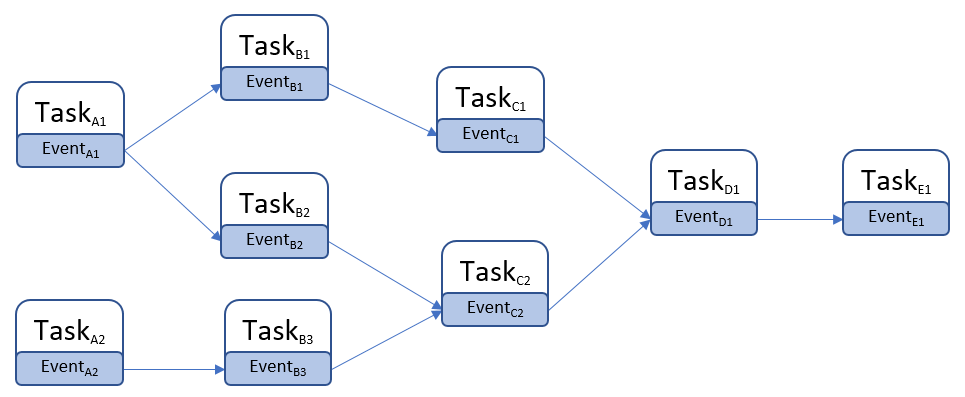
典型样例就是FTickTaskManager处理Tick之间的依赖,例如一个Actor身上挂载了多个SkeletalMesh,每个SkeletalMesh都需要Tick,但是同一帧里需要优先执行躯干SkeletalMesh的Tick,然后再执行挂载在躯干上的其他SkeletalMesh的Tick,此时就可以通过FTickFunction::AddPrerequisite来添加FTickFunction之间的依赖关系:
void FTickFunction::AddPrerequisite(UObject* TargetObject, struct FTickFunction& TargetTickFunction)
{
	const bool bThisCanTick = (bCanEverTick || IsTickFunctionRegistered());
	const bool bTargetCanTick = (TargetTickFunction.bCanEverTick || TargetTickFunction.IsTickFunctionRegistered());

	if (bThisCanTick && bTargetCanTick)
	{
		Prerequisites.AddUnique(FTickPrerequisite(TargetObject, TargetTickFunction));
	}
}
由于一个FTickFunction上可能会有多个前置的FTickFunction任务依赖,所以在FTickFunction上有一个Prerequisites数组来存储所有前置的FTickFunction任务。同时FTickTaskManager使用了基于TaskGraph的线程池来读取这个Prerequisites数组,将所有前置的FTickFunction任务作为依赖,为当前FTickFunction任务生成一个TGraphTask<FTickFunctionTask>并加入到TaskGraph中:
/**
	* Start a component tick task and add the completion handle
	*
	* @param	InPrerequisites - prerequisites that must be completed before this tick can begin
	* @param	TickFunction - the tick function to queue
	* @param	Context - tick context to tick in. Thread here is the current thread.
	*/
FORCEINLINE void QueueTickTask(const FGraphEventArray* Prerequisites, FTickFunction* TickFunction, const FTickContext& TickContext)
{
	checkSlow(TickFunction->InternalData);
	checkSlow(TickContext.Thread == ENamedThreads::GameThread);
	StartTickTask(Prerequisites, TickFunction, TickContext);
	TGraphTask<FTickFunctionTask>* Task = (TGraphTask<FTickFunctionTask>*)TickFunction->InternalData->TaskPointer;
	AddTickTaskCompletion(TickFunction->InternalData->ActualStartTickGroup, TickFunction->InternalData->ActualEndTickGroup, Task, TickFunction->bHighPriority);
}

/**
	* Start a component tick task
	*
	* @param	InPrerequisites - prerequisites that must be completed before this tick can begin
	* @param	TickFunction - the tick function to queue
	* @param	Context - tick context to tick in. Thread here is the current thread.
	*/
FORCEINLINE void StartTickTask(const FGraphEventArray* Prerequisites, FTickFunction* TickFunction, const FTickContext& TickContext)
{
	checkSlow(TickFunction->InternalData);
	checkSlow(TickFunction->InternalData->ActualStartTickGroup >=0 && TickFunction->InternalData->ActualStartTickGroup < TG_MAX);

	FTickContext UseContext = TickContext;

	bool bIsOriginalTickGroup = (TickFunction->InternalData->ActualStartTickGroup == TickFunction->TickGroup);

	if (TickFunction->bRunOnAnyThread && bAllowConcurrentTicks && bIsOriginalTickGroup)
	{
		if (TickFunction->bHighPriority)
		{
			UseContext.Thread = CPrio_HiPriAsyncTickTaskPriority.Get();
		}
		else
		{
			UseContext.Thread = CPrio_NormalAsyncTickTaskPriority.Get();
		}
	}
	else
	{
		UseContext.Thread = ENamedThreads::SetTaskPriority(ENamedThreads::GameThread, TickFunction->bHighPriority ? ENamedThreads::HighTaskPriority : ENamedThreads::NormalTaskPriority);
	}

	TickFunction->InternalData->TaskPointer = TGraphTask<FTickFunctionTask>::CreateTask(Prerequisites, TickContext.Thread).ConstructAndHold(TickFunction, &UseContext, bLogTicks, bLogTicksShowPrerequistes);
}
TGraphTask<FTickFunctionTask>::CreateTask里会遍历Prerequisites数组,调用AddPrerequisites来添加依赖关系:
/**
 *	Base class for all tasks. A replacement for `FBaseGraphTask` and `FGraphEvent` from the old API, based on `Tasks::Private::FTaskBase` functionality
 **/

class FBaseGraphTask : public UE::Tasks::Private::FTaskBase
{
public:
	explicit FBaseGraphTask(const FGraphEventArray* InPrerequisites)
		: FTaskBase(/*InitRefCount=*/ 1, false /* bUnlockPrerequisites */)
	{
		if (InPrerequisites != nullptr)
		{
			AddPrerequisites(*InPrerequisites, false /* bLockPrerequisite */);
		}

		UnlockPrerequisites();
	}
}
添加前置依赖的时候,会增加其内部的前置依赖计数器NumLocks,这个计数器为了支持多线程访问声明为了Atomic变量,只支持fetch_add和fetch_sub操作,初始的时候其值为1:
// the number of times that the task should be unlocked before it can be scheduled or completed
// initial count is 1 for launching the task (it can't be scheduled before it's launched)
// reaches 0 the task is scheduled for execution.
// NumLocks's the most significant bit (see `ExecutionFlag`) is set on task execution start, and indicates that now
// NumLocks is about how many times the task must be unlocked to be completed
static constexpr uint32 NumInitialLocks = 1;
std::atomic<uint32> NumLocks{ NumInitialLocks };

// The task will be executed only when all prerequisites are completed.
// Must not be called concurrently.
// @param InPrerequisites - an iterable collection of tasks
template<typename PrerequisiteCollectionType, decltype(std::declval<PrerequisiteCollectionType>().begin())* = nullptr>
void AddPrerequisites(const PrerequisiteCollectionType& InPrerequisites, bool bLockPrerequisite)
{
	TASKGRAPH_VERBOSE_EVENT_SCOPE(FTaskBase::AddPrerequisites_Collection);

	checkf(NumLocks.load(std::memory_order_relaxed) >= NumInitialLocks && NumLocks.load(std::memory_order_relaxed) < ExecutionFlag, TEXT("Prerequisites can be added only before the task is launched"));

	// registering the task as a subsequent of the given prerequisite can cause its immediate launch by the prerequisite
	// (if the prerequisite has been completed on another thread), so we need to keep the task locked by assuming that the
	// prerequisite can be added successfully, and release the lock if it wasn't
	uint32 PrevNumLocks = NumLocks.fetch_add(GetNum(InPrerequisites), std::memory_order_relaxed); // relaxed because the following
	// `AddSubsequent` provides required sync

	uint32 NumCompletedPrerequisites = 0;
	for (auto& Prereq : InPrerequisites)
	{
		// prerequisites can be either `FTaskBase*` or its Pimpl handle
		FTaskBase* Prerequisite;
		using FPrerequisiteType = std::decay_t<decltype(*std::declval<PrerequisiteCollectionType>().begin())>;
		if constexpr (std::is_same_v<FPrerequisiteType, FTaskBase*>)
		{
			Prerequisite = Prereq;
		}
		else if constexpr (std::is_same_v<FPrerequisiteType, FGraphEventRef>)
		{
			Prerequisite = Prereq.GetReference();
		}
		else if constexpr (std::is_pointer_v<FPrerequisiteType>)
		{
			Prerequisite = Prereq->Pimpl;
		}
		else
		{
			Prerequisite = Prereq.Pimpl;
		}

		if (Prerequisite == nullptr)
		{
			++NumCompletedPrerequisites;
			continue;
		}

		if (Prerequisite->AddSubsequent(*this)) // acq_rel memory order
		{
			Prerequisite->AddRef(); // keep it alive until this task's execution
			if (bLockPrerequisite)
			{
				Prerequisites.Push(Prerequisite); // release memory order
			}
			else
			{
				Prerequisites.PushNoLock(Prerequisite); // relaxed memory order
			}
		}
		else
		{
			++NumCompletedPrerequisites;
		}
	}

	// This check is here to avoid the data dependency on PrevNumLocks.
	checkf(PrevNumLocks + GetNum(InPrerequisites) < ExecutionFlag, TEXT("Max number of nested tasks reached: %d"), ExecutionFlag);

	// unlock for prerequisites that weren't added
	NumLocks.fetch_sub(NumCompletedPrerequisites, std::memory_order_release);
}
更新前置任务计数器的同时,通过Prerequisite->AddSubsequent(*this)在其前置依赖任务的后续任务数组Subsequents里添加当前任务:
// the task unlocks all its subsequents on completion.
// returns false if the task is already completed and the subsequent wasn't added
bool AddSubsequent(FTaskBase& Subsequent)
{
	TaskTrace::SubsequentAdded(GetTraceId(), Subsequent.GetTraceId()); // doesn't matter if we suceeded below, we need to record task dependency
	return Subsequents.PushIfNotClosed(&Subsequent);
}


// the task is completed when its subsequents list is closed and no more can be added
template <typename AllocatorType = FDefaultAllocator>
class FSubsequents
{
public:
	bool PushIfNotClosed(FTaskBase* NewItem)
	{
		TASKGRAPH_VERBOSE_EVENT_SCOPE(FSubsequents::PushIfNotClosed);
		if (bIsClosed.load(std::memory_order_relaxed))
		{
			return false;
		}
		UE::TUniqueLock Lock(Mutex);
		if (bIsClosed)
		{
			return false;
		}
		Subsequents.Emplace(NewItem);
		return true;
	}

	TArray<FTaskBase*, AllocatorType> Close()
	{
		TASKGRAPH_VERBOSE_EVENT_SCOPE(FSubsequents::Close);
		UE::TUniqueLock Lock(Mutex);
		bIsClosed = true;
		return MoveTemp(Subsequents);
	}

	bool IsClosed() const
	{
		return bIsClosed;
	}

private:
	TArray<FTaskBase*, AllocatorType> Subsequents;
	std::atomic<bool>  bIsClosed = false;
	UE::FMutex Mutex;
};

FSubsequents<TInlineAllocator<1>> Subsequents;
这样当一个GraphTask被执行的时候,在执行完成时会调用close函数,在close函数里会遍历Subsequents来驱动后续任务的调度:
// tries to get execution permission and if successful, executes given task body and completes the task if there're no pending nested tasks.
// does all required accounting before/after task execution. the task can be deleted as a result of this call.
// @returns true if the task was executed by the current thread
bool TryExecuteTask()
{
	TASKGRAPH_VERBOSE_EVENT_SCOPE(FTaskBase::TryExecuteTask);

	if (!TrySetExecutionFlag())
	{
		return false;
	}

	AddRef(); // `LowLevelTask` will automatically release the internal reference after execution, but there can be pending nested tasks, so keep it alive
	// it's released either later here if the task is closed, or when the last nested task is completed and unlocks its parent (in `TryUnlock`)

	ReleasePrerequisites();

	FTaskBase* PrevTask = ExchangeCurrentTask(this);
	ExecutingThreadId.store(FPlatformTLS::GetCurrentThreadId(), std::memory_order_relaxed);

	if (GetPipe() != nullptr)
	{
		StartPipeExecution();
	}

	{
		UE::FInheritedContextScope InheritedContextScope = RestoreInheritedContext();
		TaskTrace::FTaskTimingEventScope TaskEventScope(GetTraceId());
		TASKGRAPH_VERBOSE_EVENT_SCOPE(FTaskBase::ExecuteTask);
		ExecuteTask();
	}

	if (GetPipe() != nullptr)
	{
		FinishPipeExecution();
	}

	ExecutingThreadId.store(FThread::InvalidThreadId, std::memory_order_relaxed); // no need to sync with loads as they matter only if
	// executed by the same thread
	ExchangeCurrentTask(PrevTask);

	// close the task if there are no pending nested tasks
	uint32 LocalNumLocks = NumLocks.fetch_sub(1, std::memory_order_acq_rel) - 1; // "release" to make task execution "happen before" this, and "acquire" to
	// "sync with" another thread that completed the last nested task
	if (LocalNumLocks == ExecutionFlag) // unlocked (no pending nested tasks)
	{
		Close();
		Release(); // the internal reference that kept the task alive for nested tasks
	} // else there're non completed nested tasks, the last one will unlock, close and release the parent (this task)

	return true;
}

// closes task by unlocking its subsequents and flagging it as completed
void Close()
{
	TASKGRAPH_VERBOSE_EVENT_SCOPE(FTaskBase::Close);
	checkSlow(!IsCompleted());

	// Push the first subsequent to the local queue so we pick it up directly as our next task.
	// This saves us the cost of going to the global queue and performing a wake-up.
	// But if we're a task event, always wake up new workers because the current task could continue executing for a long time after the trigger.
	bool bWakeUpWorker = ExtendedPriority == EExtendedTaskPriority::TaskEvent;

	for (FTaskBase* Subsequent : Subsequents.Close())
	{
		// bWakeUpWorker is passed by reference and is automatically set to true if we successfully schedule a task on the local queue.
		// so all the remaining ones are sent to the global queue.
		Subsequent->TryUnlock(bWakeUpWorker);
	}

	// Clear the pipe after the task is completed (subsequents closed) so that any tasks part of the
	// pipe are not seen still being executed after FPipe::WaitUntilEmpty has returned.
	if (GetPipe() != nullptr)
	{
		ClearPipe();
	}

	// release nested tasks
	ReleasePrerequisites();

	TaskTrace::Completed(GetTraceId());

	// In case a thread is waiting on us to perform retraction, now is the time to try retraction again.
	StateChangeEvent.Notify();
}
这里的TryUnlock会将每个Subsequent的前置任务计数进行fetch_sub减一操作,当更新后的计数器LocalNumLocks等于0时,就代表当前任务的所有前置任务都已经完成,可以通过Schedule来执行当前任务的调度了:
// A task can be locked for execution (by prerequisites or if it's not launched yet) or for completion (by nested tasks).
// This method is called to unlock the task and so can result in its scheduling (and execution) or completion
bool TryUnlock(bool& bWakeUpWorker)
{
	TASKGRAPH_VERBOSE_EVENT_SCOPE(FTaskBase::TryUnlock);

	FPipe* LocalPipe = GetPipe(); // cache data locally so we won't need to touch the member (read below)

	uint32 PrevNumLocks = NumLocks.fetch_sub(1, std::memory_order_acq_rel); // `acq_rel` to make it happen after task
	// preparation and before launching it
	// the task can be dead already as the prev line can remove the lock hold for this execution path, another thread(s) can unlock
	// the task, execute, complete and delete it. thus before touching any members or calling methods we need to make sure
	// the task can't be destroyed concurrently

	uint32 LocalNumLocks = PrevNumLocks - 1;

	if (PrevNumLocks < ExecutionFlag)
	{
		// pre-execution state, try to schedule the task

		checkf(PrevNumLocks != 0, TEXT("The task is not locked"));

		bool bPrerequisitesCompleted = LocalPipe == nullptr ? LocalNumLocks == 0 : LocalNumLocks <= 1; // the only remaining lock is pipe's one (if any)
		if (!bPrerequisitesCompleted)
		{
			return false;
		}
		// this thread unlocked the task, no other thread can reach this point concurrently, we can touch the task again

		if (ExtendedPriority == EExtendedTaskPriority::Inline)
		{
			// "inline" tasks are not scheduled but executed straight away
			TryExecuteTask(); // result doesn't matter, this can fail if task retraction jumped in and got execution
			// permission between this thread unlocked the task and tried to execute it
			ReleaseInternalReference();

			// Use-after-free territory, do not touch any of the task's properties here.
		}
		else if (ExtendedPriority == EExtendedTaskPriority::TaskEvent)
		{
			// task events have nothing to execute, try to close it. task retraction can jump in and close the task event,
			// so this thread still needs to check execution permission
			if (TrySetExecutionFlag())
			{
				// task events are used as an empty prerequisites/subsequents
				ReleasePrerequisites();
				Close();
				ReleaseInternalReference();

				// Use-after-free territory, do not touch any of the task's properties here.
			}
		}
		else
		{
			Schedule(bWakeUpWorker);

			// Use-after-free territory, do not touch any of the task's properties here.
		}

		return true;
	}
	// execution already started (at least), this is nested tasks unlocking their parent
	checkf(PrevNumLocks != ExecutionFlag, TEXT("The task is not locked"));
	if (LocalNumLocks != ExecutionFlag) // still locked
	{
		return false;
	}

	// this thread unlocked the task, no other thread can reach this point concurrently, we can touch the task again
	Close();
	Release(); // the internal reference that kept the task alive for nested tasks

	// Use-after-free territory, do not touch any of the task's properties here.

	return true;
}