UnrealEngine中的行为树
行为树编辑套件
在UE中提供了一个继承自蓝图编辑功能的行为树编辑系统,整个系统的详尽介绍可以参考其官方文档ue行为树快速入门,在这张图中展示了UE4官方示例ShooterGame的行为树配置:
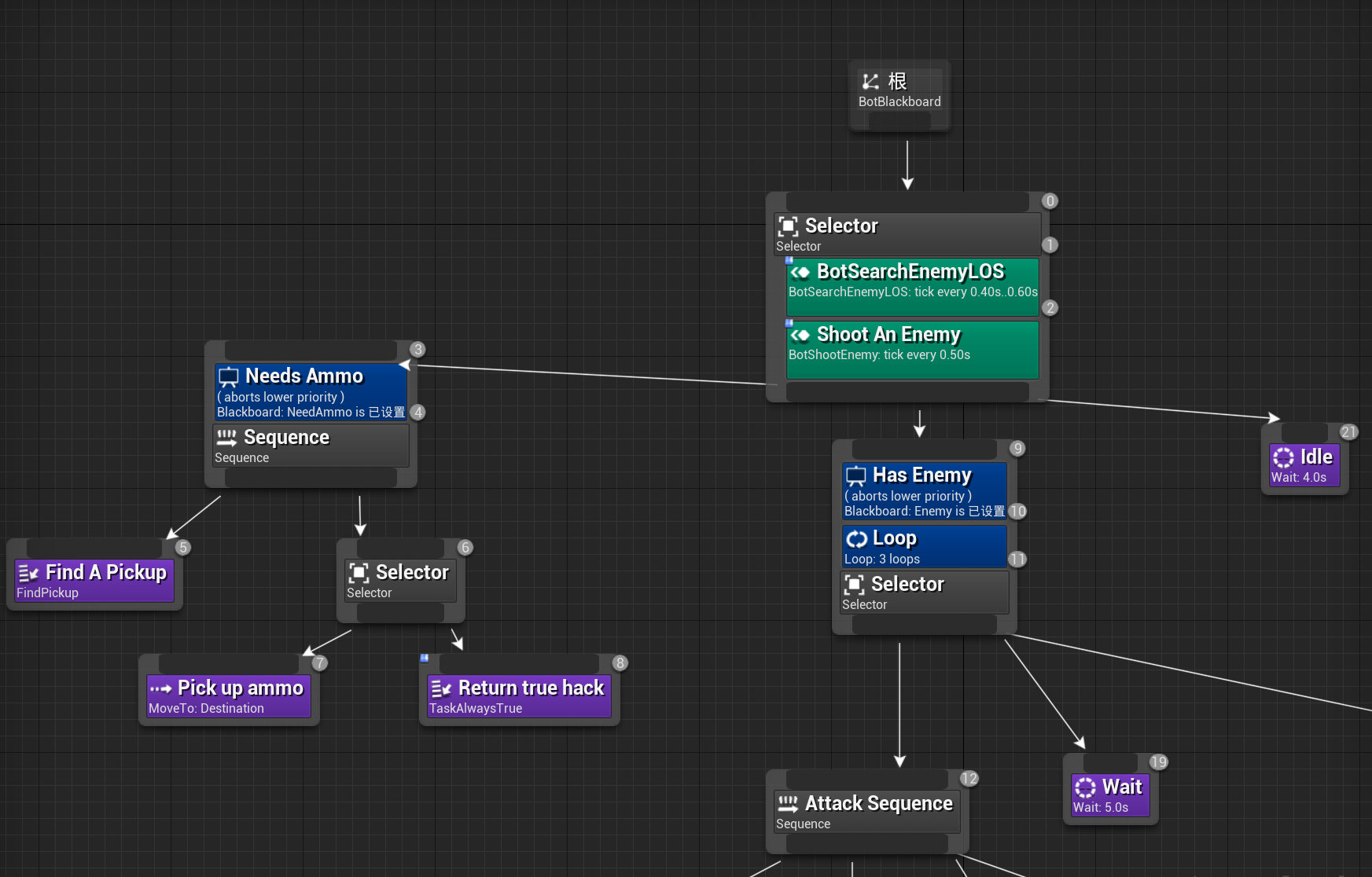
在UE的行为树设置中,节点是以从上到下、从左到右的方式来组织的,每个节点都继承自UBTNode,根节点位于最顶端。UE的行为树提供了如下几种类型的节点来给创作者来使用:
- 复合节点
(UBTCompositeNode),对应上图中底色为灰色的节点,这种节点下面可以挂载一个或者多个子节点,根节点就是只有一个子节点的复合节点。复合节点负责承担当一个子节点结束之后选择下一个节点的任务,对于只有一个子节点的就直接返回到父节点。对于有多个子节点的复合节点,根据其选择逻辑又细分为了三种:UBTComposite_Selector,对应之前介绍的选择节点UBTComposite_Sequence,对应之前介绍的顺序节点UBTComposite_SimpleParallel, 对应之前介绍的并行节点,不过做了一些限制与简化,简单平行(Simple Parallel)节点只包含两个节点,左边的节点为主节点,只能设置为任务节点,而右边的节点可以挂载任务节点、复合节点以及一颗完整的行为树。简单并行节点允许这两个子节点同时运行。主任务完成后,结束模式Finish Mode中的设置会指示该节点是应该立即结束,同时中止次要树,还是应该推迟结束,直到次要树完成。
- 任务节点
(UBTTaskNode)对应上图中底色为紫色的节点,负责执行具体的任务,每一种具体的任务都需要从这个节点继承,如移动任务UBTTask_MoveTo和等待任务UBTTask_Wait - 辅助节点
(UBTAuxiliaryNode)这种节点可以附加在复合节点和任务节点之上,一个复合节点和任务节点可以附加多个辅助节点。根据这些辅助节点的功能分类,可以细分为两种:- 装饰器节点
(UBTDecorator)装饰器节点对应上图中底色为蓝色的节点,这个节点作为条件判断节点来使用,多个装饰器节点一起组成了所修饰节点的执行前置条件,需要都返回true才能启动执行。典型的装饰器节点包括判断黑板值是否相等的节点UBTDecorator_CompareBBEntries以及限制最多执行次数的节点UBTDecorator_Loop - 服务节点
(UBTService)服务节点对应上图中的底色为浅绿色的节点,其作用就是在所修饰的节点执行期间定期的Tick执行一些操作,例如更新目标选择,定期射击等任务
- 装饰器节点
树中的每个节点都有一个数字代表其优先级,数字越小则优先级越高。复合节点、任务节点、服务节点的优先级在节点对应方框的右上角,而辅助节点对应的优先级在对应方框的右下角。这个优先级其实就是整个行为树先序遍历时每个节点的访问顺序。
UE行为树编辑系统里不仅提供了上述的行为树编辑器,还提供了黑板值编辑器和任务编辑器。
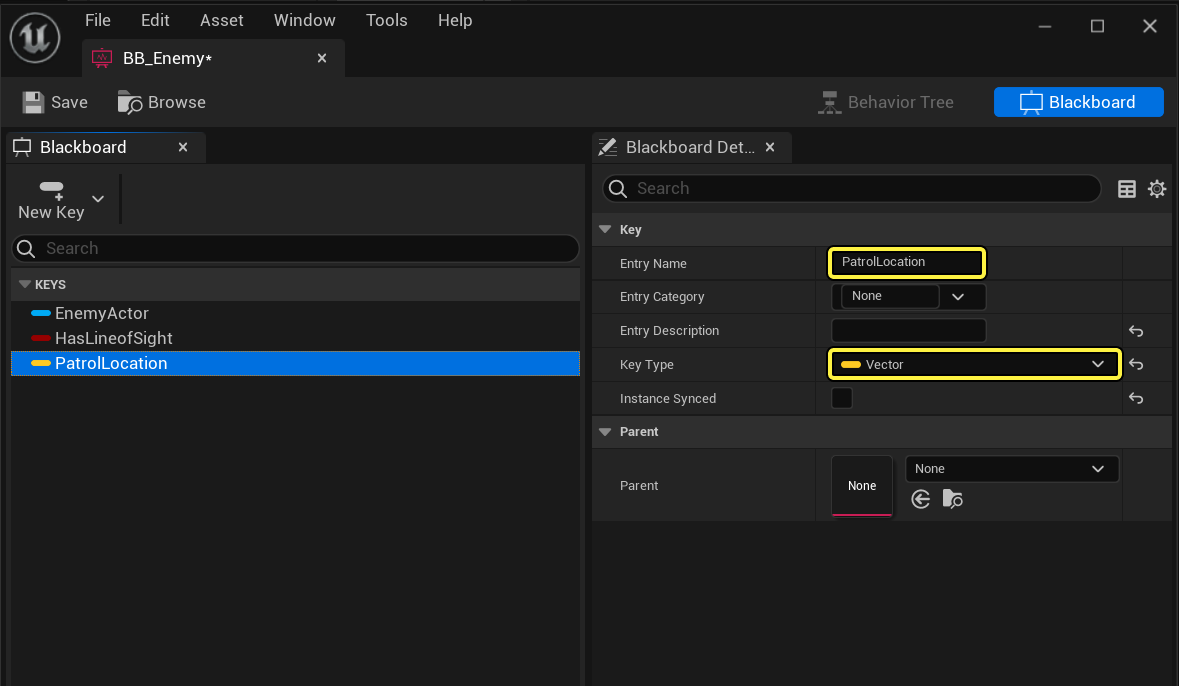
黑板值编辑器提供了一个强类型的变量编辑器,相对于我们在mosaic_game中基于map<string, json>实现的黑板系统可优秀太多了,声明的变量类型支持所有蓝图可用类型,也就是说UObject和UStruct都可以。下图中的EnemyActor就是一个Actor类型的黑板值,之前在mosaic_game中要存储一个Entity还需要通过Entity->entity_idx()来转换:
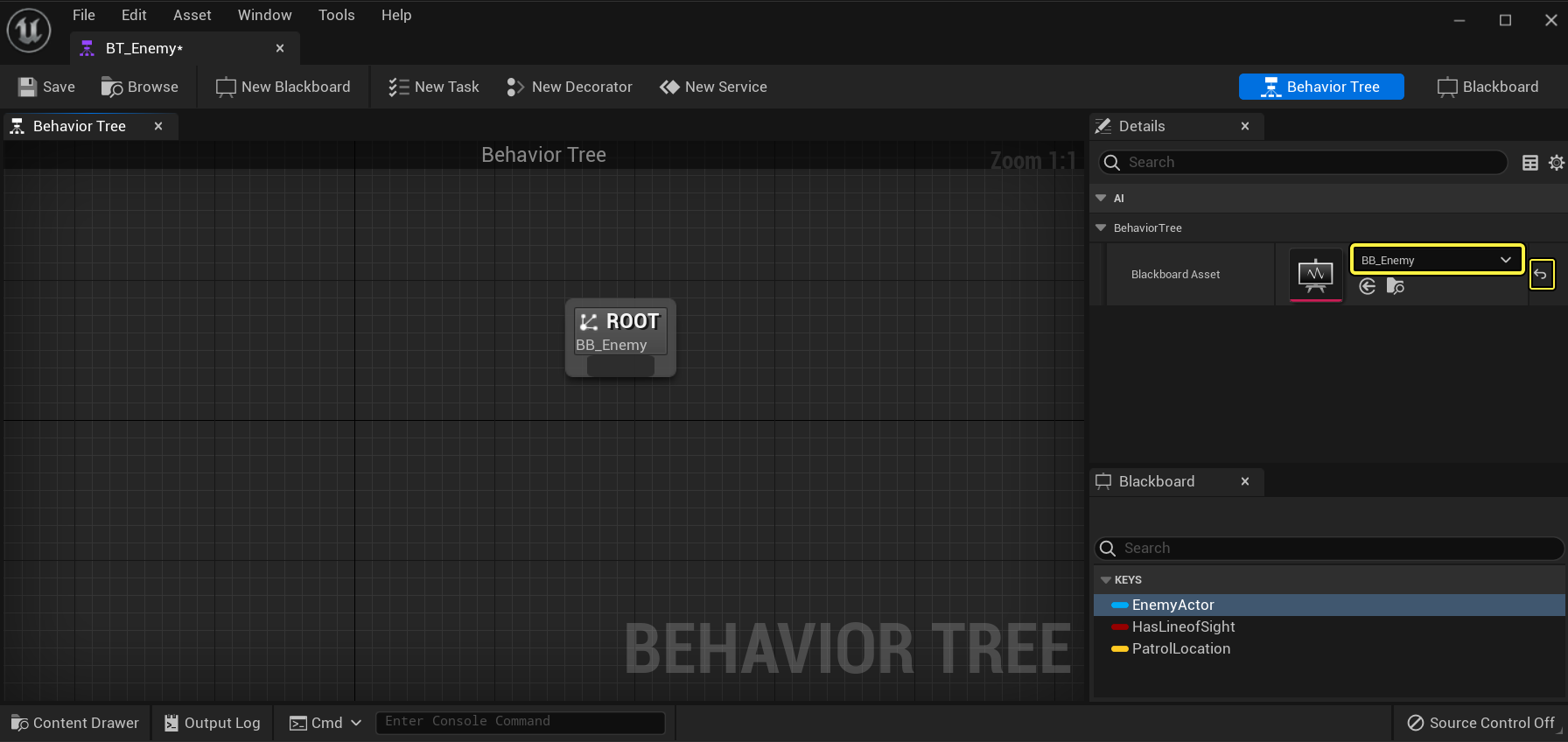
行为树黑板是作为一个单独的资产来编辑的,不能脱离行为树来使用。创建行为树的时候可以附加一个黑板资产来作为内部数据存储:
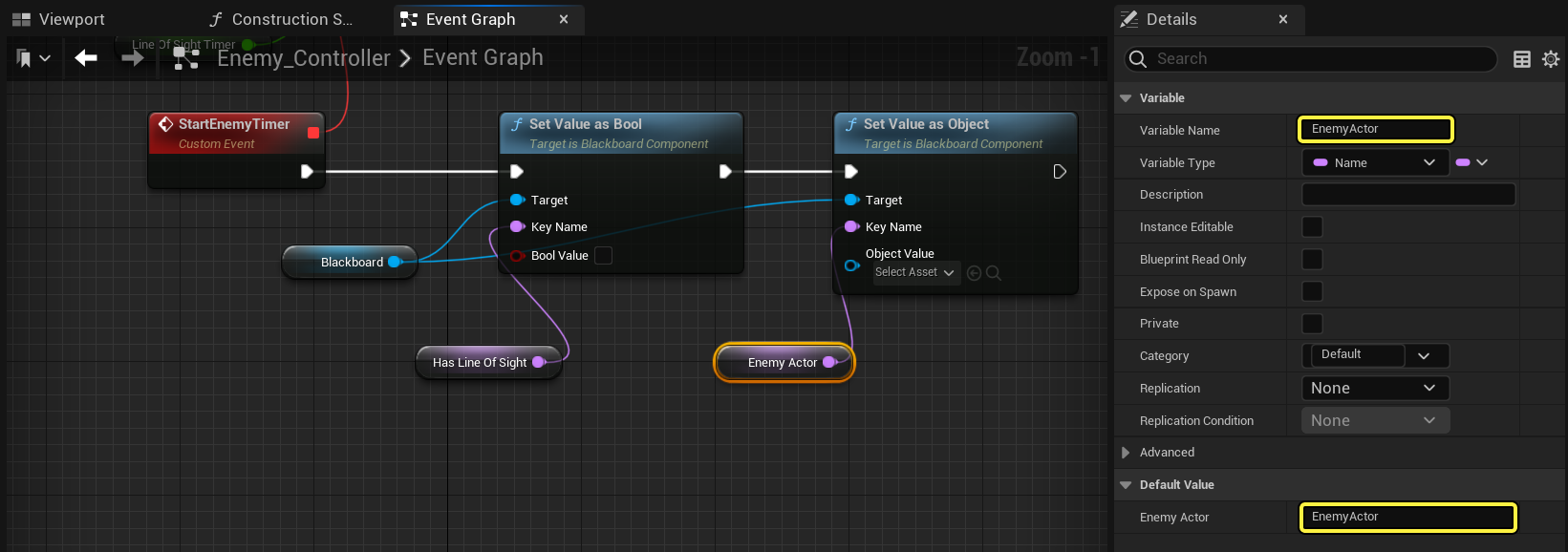
在真正使用key去查询或者设置黑板值的时候,需要自己在接口中指定值的类型,按道理应该直接从黑板对应值拉出一个连线过来:
任务编辑器其实就相当于使用蓝图新建了一个自定义的任务函数,从而在不修改代码的情况下实现一种自定义的任务节点。外层行为树将这个任务当作类的虚接口来使用,不需要在乎内部实现,这样使得上层框架更加简洁。下图就是官方文档中的选择周围一定半径内随机点进行巡逻的任务实现,:
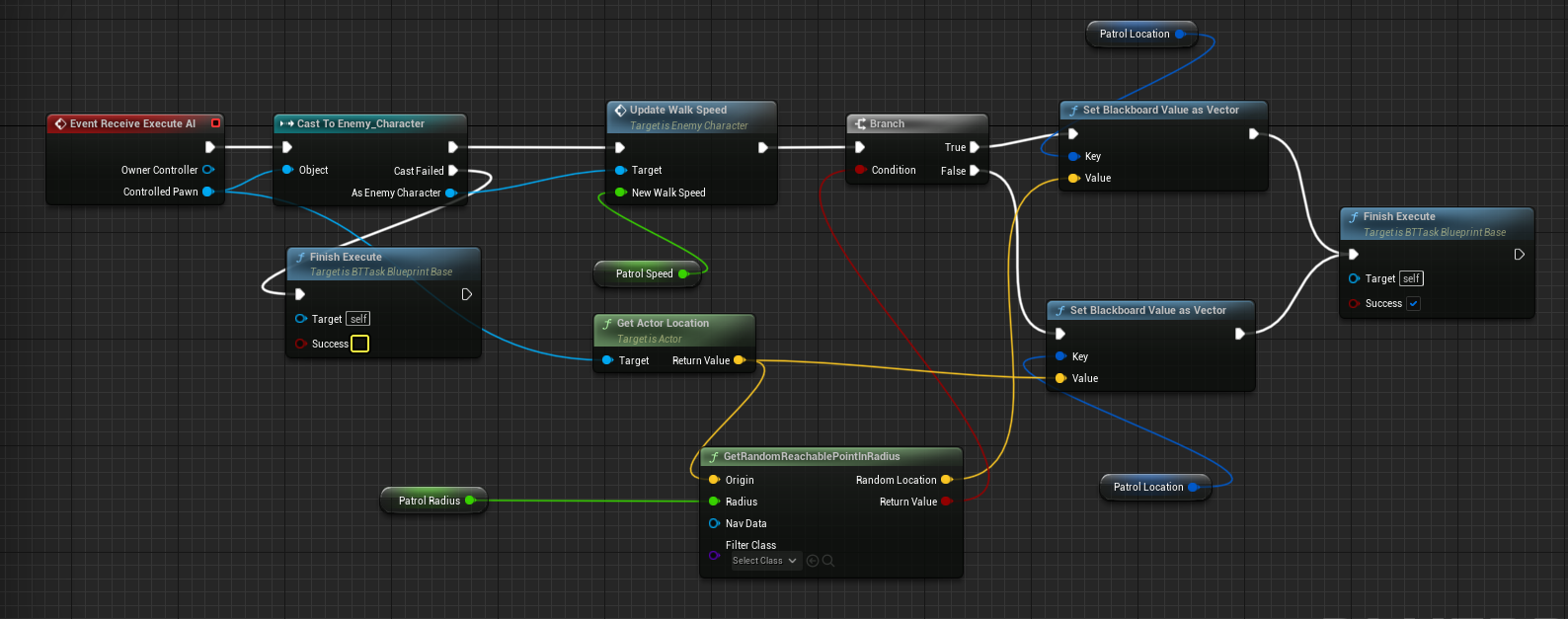
行为树的任意当前节点执行完成之后的结果,是一个枚举类,有成功、失败、被终止、持续中四种状态:
namespace EBTNodeResult
{
    // keep in sync with DescribeNodeResult()
    enum Type
    {
        Succeeded,        // finished as success
        Failed,            // finished as failure
        Aborted,        // finished aborting = failure
        InProgress,        // not finished yet
    };
}
每个节点被激活之后,会构造一个EBTNodeResult来返回,通知其父节点执行后续的节点调度,这个节点调度的流程我们将在后文中进行详解。
UE行为树的黑板
UE行为树黑板的类型继承自UAsset,内部使用Array来存储所有声明的变量:
UCLASS(BlueprintType, AutoExpandCategories=(Blackboard))
class AIMODULE_API UBlackboardData : public UDataAsset
{
	GENERATED_UCLASS_BODY()
	DECLARE_MULTICAST_DELEGATE_OneParam(FKeyUpdate, UBlackboardData* /*asset*/);

	/** parent blackboard (keys can be overridden) */
	UPROPERTY(EditAnywhere, Category=Parent)
	UBlackboardData* Parent;

#if WITH_EDITORONLY_DATA
	/** all keys inherited from parent chain */
	UPROPERTY(VisibleDefaultsOnly, Transient, Category=Parent)
	TArray<FBlackboardEntry> ParentKeys;
#endif

	/** blackboard keys */
	UPROPERTY(EditAnywhere, Category=Blackboard)
	TArray<FBlackboardEntry> Keys;
};
从这个类成员可以看出黑板是可以级联拼接的,通过Parent指针来对原始的黑板值列表进行扩充或者复写,从逻辑上实现了对Parent黑板的类型继承。
黑板中的每一个值都是一个FBlackboardEntry,内部存储了值的名字、类型和描述信息:
/** blackboard entry definition */
USTRUCT()
struct FBlackboardEntry
{
	GENERATED_USTRUCT_BODY()

	UPROPERTY(EditAnywhere, Category=Blackboard)
	FName EntryName;

#if WITH_EDITORONLY_DATA
	UPROPERTY(EditAnywhere, Category=Blackboard, Meta=(ToolTip="Optional description to explain what this blackboard entry does."))
	FString EntryDescription;

	UPROPERTY(EditAnywhere, Category=Blackboard)
	FName EntryCategory;
#endif // WITH_EDITORONLY_DATA

	/** key type and additional properties */
	UPROPERTY(EditAnywhere, Instanced, Category=Blackboard)
	UBlackboardKeyType* KeyType;

	/** if set to true then this field will be synchronized across all instances of this blackboard */
	UPROPERTY(EditAnywhere, Category=Blackboard)
	uint32 bInstanceSynced : 1;

	FBlackboardEntry()
		: KeyType(nullptr), bInstanceSynced(0)
	{}

	bool operator==(const FBlackboardEntry& Other) const;
};
KeyType就是当前值的类型信息,这个类型信息继承自UBlackboardKeyType。对应的衍生类型每个类型都会在/Engine/Source/Runtime/AIModule/Classes/BehaviorTree/Blackboard文件夹下有一个单独的头文件:
$ ls
BlackboardKeyAllTypes.h    BlackboardKeyType_Name.h
BlackboardKeyType.h        BlackboardKeyType_NativeEnum.h
BlackboardKeyType_Bool.h   BlackboardKeyType_Object.h
BlackboardKeyType_Class.h  BlackboardKeyType_Rotator.h
BlackboardKeyType_Enum.h   BlackboardKeyType_String.h
BlackboardKeyType_Float.h  BlackboardKeyType_Vector.h
BlackboardKeyType_Int.h
对于常规的数据类型,在UBlackboardComponent提供了这些类型的Get/Set接口:
UFUNCTION(BlueprintCallable, Category="AI|Components|Blackboard")
UObject* GetValueAsObject(const FName& KeyName) const;

UFUNCTION(BlueprintCallable, Category="AI|Components|Blackboard")
UClass* GetValueAsClass(const FName& KeyName) const;

UFUNCTION(BlueprintCallable, Category="AI|Components|Blackboard")
uint8 GetValueAsEnum(const FName& KeyName) const;

UFUNCTION(BlueprintCallable, Category="AI|Components|Blackboard")
int32 GetValueAsInt(const FName& KeyName) const;

UFUNCTION(BlueprintCallable, Category="AI|Components|Blackboard")
void SetValueAsObject(const FName& KeyName, UObject* ObjectValue);

UFUNCTION(BlueprintCallable, Category="AI|Components|Blackboard")
void SetValueAsClass(const FName& KeyName, UClass* ClassValue);

UFUNCTION(BlueprintCallable, Category="AI|Components|Blackboard")
void SetValueAsEnum(const FName& KeyName, uint8 EnumValue);

UFUNCTION(BlueprintCallable, Category="AI|Components|Blackboard")
void SetValueAsInt(const FName& KeyName, int32 IntValue);
外部在获取和设置值的时候会检查类型是否匹配:
int32 UBlackboardComponent::GetValueAsInt(const FName& KeyName) const
{
	return GetValue<UBlackboardKeyType_Int>(KeyName);
}
template<class TDataClass>
typename TDataClass::FDataType UBlackboardComponent::GetValue(const FName& KeyName) const
{
	const FBlackboard::FKey KeyID = GetKeyID(KeyName);
	return GetValue<TDataClass>(KeyID);
}
template<class TDataClass>
typename TDataClass::FDataType UBlackboardComponent::GetValue(FBlackboard::FKey KeyID) const
{
	const FBlackboardEntry* EntryInfo = BlackboardAsset ? BlackboardAsset->GetKey(KeyID) : nullptr;
	if ((EntryInfo == nullptr) || (EntryInfo->KeyType == nullptr) || (EntryInfo->KeyType->GetClass() != TDataClass::StaticClass()))
	{
		return TDataClass::InvalidValue;
	}

	UBlackboardKeyType* KeyOb = EntryInfo->KeyType->HasInstance() ? KeyInstances[KeyID] : EntryInfo->KeyType;
	const uint16 DataOffset = EntryInfo->KeyType->HasInstance() ? sizeof(FBlackboardInstancedKeyMemory) : 0;

	const uint8* RawData = GetKeyRawData(KeyID) + DataOffset;
	return RawData ? TDataClass::GetValue((TDataClass*)KeyOb, RawData) : TDataClass::InvalidValue;
}
从这个GetValue的实现可以看出,FBlackboardEntry中并没有存储这个黑板值的运行时数据。访问一个KeyName对应的真正数值时需要先转化为FBlackboard::FKey,然后再查询这个FKey对应的内存偏移值作为数据开始的指针。这个运行时内存和字段偏移记录都存储在UBlackboardComponent中:
	/** memory block holding all values */
	TArray<uint8> ValueMemory;

	/** offsets in ValueMemory for each key */
	TArray<uint16> ValueOffsets;

   	/** get pointer to raw data for given key */
	FORCEINLINE uint8* GetKeyRawData(const FName& KeyName) { return GetKeyRawData(GetKeyID(KeyName)); }
	FORCEINLINE uint8* GetKeyRawData(FBlackboard::FKey KeyID) { return ValueMemory.Num() && ValueOffsets.IsValidIndex(KeyID) ? (ValueMemory.GetData() + ValueOffsets[KeyID]) : NULL; }
而这两个字段是在UBlackboardComponent绑定一个UBlackboardData初始化的:
UBlackboardComponent::InitializeBlackboard(UBlackboardData& NewAsset)
{
   // 省略一些代码
   TArray<FBlackboardInitializationData> InitList;
   const int32 NumKeys = BlackboardAsset->GetNumKeys();
   InitList.Reserve(NumKeys);
   ValueOffsets.AddZeroed(NumKeys);

   for (UBlackboardData* It = BlackboardAsset; It; It = It->Parent)
   {
      for (int32 KeyIndex = 0; KeyIndex < It->Keys.Num(); KeyIndex++)
      {
         UBlackboardKeyType* KeyType = It->Keys[KeyIndex].KeyType;
         if (KeyType)
         {
            KeyType->PreInitialize(*this);

            const uint16 KeyMemory = KeyType->GetValueSize() + (KeyType->HasInstance() ? sizeof(FBlackboardInstancedKeyMemory) : 0);
            InitList.Add(FBlackboardInitializationData(KeyIndex + It->GetFirstKeyID(), KeyMemory));
         }
      }
   }

   // sort key values by memory size, so they can be packed better
   // it still won't protect against structures, that are internally misaligned (-> uint8, uint32)
   // but since all Engine level keys are good...
   InitList.Sort(FBlackboardInitializationData::FMemorySort());
   uint16 MemoryOffset = 0;
   for (int32 Index = 0; Index < InitList.Num(); Index++)
   {
      ValueOffsets[InitList[Index].KeyID] = MemoryOffset;
      MemoryOffset += InitList[Index].DataSize;
   }

   ValueMemory.AddZeroed(MemoryOffset);

   // initialize memory
   KeyInstances.AddZeroed(InitList.Num());
}
这里为了让内存总大小尽可能的小,会根据每个Item的总内存大小从大到小排序,然后再连续分配。这样会带来一个问题就是获取出来的指针其实并没有遵照相关类型的对齐规则。不过这里注释说对于引擎提供好的这些黑板值类型,不对齐也没啥影响。如果黑板值是POD类型的话的确没啥影响,但是如果是FString这种动态容器类型感觉会出问题。所以我们来看一下这里对FString是如何处理的,先来看一下这个类型的构造函数:
UBlackboardKeyType_String::UBlackboardKeyType_String(const FObjectInitializer& ObjectInitializer) : Super(ObjectInitializer)
{
	ValueSize = 0;
	bCreateKeyInstance = true;

	SupportedOp = EBlackboardKeyOperation::Text;
}
这里有两个特殊的字段:
ValueSize代表这个类型对应的运行时值的字节大小,这里初始化为0bCreateKeyInstance代表这个类型是否需要创建KeyInstance,这里初始化为true
所以下面这一句在计算当前Key的内存大小的时候,遇到FString则会返回sizeof(FBlackboardInstancedKeyMemory)
const uint16 KeyMemory = KeyType->GetValueSize() + (KeyType->HasInstance() ? sizeof(FBlackboardInstancedKeyMemory) : 0);
FORCEINLINE uint16 UBlackboardKeyType::GetValueSize() const
{
	return ValueSize;
}

FORCEINLINE bool UBlackboardKeyType::HasInstance() const
{
	return bCreateKeyInstance;
}
而这个FBlackboardInstancedKeyMemory其实只是作为索引使用的,指向UBlackboardComponent的另外一个动态内存分配区KeyInstances:
struct FBlackboardInstancedKeyMemory
{
	/** index of instanced key in UBlackboardComponent::InstancedKeys */
	int32 KeyIdx;
};

/** instanced keys with custom data allocations */
UPROPERTY(transient)
TArray<UBlackboardKeyType*> KeyInstances;
在UBlackboardKeyType_String执行InitializeKey的时候,由于其bCreateKeyInstance=true,所以会使用NewObject来创建一个新的UBlackboardKeyType_String对象,这个对象作为当前UBlackboardComponent里当前UBlackboardKeyType_String真正实例:
void UBlackboardKeyType::InitializeKey(UBlackboardComponent& OwnerComp, FBlackboard::FKey KeyID)
{
	uint8* RawData = OwnerComp.GetKeyRawData(KeyID);

	if (bCreateKeyInstance)
	{
		FBlackboardInstancedKeyMemory* MyMemory = (FBlackboardInstancedKeyMemory*)RawData;
		UBlackboardKeyType* KeyInstance = NewObject<UBlackboardKeyType>(&OwnerComp, GetClass());
		KeyInstance->bIsInstanced = true;
		MyMemory->KeyIdx = KeyID;
		OwnerComp.KeyInstances[KeyID] = KeyInstance;

		uint8* InstanceMemoryBlock = RawData + sizeof(FBlackboardInstancedKeyMemory);
		KeyInstance->InitializeMemory(OwnerComp, InstanceMemoryBlock);
	}
	else
	{
		InitializeMemory(OwnerComp, RawData);
	}
}
所以对于UBlackboardKeyType_String来说,其在ValueMemory占据的四个字节内存不代表任何意义,只是为了避免不同字段的数据开始指针相同而存在的,其读取和设置数据的时候完全忽视了传入的RawData:
FString UBlackboardKeyType_String::GetValue(const UBlackboardKeyType_String* KeyOb, const uint8* RawData)
{
	return KeyOb->StringValue;
}

bool UBlackboardKeyType_String::SetValue(UBlackboardKeyType_String* KeyOb, uint8* RawData, const FString& Value)
{
	const bool bChanged = !KeyOb->StringValue.Equals(Value);
	KeyOb->StringValue = Value;
	return bChanged;
}
黑板值除了作为存储区来使用之外,还可以用来做一些数值运算和文本运算,在UBlackboardKeyType这个基类上提供了这些运算的接口:
	/** various value testing, works directly on provided memory/properties */
	virtual bool TestBasicOperation(const UBlackboardComponent& OwnerComp, const uint8* MemoryBlock, EBasicKeyOperation::Type Op) const;
	virtual bool TestArithmeticOperation(const UBlackboardComponent& OwnerComp, const uint8* MemoryBlock, EArithmeticKeyOperation::Type Op, int32 OtherIntValue, float OtherFloatValue) const;
	virtual bool TestTextOperation(const UBlackboardComponent& OwnerComp, const uint8* MemoryBlock, ETextKeyOperation::Type Op, const FString& OtherString) const;
可惜的是这些接口都只能在Decorator节点里来使用,不像mosaic_game中的行为树可以作为一般的Action节点来使用:
bool UBTDecorator_Blackboard::CalculateRawConditionValue(UBehaviorTreeComponent& OwnerComp, uint8* NodeMemory) const
{
	const UBlackboardComponent* BlackboardComp = OwnerComp.GetBlackboardComponent();
	// note that this may produce unexpected logical results. FALSE is a valid return value here as well
	// @todo signal it
	return BlackboardComp && EvaluateOnBlackboard(*BlackboardComp);
}

bool UBTDecorator_Blackboard::EvaluateOnBlackboard(const UBlackboardComponent& BlackboardComp) const
{
	bool bResult = false;
	if (BlackboardKey.SelectedKeyType)
	{
		UBlackboardKeyType* KeyCDO = BlackboardKey.SelectedKeyType->GetDefaultObject<UBlackboardKeyType>();
		const uint8* KeyMemory = BlackboardComp.GetKeyRawData(BlackboardKey.GetSelectedKeyID());

		// KeyMemory can be NULL if the blackboard has its data setup wrong, so we must conditionally handle that case.
		if (ensure(KeyCDO != NULL) && (KeyMemory != NULL))
		{
			const EBlackboardKeyOperation::Type Op = KeyCDO->GetTestOperation();
			switch (Op)
			{
			case EBlackboardKeyOperation::Basic:
				bResult = KeyCDO->WrappedTestBasicOperation(BlackboardComp, KeyMemory, (EBasicKeyOperation::Type)OperationType);
				break;

			case EBlackboardKeyOperation::Arithmetic:
				bResult = KeyCDO->WrappedTestArithmeticOperation(BlackboardComp, KeyMemory, (EArithmeticKeyOperation::Type)OperationType, IntValue, FloatValue);
				break;

			case EBlackboardKeyOperation::Text:
				bResult = KeyCDO->WrappedTestTextOperation(BlackboardComp, KeyMemory, (ETextKeyOperation::Type)OperationType, StringValue);
				break;

			default:
				break;
			}
		}
	}

	return bResult;
}
在UE介绍装饰器的官方文档中就提供了一个比较两个黑板值的Decorator节点:
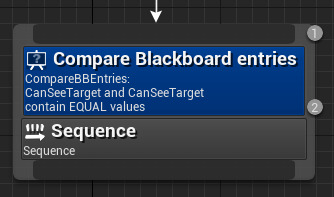
这个节点的类型继承自上面的UBTDecorator:
class AIMODULE_API UBTDecorator_CompareBBEntries : public UBTDecorator
UE的黑板设计里还有一个高级特性,就是监听一个黑板值的变化。
	/** register observer for blackboard key */
	FDelegateHandle RegisterObserver(FBlackboard::FKey KeyID, UObject* NotifyOwner, FOnBlackboardChangeNotification ObserverDelegate);

	/** unregister observer from blackboard key */
	void UnregisterObserver(FBlackboard::FKey KeyID, FDelegateHandle ObserverHandle);

	/** unregister all observers associated with given owner */
	void UnregisterObserversFrom(UObject* NotifyOwner);

	/** notifies behavior tree decorators about change in blackboard */
	void NotifyObservers(FBlackboard::FKey KeyID) const;
这个UBlackboardComponent内部使用一个TMultiMap来记录每个key对应的多个监听者:
/** observers registered for blackboard keys */
mutable TMultiMap<uint8, FOnBlackboardChangeNotificationInfo> Observers;

FDelegateHandle UBlackboardComponent::RegisterObserver(FBlackboard::FKey KeyID, UObject* NotifyOwner, FOnBlackboardChangeNotification ObserverDelegate)
{
	for (auto It = Observers.CreateConstKeyIterator(KeyID); It; ++It)
	{
		// If the pair's value matches, return a pointer to it.
		if (It.Value().GetHandle() == ObserverDelegate.GetHandle())
		{
			return It.Value().GetHandle();
		}
	}

	FDelegateHandle Handle = Observers.Add(KeyID, ObserverDelegate).GetHandle();
	ObserverHandles.Add(NotifyOwner, Handle);

	return Handle;
}
在每次修改一个黑板值的时候,都会调用NotifyObserver来广播这个黑板值的改变:
template<class TDataClass>
bool UBlackboardComponent::SetValue(FBlackboard::FKey KeyID, typename TDataClass::FDataType Value)
{
	const FBlackboardEntry* EntryInfo = BlackboardAsset ? BlackboardAsset->GetKey(KeyID) : nullptr;
	if ((EntryInfo == nullptr) || (EntryInfo->KeyType == nullptr) || (EntryInfo->KeyType->GetClass() != TDataClass::StaticClass()))
	{
		return false;
	}

	const uint16 DataOffset = EntryInfo->KeyType->HasInstance() ? sizeof(FBlackboardInstancedKeyMemory) : 0;
	uint8* RawData = GetKeyRawData(KeyID) + DataOffset;
	if (RawData)
	{
		UBlackboardKeyType* KeyOb = EntryInfo->KeyType->HasInstance() ? KeyInstances[KeyID] : EntryInfo->KeyType;
		const bool bChanged = TDataClass::SetValue((TDataClass*)KeyOb, RawData, Value);
		if (bChanged)
		{
			NotifyObservers(KeyID);
			// 省略一些无关代码
		}

		return true;
	}

	return false;
}
黑板值改变通知的典型应用场景就是Decorator节点里比较两个黑板值是否相等,这里会注册对这两个黑板值的监听,当数据有变化的时候按需要去终止对应的复合节点的运行:
void UBTDecorator_CompareBBEntries::OnBecomeRelevant(UBehaviorTreeComponent& OwnerComp, uint8* NodeMemory)
{
	UBlackboardComponent* BlackboardComp = OwnerComp.GetBlackboardComponent();
	if (BlackboardComp)
	{
		BlackboardComp->RegisterObserver(BlackboardKeyA.GetSelectedKeyID(), this, FOnBlackboardChangeNotification::CreateUObject(this, &UBTDecorator_CompareBBEntries::OnBlackboardKeyValueChange));
		BlackboardComp->RegisterObserver(BlackboardKeyB.GetSelectedKeyID(), this, FOnBlackboardChangeNotification::CreateUObject(this, &UBTDecorator_CompareBBEntries::OnBlackboardKeyValueChange));
	}
}
还有另外一个重要的使用场景就是UBTTask_MoveTo这个移动到目标位置的寻路任务,这个任务会监听目标位置的变化,来触发路线调整和重新规划:
if (NodeResult == EBTNodeResult::InProgress && bObserveBlackboardValue)
{
   UBlackboardComponent* BlackboardComp = OwnerComp.GetBlackboardComponent();
   if (ensure(BlackboardComp))
   {
      if (MyMemory->BBObserverDelegateHandle.IsValid())
      {
         UE_VLOG(MyController, LogBehaviorTree, Warning, TEXT("UBTTask_MoveTo::ExecuteTask \'%s\' Old BBObserverDelegateHandle is still valid! Removing old Observer."), *GetNodeName());
         BlackboardComp->UnregisterObserver(BlackboardKey.GetSelectedKeyID(), MyMemory->BBObserverDelegateHandle);
      }
      MyMemory->BBObserverDelegateHandle = BlackboardComp->RegisterObserver(BlackboardKey.GetSelectedKeyID(), this, FOnBlackboardChangeNotification::CreateUObject(this, &UBTTask_MoveTo::OnBlackboardValueChange));
   }
}
UE行为树的加载
UE的行为树必须依托在AAIController才能执行逻辑,其函数入口为RunBehaviorTree,这个函数需要附加上其对应的UBehaviorTree资产:
bool AAIController::RunBehaviorTree(UBehaviorTree* BTAsset)
{
	// @todo: find BrainComponent and see if it's BehaviorTreeComponent
	// Also check if BTAsset requires BlackBoardComponent, and if so
	// check if BB type is accepted by BTAsset.
	// Spawn BehaviorTreeComponent if none present.
	// Spawn BlackBoardComponent if none present, but fail if one is present but is not of compatible class
	if (BTAsset == NULL)
	{
		UE_VLOG(this, LogBehaviorTree, Warning, TEXT("RunBehaviorTree: Unable to run NULL behavior tree"));
		return false;
	}

	bool bSuccess = true;

	// see if need a blackboard component at all
	UBlackboardComponent* BlackboardComp = Blackboard;
	if (BTAsset->BlackboardAsset && (Blackboard == nullptr || Blackboard->IsCompatibleWith(BTAsset->BlackboardAsset) == false))
	{
		bSuccess = UseBlackboard(BTAsset->BlackboardAsset, BlackboardComp);
	}

	if (bSuccess)
	{
		UBehaviorTreeComponent* BTComp = Cast<UBehaviorTreeComponent>(BrainComponent);
		if (BTComp == NULL)
		{
			UE_VLOG(this, LogBehaviorTree, Log, TEXT("RunBehaviorTree: spawning BehaviorTreeComponent.."));

			BTComp = NewObject<UBehaviorTreeComponent>(this, TEXT("BTComponent"));
			BTComp->RegisterComponent();
		}

		// make sure BrainComponent points at the newly created BT component
		BrainComponent = BTComp;

		check(BTComp != NULL);
		BTComp->StartTree(*BTAsset, EBTExecutionMode::Looped);
	}

	return bSuccess;
}
其内部实现分为了三个步骤:
- 获取自身的
UBlackboardComponent组件,使用UseBlackboard来读取当前行为树挂载的黑板资产,最终会调用到前述分析了的UBlackboardComponent::InitializeBlackboard来初始化内部的所有黑板值 - 创建一个
UBehaviorTreeComponent组件,并赋值到BrainComponent上, - 执行
UBehaviorTreeComponent::StartTree来启动行为树
这里的StartTree经过一些之前的行为树状态清理之后,使用PushInstance来加载这个行为树资产:
bool UBehaviorTreeComponent::PushInstance(UBehaviorTree& TreeAsset);
其实这个PushInstance不仅仅是启动行为树的时候会被调用到,而且还会在行为树节点RunBehavior执行子树的时候被调用,由于有些节点不能执行子树,所以这个函数的开头会做一下挂载检查:
// check if parent node allows it
const UBTNode* ActiveNode = GetActiveNode();
const UBTCompositeNode* ActiveParent = ActiveNode ? ActiveNode->GetParentNode() : NULL;
if (ActiveParent)
{
   uint8* ParentMemory = GetNodeMemory((UBTNode*)ActiveParent, InstanceStack.Num() - 1);
   int32 ChildIdx = ActiveNode ? ActiveParent->GetChildIndex(*ActiveNode) : INDEX_NONE;

   const bool bIsAllowed = ActiveParent->CanPushSubtree(*this, ParentMemory, ChildIdx);
   if (!bIsAllowed)
   {
      UE_VLOG(GetOwner(), LogBehaviorTree, Warning, TEXT("Failed to execute tree %s: parent of active node does not allow it! (%s)"),
         *TreeAsset.GetName(), *UBehaviorTreeTypes::DescribeNodeHelper(ActiveParent));
      return false;
   }
}
在目前的行为树设计实现中,只有SimpleParallel节点增加了这种子树不能作为主任务来挂载的限制:
bool UBTComposite_SimpleParallel::CanPushSubtree(UBehaviorTreeComponent& OwnerComp, uint8* NodeMemory, int32 ChildIdx) const
{
	return (ChildIdx != EBTParallelChild::MainTask);
}
通过加载允许检查之后,开始以这个Asset来创建行为树运行逻辑结构数据:
UBTCompositeNode* RootNode = NULL;
uint16 InstanceMemorySize = 0;

const bool bLoaded = BTManager->LoadTree(TreeAsset, RootNode, InstanceMemorySize);
由于同一份行为树资产对应的运行逻辑结构都是一样的,所以BTManager会存储已经加载的Asset对应的逻辑结构数据,加载的时候优先使用之前的结果,避免重复创建,这个加载设计跟mosaic_game其实是一样的:
for (int32 TemplateIndex = 0; TemplateIndex < LoadedTemplates.Num(); TemplateIndex++)
{
   FBehaviorTreeTemplateInfo& TemplateInfo = LoadedTemplates[TemplateIndex];
   if (TemplateInfo.Asset == &Asset)
   {
      Root = TemplateInfo.Template;
      InstanceMemorySize = TemplateInfo.InstanceMemorySize;
      return true;
   }
}
如果已加载列表里找不到所需的结果,才会真正的触发构造行为树逻辑结构的流程:
if (Asset.RootNode)
{
   FBehaviorTreeTemplateInfo TemplateInfo;
   TemplateInfo.Asset = &Asset;
   TemplateInfo.Template = Cast<UBTCompositeNode>(StaticDuplicateObject(Asset.RootNode, this));

   TArray<FNodeInitializationData> InitList;
   uint16 ExecutionIndex = 0;
   InitializeNodeHelper(NULL, TemplateInfo.Template, 0, ExecutionIndex, InitList, Asset, this);
   // 暂时省略一些代码
}
这里的InitializeNodeHelper负责给行为树的创建所有的节点,每个节点附加一个编号,其简化版本的代码可以明显的看出这是一个递归函数:
static void InitializeNodeHelper(UBTCompositeNode* ParentNode, UBTNode* NodeOb,
	uint8 TreeDepth, uint16& ExecutionIndex, TArray<FNodeInitializationData>& InitList,
	UBehaviorTree& TreeAsset, UObject* NodeOuter)
{
	InitList.Add(FNodeInitializationData(NodeOb, ParentNode, ExecutionIndex, TreeDepth, NodeOb->GetInstanceMemorySize(), NodeOb->GetSpecialMemorySize()));
	NodeOb->InitializeFromAsset(TreeAsset);
	ExecutionIndex++;

	UBTCompositeNode* CompositeOb = Cast<UBTCompositeNode>(NodeOb);
	if (CompositeOb)
	{

		for (int32 ChildIndex = 0; ChildIndex < CompositeOb->Children.Num(); ChildIndex++)
		{
			FBTCompositeChild& ChildInfo = CompositeOb->Children[ChildIndex];

			UBTNode* ChildNode = NULL;

			if (ChildInfo.ChildComposite)
			{
				ChildInfo.ChildComposite = Cast<UBTCompositeNode>(StaticDuplicateObject(ChildInfo.ChildComposite, NodeOuter));
				ChildNode = ChildInfo.ChildComposite;
			}
			else if (ChildInfo.ChildTask)
			{
				ChildInfo.ChildTask = Cast<UBTTaskNode>(StaticDuplicateObject(ChildInfo.ChildTask, NodeOuter));
				ChildNode = ChildInfo.ChildTask;
			}

			if (ChildNode)
			{
				InitializeNodeHelper(CompositeOb, ChildNode, TreeDepth + 1, ExecutionIndex, InitList, TreeAsset, NodeOuter);
			}
		}

		CompositeOb->InitializeComposite(ExecutionIndex - 1);
	}
}
这个递归函数会填充每个UBTCompositeNode的Children子节点信息,但是此时子节点里并没有存其Parent信息。初始化每个节点的Parent信息是一个单独的步骤InitializeNode:
void UBTNode::InitializeNode(UBTCompositeNode* InParentNode, uint16 InExecutionIndex, uint16 InMemoryOffset, uint8 InTreeDepth)
{
	ParentNode = InParentNode;
	ExecutionIndex = InExecutionIndex;
	MemoryOffset = InMemoryOffset;
	TreeDepth = InTreeDepth;
}
所以LoadTree函数会用到InitializeNodeHelper这个递归函数填充的InitList节点描述信息数组来逐一调用InitializeNode:
// sort nodes by memory size, so they can be packed better
// it still won't protect against structures, that are internally misaligned (-> uint8, uint32)
// but since all Engine level nodes are good...
InitList.Sort(FNodeInitializationData::FMemorySort());
uint16 MemoryOffset = 0;
for (int32 Index = 0; Index < InitList.Num(); Index++)
{
   InitList[Index].Node->InitializeNode(InitList[Index].ParentNode, InitList[Index].ExecutionIndex, InitList[Index].SpecialDataSize + MemoryOffset, InitList[Index].TreeDepth);
   MemoryOffset += InitList[Index].DataSize;
}

TemplateInfo.InstanceMemorySize = MemoryOffset;

INC_DWORD_STAT(STAT_AI_BehaviorTree_NumTemplates);
LoadedTemplates.Add(TemplateInfo);
Root = TemplateInfo.Template;
InstanceMemorySize = TemplateInfo.InstanceMemorySize;
return true;
在这个加载代码中我们看到了与黑板值类似的节点总内存统计逻辑,所以我们大概可以猜到行为树的运行结构和运行存储是分别管理的,就跟黑板一样。每个节点需要提供这个接口的实现来返回当前节点所需的运行时数据大小:
virtual uint16 UBTNode::GetInstanceMemorySize() const
{
	return 0;
}
在具体的节点实现中,一般会单独声明一个FBTXXXMemory的结构体来表明当前节点所需的所有运行时数据的描述:
struct FBTCompositeMemory
{
	/** index of currently active child node */
	int8 CurrentChild;

	/** child override for next selection */
	int8 OverrideChild;
};
uint16 UBTCompositeNode::GetInstanceMemorySize() const
{
	return sizeof(FBTCompositeMemory);
}

struct FBTParallelMemory : public FBTCompositeMemory
{
	/** last Id of search, detect infinite loops when there isn't any valid task in background tree */
	int32 LastSearchId;

	/** finish result of main task */
	TEnumAsByte<EBTNodeResult::Type> MainTaskResult;

	/** set when main task is running */
	uint8 bMainTaskIsActive : 1;

	/** try running background tree task even if main task has finished */
	uint8 bForceBackgroundTree : 1;

	/** set when main task needs to be repeated */
	uint8 bRepeatMainTask : 1;
};

uint16 UBTComposite_SimpleParallel::GetInstanceMemorySize() const
{
	return sizeof(FBTParallelMemory);
}

struct FBTWaitTaskMemory
{
	/** time left */
	float RemainingWaitTime;
};

uint16 UBTTask_Wait::GetInstanceMemorySize() const
{
	return sizeof(FBTWaitTaskMemory);
}
就这样,行为树运行时实现了逻辑与数据完全分离,同一份行为树资产的运行时逻辑结构共享,每个单独的实例分配自己的运行时数据。所以在PushInstance函数的最后,会根据计算出来的运行时数据大小去分配内存:
UBTCompositeNode* RootNode = NULL;
uint16 InstanceMemorySize = 0;

const bool bLoaded = BTManager->LoadTree(TreeAsset, RootNode, InstanceMemorySize);
if (bLoaded)
{
   FBehaviorTreeInstance NewInstance;
   NewInstance.InstanceIdIndex = UpdateInstanceId(&TreeAsset, ActiveNode, InstanceStack.Num() - 1);
   NewInstance.RootNode = RootNode;
   NewInstance.ActiveNode = NULL;
   NewInstance.ActiveNodeType = EBTActiveNode::Composite;

   // initialize memory and node instances
   FBehaviorTreeInstanceId& InstanceInfo = KnownInstances[NewInstance.InstanceIdIndex];
   int32 NodeInstanceIndex = InstanceInfo.FirstNodeInstance;
   const bool bFirstTime = (InstanceInfo.InstanceMemory.Num() != InstanceMemorySize);
   if (bFirstTime)
   {
      InstanceInfo.InstanceMemory.AddZeroed(InstanceMemorySize);
      InstanceInfo.RootNode = RootNode;
   }

   NewInstance.SetInstanceMemory(InstanceInfo.InstanceMemory);
   NewInstance.Initialize(*this, *RootNode, NodeInstanceIndex, bFirstTime ? EBTMemoryInit::Initialize : EBTMemoryInit::RestoreSubtree);

   InstanceStack.Push(NewInstance);
   ActiveInstanceIdx = InstanceStack.Num() - 1;
}
每个节点在获取自己的数据存储区域的时候,利用传入的FBehaviorTreeInstance和自己内部存储的MemoryOffset相加即可:
template<typename T>
T* UBTNode::GetNodeMemory(FBehaviorTreeInstance& BTInstance) const
{
	return (T*)(BTInstance.GetInstanceMemory().GetData() + MemoryOffset);
}

template<typename T>
const T* UBTNode::GetNodeMemory(const FBehaviorTreeInstance& BTInstance) const
{
	return (const T*)(BTInstance.GetInstanceMemory().GetData() + MemoryOffset);
}
在NewInstance.SetInstanceMemory之后会调用FBehaviorTreeInstance::Initialize来执行每个节点的内存数据初始化,这也是一个递归的过程:
void FBehaviorTreeInstance::Initialize(UBehaviorTreeComponent& OwnerComp, UBTCompositeNode& Node, int32& InstancedIndex, EBTMemoryInit::Type InitType)
{
	uint8* NodeMemory = Node.GetNodeMemory<uint8>(*this);
	Node.InitializeInSubtree(OwnerComp, NodeMemory, InstancedIndex, InitType);

	UBTCompositeNode* InstancedComposite = Cast<UBTCompositeNode>(Node.GetNodeInstance(OwnerComp, NodeMemory));
	if (InstancedComposite)
	{
		InstancedComposite->InitializeComposite(Node.GetLastExecutionIndex());
	}

	for (int32 ChildIndex = 0; ChildIndex < Node.Children.Num(); ChildIndex++)
	{
		FBTCompositeChild& ChildInfo = Node.Children[ChildIndex];


		if (ChildInfo.ChildComposite)
		{
			Initialize(OwnerComp, *(ChildInfo.ChildComposite), InstancedIndex, InitType);
		}
		else if (ChildInfo.ChildTask)
		{

			ChildInfo.ChildTask->InitializeInSubtree(OwnerComp, ChildInfo.ChildTask->GetNodeMemory<uint8>(*this), InstancedIndex, InitType);
		}
	}
}
在这个递归过程中,会让每个节点都执行InitializeInSubtree函数,这个函数的主要作用就是去为每个行为树节点绑定并初始化对应的数据内存区:
void UBTNode::InitializeInSubtree(UBehaviorTreeComponent& OwnerComp, uint8* NodeMemory, int32& NextInstancedIndex, EBTMemoryInit::Type InitType) const
{
	FBTInstancedNodeMemory* SpecialMemory = GetSpecialNodeMemory<FBTInstancedNodeMemory>(NodeMemory);
	if (SpecialMemory)
	{
		SpecialMemory->NodeIdx = INDEX_NONE;
	}

	if (bCreateNodeInstance)
	{
		// composite nodes can't be instanced!
		check(IsA(UBTCompositeNode::StaticClass()) == false);

		UBTNode* NodeInstance = OwnerComp.NodeInstances.IsValidIndex(NextInstancedIndex) ? OwnerComp.NodeInstances[NextInstancedIndex] : NULL;
		if (NodeInstance == NULL)
		{
			NodeInstance = (UBTNode*)StaticDuplicateObject(this, &OwnerComp);
			NodeInstance->InitializeNode(GetParentNode(), GetExecutionIndex(), GetMemoryOffset(), GetTreeDepth());
			NodeInstance->bIsInstanced = true;

			OwnerComp.NodeInstances.Add(NodeInstance);
		}

		check(NodeInstance);
		check(SpecialMemory);

		SpecialMemory->NodeIdx = NextInstancedIndex;

		NodeInstance->SetOwner(OwnerComp.GetOwner());
		NodeInstance->InitializeMemory(OwnerComp, NodeMemory, InitType);
		check(TreeAsset);
		NodeInstance->InitializeFromAsset(*TreeAsset);
		NodeInstance->OnInstanceCreated(OwnerComp);
		NextInstancedIndex++;
	}
	else
	{
		InitializeMemory(OwnerComp, NodeMemory, InitType);
	}
}
这个函数有一个分支判断,使用的是bCreateNodeInstance变量,这个变量的意义与我们之前在介绍黑板值的时候提到的bCreateKeyInstance一样,都代表是否需要创建当前对象的副本。其用途也是为了处理节点所需数据不能用POD数据类型表示的情况,例如数据成员里有FString。如果需要创建副本,这个节点返回的数据成员大小就是sizeof(FBTInstancedNodeMemory),内部用一个int32去保存当前创建的动态节点的索引,即上面函数传入的NextInstancedIndex。
virtual uint16 UBTNode::GetInstanceMemorySize() const
{
	return 0;
}
uint16 UBTNode::GetSpecialMemorySize() const
{
	return bCreateNodeInstance ? sizeof(FBTInstancedNodeMemory) : 0;
}

struct FBTInstancedNodeMemory
{
	int32 NodeIdx;
};
这个索引代表的是UBehaviorTreeComponent::NodeInstances中的元素索引, 所有被创建的行为树节点实例都会保存在UBehaviorTreeComponent::NodeInstances这个数组之中:
UPROPERTY(transient)
TArray<UBTNode*> NodeInstances;

UBTNode* UBTNode::GetNodeInstance(const UBehaviorTreeComponent& OwnerComp, uint8* NodeMemory) const
{
	FBTInstancedNodeMemory* MyMemory = GetSpecialNodeMemory<FBTInstancedNodeMemory>(NodeMemory);
	return MyMemory && OwnerComp.NodeInstances.IsValidIndex(MyMemory->NodeIdx) ?
		OwnerComp.NodeInstances[MyMemory->NodeIdx] : NULL;
}
这个FBTInstancedNodeMemory的存储位置通过GetSpecialNodeMemory函数来计算,不过这里有个非常奇怪的设计就是这个地址是比NodeMemory更靠前的,而不是与黑板一样直接复用NodeMemory作为开始地址:
template<typename T>
T* UBTNode::GetSpecialNodeMemory(uint8* NodeMemory) const
{
	const int32 SpecialMemorySize = GetSpecialMemorySize();
	return SpecialMemorySize ? (T*)(NodeMemory - ((SpecialMemorySize + 3) & ~3)) : nullptr;
}
为了了解为什么这么做,这里再来回顾一下节点数据内存的创建以及偏移量的计算相关代码。在收集节点的时候会同时记录节点的特殊内存和实例内存这两个数据:
InitList.Add(FNodeInitializationData(NodeOb, ParentNode, ExecutionIndex, TreeDepth, NodeOb->GetInstanceMemorySize(), NodeOb->GetSpecialMemorySize()));
FNodeInitializationData内部使用一个DataSize字段来记录这两个内存的总和:
FNodeInitializationData(UBTNode* InNode, UBTCompositeNode* InParentNode,
   uint16 InExecutionIndex, uint8 InTreeDepth, uint16 NodeMemory, uint16 SpecialNodeMemory = 0)
   : Node(InNode), ParentNode(InParentNode), ExecutionIndex(InExecutionIndex), TreeDepth(InTreeDepth)
{
   SpecialDataSize = UBehaviorTreeManager::GetAlignedDataSize(SpecialNodeMemory);

   const uint16 NodeMemorySize = NodeMemory + SpecialDataSize;
   DataSize = (NodeMemorySize <= 2) ? NodeMemorySize : UBehaviorTreeManager::GetAlignedDataSize(NodeMemorySize);
}
计算总的MemoryOffset的时候累加的值是DataSize字段,保证同时统计到这两份内存(其实两者其一一定为0),然后使用InitializeNode初始化一个节点的时候使用的是SpecialDataSize + MemoryOffset作为这个节点的MemoryOffset,这样就保证了这个MemoryOffset之前的SpecialDataSize字节一定是为这个节点保留的SpecialNodeMemory:
InitList.Sort(FNodeInitializationData::FMemorySort());
uint16 MemoryOffset = 0;
for (int32 Index = 0; Index < InitList.Num(); Index++)
{
   InitList[Index].Node->InitializeNode(InitList[Index].ParentNode, InitList[Index].ExecutionIndex, InitList[Index].SpecialDataSize + MemoryOffset, InitList[Index].TreeDepth);
   MemoryOffset += InitList[Index].DataSize;
}

TemplateInfo.InstanceMemorySize = MemoryOffset;
按道理黑板值的Instance内存偏移量机制与BTNode的Instance内存偏移量机制要采用同一套方案,这样就可以降低理解难度了。
在PushInstance加载好一个行为树之后,其内部最后会将这个行为树的根节点加入调度系统来执行:
FBehaviorTreeDelegates::OnTreeStarted.Broadcast(*this, TreeAsset);

// start new task
RequestExecution(RootNode, ActiveInstanceIdx, RootNode, 0, EBTNodeResult::InProgress);
这个RequestExecution就是执行一个节点逻辑的入口,指定来执行一个复合节点的某个子节点。其代码逻辑比较复杂,需要我们理解更多的信息之后才能理解其具体执行流,所以目前这里先略过。
UE行为树装饰器
装饰器Decorator的作用是限制所修饰的节点的准入条件,一个复合节点或者任务节点可以加任意数量的Decorator去修饰。所以复合节点里存储的子节点的描述信息就包括装饰器数组这个字段:
USTRUCT()
struct FBTCompositeChild
{
	GENERATED_USTRUCT_BODY()

	/** child node */
	UPROPERTY()
	UBTCompositeNode* ChildComposite = nullptr;

	UPROPERTY()
	UBTTaskNode* ChildTask = nullptr;

	/** execution decorators */
	UPROPERTY()
	TArray<UBTDecorator*> Decorators;

	/** logic operations for decorators */
	UPROPERTY()
	TArray<FBTDecoratorLogic> DecoratorOps;
};
这里还有一个装饰器逻辑操作数组DecoratorOps,用来组合装饰器之间的逻辑运算的,目前看上编辑器没有提供这个的支持,所以暂时忽略。
一个节点能否通过对应的Decorator数组判定的接口是DoDecoratorsAllowExecution,正常情况下这个函数逻辑就是遍历当前节点的所有Decorator,执行Decorator->WrapperCanExecute。如果所有Decorator执行WrappedCanExecute返回的结果都是true则代表可以执行,否则不可以执行。这个WrapperCanExecute只是对获取Decorator节点执行数据的一个封装,真正的判定在CalculateRawConditionValue:
bool UBTDecorator::WrappedCanExecute(UBehaviorTreeComponent& OwnerComp, uint8* NodeMemory) const
{
	const UBTDecorator* NodeOb = bCreateNodeInstance ? (const UBTDecorator*)GetNodeInstance(OwnerComp, NodeMemory) : this;
	return NodeOb ? (IsInversed() != NodeOb->CalculateRawConditionValue(OwnerComp, NodeMemory)) : false;
}
这个CalculateRawConditionValue是一个虚函数,具体的Decorator对这个虚函数进行重写,下面的就是比较两个黑板值是否相等的Decorator的判定逻辑实现:
bool UBTDecorator_CompareBBEntries::CalculateRawConditionValue(UBehaviorTreeComponent& OwnerComp, uint8* NodeMemory) const
{
	// first of all require same type
	// @todo this could be checked statically (i.e. in editor, asset creation time)!
	if (BlackboardKeyA.SelectedKeyType != BlackboardKeyB.SelectedKeyType)
	{
		return false;
	}

	const UBlackboardComponent* BlackboardComp = OwnerComp.GetBlackboardComponent();
	if (BlackboardComp)
	{
		const EBlackboardCompare::Type Result = BlackboardComp->CompareKeyValues(BlackboardKeyA.SelectedKeyType, BlackboardKeyA.GetSelectedKeyID(), BlackboardKeyB.GetSelectedKeyID());

		return ((Result == EBlackboardCompare::Equal) == (Operator == EBlackBoardEntryComparison::Equal));
	}

	return false;
}
上面介绍的是装饰器作为被修饰节点的前置检查的相关代码。装饰器其实还有一个非常重要的特性,就是节点对应的任务持续运行时,如果装饰器的判定结果由于外部影响导致变成False时,还有可能打断当前被修饰节点的执行。而具体的打断机制则依赖于这个装饰器的打断设置,目前可以最多允许四种打断设置:
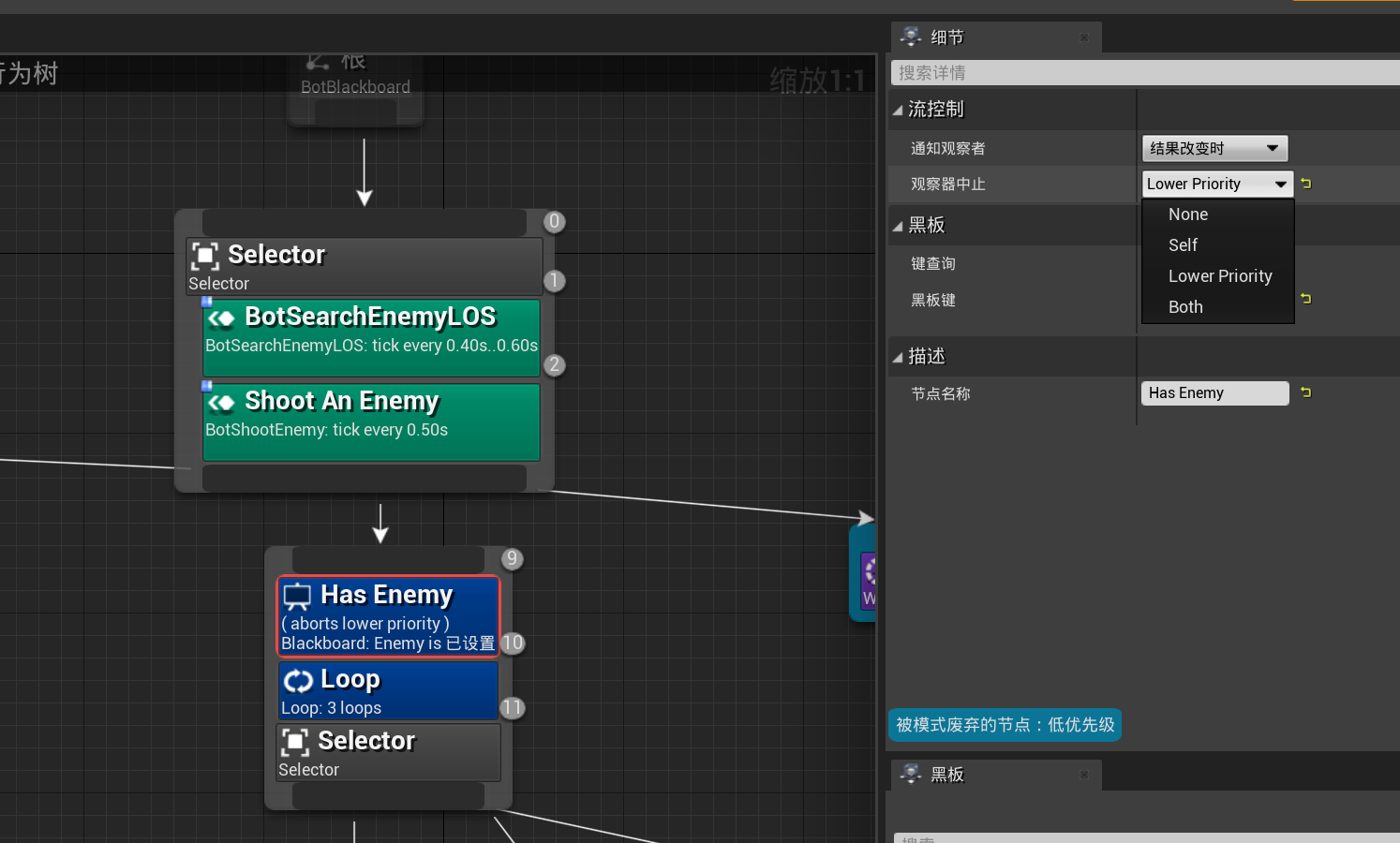
这四种打断设置对应一个枚举类型EBTFlowAbortMode:
namespace EBTFlowAbortMode
{
	// keep in sync with DescribeFlowAbortMode()

	enum Type
	{
		None				UMETA(DisplayName="Nothing"),
		LowerPriority		UMETA(DisplayName="Lower Priority"),
		Self				UMETA(DisplayName="Self"),
		Both				UMETA(DisplayName="Both"),
	};
}
None不中断,即无视装饰器的运行时值改变Lower Priority:打断除去自己子树外所有比自己优先级更低(执行索引更大)的节点,抢夺执行权。Self:立即终止自己子节点的执行,让出执行权。Both:结合了Lower Priority和Self的特性,打断包括自己子节点在内的所有比自己优先级低(执行索引更大)的节点。
其实只有修饰的节点是Selector的子节点的时候才会出现这四个选项,如果修饰的节点的父节点不是Selector节点则只会出现Self, None两种。这里有一个非常反直觉的Lower Priority设置,代表如果这个Decorator的判定从False切换为True时,如果当前正在运行的任务节点A优先级比当前装饰器所修饰的节点B优先级低,且B的所有装饰器都返回True,则这个正在运行的节点A将会被打断,同时B节点会被加入到调度。现在我们来使用ShooterGame的行为树来理解优先级打断:
节点0是一个Selector,下方有三个分支:
- 节点
3对应的分支进入条件是装饰器4,代表如果需要弹药则优先采集弹药 - 节点
9对应的分支有两个装饰器来限制进入条件,主要是节点10,要求有敌人时才发起攻击然后等待5s - 节点
21对应的分支就是前面两个分支都失败的时候才进入,进入一个4s的等待,避免死循环
假如某次节点0执行时,发现弹药充足且发现了敌人,则会进入节点9对应的分支来攻击敌人,但是如果节点9执行的过程中发现弹药打光了,此时节点4对应的装饰器会变成true,从而导致节点3的运行条件被满足。由于节点4的中断设置为LowerPriority,则此时会打断节点9整个子树的运行,同时将节点3设置为运行态。本来如果不适用优先级打断这个功能的话,常规的行为树在节点9中会定期检查弹药充足,如果弹药短缺了则节点9执行失败,并将执行结果通知回节点0,然后一路上升到根结点,再触发一次根节点的重新执行。有了优先级打断之后,只需要检查这些优先级打断的装饰器即可快速的切换到当前应该执行的更高优先级任务,这样就避免了行为树的回溯与重启。
但是一般来说行为树执行的时候只会记录当前正在运行的节点,检查这个节点是否会被自己的执行条件装饰器打断只需要递归遍历节点的父节点的装饰器是否满足即可。但是为了处理高优先级打断,我们还需要处理那些优先级较高且不在执行链路上的装饰器,比较暴力的方法就是外界环境变化的时候检查一下所有的高优先级的装饰器。但是这样的实现效率太低了,更好的方式是记录在行为树搜索调度过程中遇到的所有需要关心的装饰器到一个集合之中,这样就避免了整棵树的遍历去寻找高优先级装饰器,也避免了递归上升找当前节点的执行链路。
实现的时候,每个行为树实例都会记录在这个行为树上的活动装饰器的集合,字段为ActiveAuxNodes:
/** data required for instance of single subtree */
struct FBehaviorTreeInstance
{
	/** root node in template */
	UBTCompositeNode* RootNode;

	/** active node in template */
	UBTNode* ActiveNode;

	/** active auxiliary nodes */
	TArray<UBTAuxiliaryNode*> ActiveAuxNodes;
	// 省略很多字段
};
不过这个集合并不会被直接操作,而是先将增加和删除的指令存储到FBehaviorTreeSearchData里的PendingUpdates数组中:
/** node update data */
struct FBehaviorTreeSearchUpdate
{
	UBTAuxiliaryNode* AuxNode;
	UBTTaskNode* TaskNode;

	uint16 InstanceIndex;

	TEnumAsByte<EBTNodeUpdateMode::Type> Mode;

	/** if set, this entry will be applied AFTER other are processed */
	uint8 bPostUpdate : 1;
};

/** node search data */
struct FBehaviorTreeSearchData
{
	/** BT component */
	UBehaviorTreeComponent& OwnerComp;

	/** requested updates of additional nodes (preconditions, services, parallels)
	 *  buffered during search to prevent instant add & remove pairs */
	TArray<FBehaviorTreeSearchUpdate> PendingUpdates;

	// 省略其他的代码
};
更新这个PendingUpdates集合的逻辑被附加到了复合节点上,复合节点在处理子节点的时候,会有如下逻辑:
- 当复合节点的某个子节点被成功激活时,会调用到
UBTCompositeNode::NotifyDecoratorsOnActivation来将中断逻辑设置为Self,Both的装饰器加入到PendingUpdates中,同时将中断逻辑为LowerPriority的装饰器从PendingUpdates中删除 - 当复合节点的某个子节点执行完成时,会调用到
UBTCompositeNode::NotifyDecoratorsOnDeactivation来将中断逻辑设置为Self的装饰器从PendingUpdates中删除,同时将中断逻辑为LowerPriority的装饰器加入到PendingUpdates中 - 当符合节点的某个子节点激活失败时,会调用到
UBTCompositeNode::NotifyDecoratorsOnFailedActivation来将中断逻辑设置为LowerPriority,Both的装饰器加入到PendingUpdates
这样的设置下,只要一个更高优先级的节点不在执行,则这个节点的所有中断设置为LowerPriority,Both的装饰器都会在PendingUpdates中。而正在执行的节点到Root节点整个链路中的的所有中断设置为``Self,Both的装饰器都会在PendingUpdates`中。
在UBehaviorTreeComponent::ApplySearchUpdates会真正处理这个PendingUpdate集合的更新,如果添加装饰器节点则会调用节点的OnBecomeRelevant,如果删除节点则会调用节点的OnCeaseRelevant:
// void UBehaviorTreeComponent::ApplySearchUpdates(const TArray<FBehaviorTreeSearchUpdate>& UpdateList, int32 NewNodeExecutionIndex, bool bPostUpdate)
for (int32 Index = 0; Index < UpdateList.Num(); Index++)
{
	const FBehaviorTreeSearchUpdate& UpdateInfo = UpdateList[Index];
	uint8* NodeMemory = (uint8*)UpdateNode->GetNodeMemory<uint8>(UpdateInstance);
	if (UpdateInfo.Mode == EBTNodeUpdateMode::Remove)
	{
		UpdateInstance.RemoveFromActiveAuxNodes(UpdateInfo.AuxNode);
		UpdateInfo.AuxNode->WrappedOnCeaseRelevant(*this, NodeMemory);
	}
	else
	{
		UpdateInstance.AddToActiveAuxNodes(UpdateInfo.AuxNode);
		UpdateInfo.AuxNode->WrappedOnBecomeRelevant(*this, NodeMemory);
	}
}
Decorator运行时可以监听一些事件来检查是否需要打断执行,这个事件监听的添加时机就是OnBecomeRelevant,删除时机就是OnCeaseRelevant。例如所有继承自UBTDecorator_BlueprintBase的OnBecomeRelevant都会注册相关黑板值的修改回调,黑板值变化之后都需要检查一下运行条件是否还满足:
void UBTDecorator_BlackboardBase::OnBecomeRelevant(UBehaviorTreeComponent& OwnerComp, uint8* NodeMemory)
{
	UBlackboardComponent* BlackboardComp = OwnerComp.GetBlackboardComponent();
	if (BlackboardComp)
	{
		auto KeyID = BlackboardKey.GetSelectedKeyID();
		BlackboardComp->RegisterObserver(KeyID, this, FOnBlackboardChangeNotification::CreateUObject(this, &UBTDecorator_BlackboardBase::OnBlackboardKeyValueChange));
	}
}
EBlackboardNotificationResult UBTDecorator_BlueprintBase::OnBlackboardKeyValueChange(const UBlackboardComponent& Blackboard, FBlackboard::FKey ChangedKeyID)
{
	UBehaviorTreeComponent* BehaviorComp = (UBehaviorTreeComponent*)Blackboard.GetBrainComponent();
	if (BehaviorComp && GetShouldAbort(*BehaviorComp))
	{
		BehaviorComp->RequestExecution(this);
	}
	return BehaviorComp ? EBlackboardNotificationResult::ContinueObserving : EBlackboardNotificationResult::RemoveObserver;
}
这里的GetShouldAbort就是检查是否需要Abort的位置,这个函数内会根据当前装饰器的打断模式来决定是否应该打断:
bool UBTDecorator_BlueprintBase::GetShouldAbort(UBehaviorTreeComponent& OwnerComp) const
{
	// if there's no condition-checking function implemented we always want to abort on any change
	if (PerformConditionCheckImplementations == 0)
	{
		return true;
	}

	const bool bIsOnActiveBranch = OwnerComp.IsExecutingBranch(GetMyNode(), GetChildIndex());

	bool bShouldAbort = false;
	if (bIsOnActiveBranch)
	{
		bShouldAbort = (FlowAbortMode == EBTFlowAbortMode::Self || FlowAbortMode == EBTFlowAbortMode::Both) && CalculateRawConditionValueImpl(OwnerComp) == IsInversed();
	}
	else
	{
		bShouldAbort = (FlowAbortMode == EBTFlowAbortMode::LowerPriority || FlowAbortMode == EBTFlowAbortMode::Both) && CalculateRawConditionValueImpl(OwnerComp) != IsInversed();
	}

	return bShouldAbort;
}
- 当所修饰的节点在执行的时候,首先检查打断模式是否为
Self,Both其中一个,如果是再使用CalculateRawConditionValueImpl来计算执行条件是否还满足,不满足的时候就返回应该打断 - 当所修饰的节点不在执行的时候,首先检查打断模式是否为
LowerPriority,Both其中一个,如果是再使用CalculateRawConditionValueImpl来计算执行条件是否还满足,满足的时候就返回应该打断,这就是优先级抢占
当这个装饰器节点被判定应该打断运行的节点执行的时候,BehaviorComp->RequestExecution(this)就会被调用,这个函数的具体含义我们将在后面的节点调度中详细介绍。
UE行为树复合节点
当复合节点的一个子节点执行彻底结束之后,或者这个复合节点第一次进入时,都需要去寻找下一个子节点去执行,对应的接口为FindChildToExecute:
int32 UBTCompositeNode::FindChildToExecute(FBehaviorTreeSearchData& SearchData, EBTNodeResult::Type& LastResult) const
{
	FBTCompositeMemory* NodeMemory = GetNodeMemory<FBTCompositeMemory>(SearchData);
	int32 RetIdx = BTSpecialChild::ReturnToParent;

	if (Children.Num())
	{
		int32 ChildIdx = GetNextChild(SearchData, NodeMemory->CurrentChild, LastResult);
		while (Children.IsValidIndex(ChildIdx) && !SearchData.bPostponeSearch)
		{
			// check decorators
			if (DoDecoratorsAllowExecution(SearchData.OwnerComp, SearchData.OwnerComp.ActiveInstanceIdx, ChildIdx))
			{
				OnChildActivation(SearchData, ChildIdx);
				RetIdx = ChildIdx;
				break;
			}
			else
			{
				LastResult = EBTNodeResult::Failed;

				const bool bCanNotify = !bUseDecoratorsFailedActivationCheck || CanNotifyDecoratorsOnFailedActivation(SearchData, ChildIdx, LastResult);
				if (bCanNotify)
				{
					NotifyDecoratorsOnFailedActivation(SearchData, ChildIdx, LastResult);
				}
			}

			ChildIdx = GetNextChild(SearchData, ChildIdx, LastResult);
		}
	}

	return RetIdx;
}
这个接口会带上当前子节点的执行结果LastResult,然后通过GetNextChild来获取下一个子节点的索引。这个GetNextChild正常情况下,会调用到GetNextChildHandler来获取结果:
NextChildIndex = GetNextChildHandler(SearchData, LastChildIdx, LastResult);
GetNextChildHandler是一个虚函数,在Selector与Sequence中有不同的实现:
int32 UBTComposite_Selector::GetNextChildHandler(FBehaviorTreeSearchData& SearchData, int32 PrevChild, EBTNodeResult::Type LastResult) const
{
	// success = quit
	int32 NextChildIdx = BTSpecialChild::ReturnToParent;

	if (PrevChild == BTSpecialChild::NotInitialized)
	{
		// newly activated: start from first
		NextChildIdx = 0;
	}
	else if (LastResult == EBTNodeResult::Failed && (PrevChild + 1) < GetChildrenNum())
	{
		// failed = choose next child
		NextChildIdx = PrevChild + 1;
	}

	return NextChildIdx;
}

int32 UBTComposite_Sequence::GetNextChildHandler(FBehaviorTreeSearchData& SearchData, int32 PrevChild, EBTNodeResult::Type LastResult) const
{
	// failure = quit
	int32 NextChildIdx = BTSpecialChild::ReturnToParent;

	if (PrevChild == BTSpecialChild::NotInitialized)
	{
		// newly activated: start from first
		NextChildIdx = 0;
	}
	else if (LastResult == EBTNodeResult::Succeeded && (PrevChild + 1) < GetChildrenNum())
	{
		// success = choose next child
		NextChildIdx = PrevChild + 1;
	}

	return NextChildIdx;
}
这个函数的差别基本就是UBTComposite_Selector与UBTComposite_Sequence的实现上的所有差别,其他功能逻辑全都在其父类UBTCompositeNode中实现。
当找到一个待处理的ChildIndex之后,还需要检查一下这个子节点的Decorator是否允许这个节点去执行,所以会执行下面的几行:
if (DoDecoratorsAllowExecution(SearchData.OwnerComp, SearchData.OwnerComp.ActiveInstanceIdx, ChildIdx))
{
	OnChildActivation(SearchData, ChildIdx);
	RetIdx = ChildIdx;
	break;
}
这里的DoDecoratorsAllowExecution就是我们之前介绍过的Decorator检查逻辑,会遍历这个Child的所有装饰器来做逻辑判断。当装饰器检查通过之后进入OnChildActivation逻辑,也就是激活这个子节点来作为当前运行节点:
void UBTCompositeNode::OnChildActivation(FBehaviorTreeSearchData& SearchData, int32 ChildIndex) const
{
	const FBTCompositeChild& ChildInfo = Children[ChildIndex];
	FBTCompositeMemory* NodeMemory = GetNodeMemory<FBTCompositeMemory>(SearchData);

	// pass to decorators before changing current child in node memory
	// so they can access previously executed one if needed
	const bool bCanNotify = !bUseDecoratorsActivationCheck || CanNotifyDecoratorsOnActivation(SearchData, ChildIndex);
	if (bCanNotify)
	{
		NotifyDecoratorsOnActivation(SearchData, ChildIndex);
	}

	// don't activate task services here, it's applied BEFORE aborting (e.g. abort lower pri decorator)
	// use UBehaviorTreeComponent::ExecuteTask instead

	// pass to child composite
	if (ChildInfo.ChildComposite)
	{
		ChildInfo.ChildComposite->OnNodeActivation(SearchData);
	}

	// update active node in current context: child node
	NodeMemory->CurrentChild = ChildIndex;
}
由于目前源码实现原因,bCanNotify会永远为true,所以这里的NotifyDecoratorsOnActivation永远会执行,执行内容就是通知这个子节点的所有Decorator当前子节点已经被激活了,例如UBTDecorator_Loop这个在被所附属节点被激活之后会减去内部的计数器,UBTDecorator_TimeLimit则会开启一个超时的计时器。除了激活装饰器节点的执行之外,还会处理节点的装饰器是否需要记录到之前提到的PendingUpdates中来处理运行时打断:
void UBTCompositeNode::NotifyDecoratorsOnActivation(FBehaviorTreeSearchData& SearchData, int32 ChildIdx) const
{
	const FBTCompositeChild& ChildInfo = Children[ChildIdx];
	for (int32 DecoratorIndex = 0; DecoratorIndex < ChildInfo.Decorators.Num(); DecoratorIndex++)
	{
		const UBTDecorator* DecoratorOb = ChildInfo.Decorators[DecoratorIndex];
		DecoratorOb->WrappedOnNodeActivation(SearchData);

		switch (DecoratorOb->GetFlowAbortMode())
		{
			case EBTFlowAbortMode::LowerPriority:
				SearchData.AddUniqueUpdate(FBehaviorTreeSearchUpdate(DecoratorOb, SearchData.OwnerComp.GetActiveInstanceIdx(), EBTNodeUpdateMode::Remove));
				break;

			case EBTFlowAbortMode::Self:
			case EBTFlowAbortMode::Both:
				SearchData.AddUniqueUpdate(FBehaviorTreeSearchUpdate(DecoratorOb, SearchData.OwnerComp.GetActiveInstanceIdx(), EBTNodeUpdateMode::Add));
				break;

			default:
				break;
		}
	}
}
当装饰器被通知之后,再执行这个子节点,但是从源码来看,只有子节点是复合节点的时候才会执行:
// don't activate task services here, it's applied BEFORE aborting (e.g. abort lower pri decorator)
// use UBehaviorTreeComponent::ExecuteTask instead

// pass to child composite
if (ChildInfo.ChildComposite)
{
	ChildInfo.ChildComposite->OnNodeActivation(SearchData);
}
那这个子节点如果不是复合节点而是任务节点的时候,对应的OnNodeActivation需要在行为树的节点调度里去设置,这个我们留到后文中再讨论。
UE行为树任务节点
一个任务节点的执行入口在UBehaviorTreeComponent::ExecuteTask中:
void UBehaviorTreeComponent::ExecuteTask(UBTTaskNode* TaskNode)
{
	SCOPE_CYCLE_COUNTER(STAT_AI_BehaviorTree_ExecutionTime);

	// We expect that there should be valid instances on the stack
	if (!ensure(InstanceStack.IsValidIndex(ActiveInstanceIdx)))
	{
		return;
	}

	FBehaviorTreeInstance& ActiveInstance = InstanceStack[ActiveInstanceIdx];

	// 省略一些处理服务节点ServiceNode的代码

	ActiveInstance.ActiveNode = TaskNode;
	ActiveInstance.ActiveNodeType = EBTActiveNode::ActiveTask;

	// make a snapshot for debugger
	StoreDebuggerExecutionStep(EBTExecutionSnap::Regular);

	UE_VLOG(GetOwner(), LogBehaviorTree, Log, TEXT("Execute task: %s"), *UBehaviorTreeTypes::DescribeNodeHelper(TaskNode));

	// store instance before execution, it could result in pushing a subtree
	uint16 InstanceIdx = ActiveInstanceIdx;

	EBTNodeResult::Type TaskResult;
	{
		SCOPE_CYCLE_UOBJECT(TaskNode, TaskNode);
		uint8* NodeMemory = (uint8*)(TaskNode->GetNodeMemory<uint8>(ActiveInstance));
		TaskResult = TaskNode->WrappedExecuteTask(*this, NodeMemory);
	}

	// pass task finished if wasn't already notified (FinishLatentTask)
	const UBTNode* ActiveNodeAfterExecution = GetActiveNode();
	if (ActiveNodeAfterExecution == TaskNode)
	{
		// update task's runtime values after it had a chance to initialize memory
		UpdateDebuggerAfterExecution(TaskNode, InstanceIdx);

		OnTaskFinished(TaskNode, TaskResult);
	}
}
当一个TaskNode被执行时,首先遍历其拥有的所有ServiceNode,通知其执行OnBecomeRelevant,然后再调用WrapperExecuteTask来真正的执行当前节点对应的任务ExecuteTask,不同的任务其ExecuteTask有不同的实现:
EBTNodeResult::Type UBTTaskNode::WrappedExecuteTask(UBehaviorTreeComponent& OwnerComp, uint8* NodeMemory) const
{
	const UBTNode* NodeOb = bCreateNodeInstance ? GetNodeInstance(OwnerComp, NodeMemory) : this;
	return NodeOb ? ((UBTTaskNode*)NodeOb)->ExecuteTask(OwnerComp, NodeMemory) : EBTNodeResult::Failed;
}
EBTNodeResult::Type UBTTask_Wait::ExecuteTask(UBehaviorTreeComponent& OwnerComp, uint8* NodeMemory)
{
	FBTWaitTaskMemory* MyMemory = (FBTWaitTaskMemory*)NodeMemory;
	MyMemory->RemainingWaitTime = FMath::FRandRange(FMath::Max(0.0f, WaitTime - RandomDeviation), (WaitTime + RandomDeviation));

	return EBTNodeResult::InProgress;
}
这个ExecuteTask是带有返回值的,代表节点执行的结果,这个枚举值的四种取值之前已经介绍过了。当这个任务的发起结束之后,再使用OnTaskFinished来检查这个节点是否执行完了所代表的任务,这个函数分为了两个分支:
- 如果正常的执行返回了
success或者fail,则调用TaskNode->WrappedOnTaskFinished来调用TaskNode->OnTaskFinished做一些任务的清理工作,然后调用RequestExecution(TaskResult)来推动行为树寻找下一个节点去调度 - 如果返回的是
InProgress,则什么都不做
这里我们又看到了熟悉的RequestExecution函数,下面我们来具体的介绍这个函数是怎么驱动行为树选择下一个节点的。
UE行为树节点调度
现在我们已经了解了足够多的信息,可以来正面攻克行为树的节点调度了,这个节点调度函数RequestExecution有三个不同的函数签名:
/** request execution change */
void RequestExecution(UBTCompositeNode* RequestedOn, int32 InstanceIdx,
	const UBTNode* RequestedBy, int32 RequestedByChildIndex,
	EBTNodeResult::Type ContinueWithResult, bool bStoreForDebugger = true);

/** request execution change: helpers for decorator nodes */
void RequestExecution(const UBTDecorator* RequestedBy);

/** request execution change: helpers for task nodes */
void RequestExecution(EBTNodeResult::Type ContinueWithResult);
参数最多的那个版本我们在行为树加载完成之后的根节点调度中见过,当一棵行为树被加载完成之后会调用这个接口来开始运行,其具体调用参数如下:
RequestExecution(RootNode, ActiveInstanceIdx, RootNode, 0, EBTNodeResult::InProgress);
以const UBTDecorator*为参数的RequestExecution我们在装饰器的打断机制介绍过,当一个装饰器需要处理打断逻辑的时候,会以下面的方式去调用:
BehaviorComp->RequestExecution(this);
以EBTNodeResult::Type为参数的RequestExecution我们在任务节点调度中介绍过,在这个节点执行成功或者失败的时候会以这个方式去调用:
RequestExecution(TaskResult);
其实后面两个单参数的版本都是最上面那个版本的封装。对于装饰器中断触发的RequestExecution来说,主要负责填充完整版RequestExecution所需的ContinueWithResult。
void UBehaviorTreeComponent::RequestExecution(const UBTDecorator* RequestedBy)
{
	check(RequestedBy);
	// search range depends on decorator's FlowAbortMode:
	//
	// - LowerPri: try entering branch = search only nodes under decorator
	//
	// - Self: leave execution = from node under decorator to end of tree
	//
	// - Both: check if active node is within inner child nodes and choose Self or LowerPri
	//

	EBTFlowAbortMode::Type AbortMode = RequestedBy->GetFlowAbortMode();
	if (AbortMode == EBTFlowAbortMode::None)
	{
		return;
	}

	const int32 InstanceIdx = FindInstanceContainingNode(RequestedBy->GetParentNode());
	if (InstanceIdx == INDEX_NONE)
	{
		return;
	}

	if (AbortMode == EBTFlowAbortMode::Both)
	{
		const bool bIsExecutingChildNodes = IsExecutingBranch(RequestedBy, RequestedBy->GetChildIndex());
		AbortMode = bIsExecutingChildNodes ? EBTFlowAbortMode::Self : EBTFlowAbortMode::LowerPriority;
	}

	EBTNodeResult::Type ContinueResult = (AbortMode == EBTFlowAbortMode::Self) ? EBTNodeResult::Failed : EBTNodeResult::Aborted;
	RequestExecution(RequestedBy->GetParentNode(), InstanceIdx, RequestedBy, RequestedBy->GetChildIndex(), ContinueResult);
}
这个参数的填充规则如下:
- 如果当前装饰器所修饰的节点在执行链路上,则设置为
Fail,代表当前执行链路执行失败 - 如果当前装饰器所修饰的节点不在执行链路上,则设置为
Aborted,代表准备处理高优先级抢占逻辑
另外这里需要注意的是装饰器的GetParentNode返回的并不是这个装饰器所修饰的节点,而是所修饰节点的父节点;同时装饰器的GetChildIndex返回的是所修饰节点在父节点中的索引。
对于任务节点正常返回从而调用的RequestExecution版本来说就更简单了,按照规则填充对应的六个参数即可:
void UBehaviorTreeComponent::RequestExecution(EBTNodeResult::Type LastResult)
{
	// task helpers can't continue with InProgress or Aborted result, it should be handled
	// either by decorator helper or regular RequestExecution() (6 param version)

	if (LastResult != EBTNodeResult::Aborted && LastResult != EBTNodeResult::InProgress && InstanceStack.IsValidIndex(ActiveInstanceIdx))
	{
		const FBehaviorTreeInstance& ActiveInstance = InstanceStack[ActiveInstanceIdx];
		UBTCompositeNode* ExecuteParent = (ActiveInstance.ActiveNode == NULL) ? ActiveInstance.RootNode :
			(ActiveInstance.ActiveNodeType == EBTActiveNode::Composite) ? (UBTCompositeNode*)ActiveInstance.ActiveNode :
			ActiveInstance.ActiveNode->GetParentNode();

		RequestExecution(ExecuteParent, InstanceStack.Num() - 1,
			ActiveInstance.ActiveNode ? ActiveInstance.ActiveNode : ActiveInstance.RootNode, -1,
			LastResult, false);
	}
}
这里注意一下传入的第四个参数是-1,代表需要这个节点的父节点重新根据这个执行结果执行一下调度。
而完整版RequestExecution的显示调用主要是在加载完一颗行为树之后的根节点调度时才会被用到,此时对应的bContinueWithResult参数被设置为了InProgress:
// start new task
RequestExecution(RootNode, ActiveInstanceIdx, RootNode, 0, EBTNodeResult::InProgress);
接下来我们去理解这个完整版本RequestExecution函数的实现。这个函数的实现很长,考虑了很多细节。这里我们把更高优先级任务引发的执行流打断相关逻辑先进行忽略,只考虑普通情况下的执行,这样就能简化很多了。在没有更高优先级任务的情况下,会执行这部分代码:
const bool bSwitchToHigherPriority = (ContinueWithResult == EBTNodeResult::Aborted);
const bool bAlreadyHasRequest = (ExecutionRequest.ExecuteNode != NULL);
const UBTNode* DebuggerNode = bStoreForDebugger ? RequestedBy : NULL;

FBTNodeIndex ExecutionIdx;
ExecutionIdx.InstanceIndex = InstanceIdx;
ExecutionIdx.ExecutionIndex = RequestedBy->GetExecutionIndex();
开头的bSwitchToHigherPriority就是装饰器节点触发高优先级打断的标记位,当这个值为False的时候紧接着会执行下面的这一段代码:
// check if decorators allow execution on requesting link (only when restart comes from composite decorator)
const bool bShouldCheckDecorators = RequestedOn->Children.IsValidIndex(RequestedByChildIndex) &&
   (RequestedOn->Children[RequestedByChildIndex].DecoratorOps.Num() > 0) &&
   RequestedBy->IsA(UBTDecorator::StaticClass());

const bool bCanExecute = bShouldCheckDecorators && RequestedOn->DoDecoratorsAllowExecution(*this, InstanceIdx, RequestedByChildIndex);
if (bCanExecute)
{
   UE_VLOG(GetOwner(), LogBehaviorTree, Log, TEXT("> skip: decorators are still allowing execution"));
   StoreDebuggerRestart(DebuggerNode, InstanceIdx, false);
   return;
}

ExecutionRequest.ExecuteNode = RequestedOn;
ExecutionRequest.ExecuteInstanceIdx = InstanceIdx;
这里会检查一下Decorator是否允许当前节点执行,但是这个检查Decorator限制有一个前提条件,就是当前的RequestBy是一个Decorator。在非切换到高优先级的情况下,RequestBy为Decorator只有一种可能,就是这个装饰器的所需条件不再满足需要打断自身所修饰的节点的执行,如果此时检查发现所修饰的节点的所有装饰器都满足了执行条件则提前返回,说明这个打断估计是一个误报。对于其他正常情况下,只有最后的两行代码起作用了。这两行代码的意思就是记录一下下一次要执行的节点信息。
但是当这个值为true的时候,代码就很多了,主要是确定当前RequestOn节点是可以执行的,其实就是递归的处理这个RequestOn节点的父节点判断是否可以执行。这里实现使用很多代码的原因就是做了一个优化,当递归回溯到一个存在于当前正在执行的节点的父系节点CommonParent时停止。这一句有点绕口,我们以例子来说明。假设从根节点到当前正在执行的任务节点的链路为A->B->M->N,但是此时一个更高优先级的节点E的装饰器发出了高优先级打断请求,从A到E的链路为A->B->C->D->E,则如果要切换到节点E去执行,则需要保证A->B->C->D->E的所有装饰器都满足需求。但是考虑到当前正在执行的链路A->B->M->N上的所有装饰器肯定都是满足需求的,所以从E一路回溯的时候,只需要回溯到B即可认为全链路的装饰器都满足需求,不再需要重新检查A,B两个节点的执行条件了,此时B就是所求的CommonParent。
如果发现请求打断执行的节点全链路无法通过装饰器检查,则直接返回不再处理这个高优先级抢占请求。如果装饰器检查全都通过了,也会设置一下ExecutionRequest的这两个字段,值得注意的是这里的ExecuteNope不是RequestOn,而是CommonParent:
ExecutionRequest.ExecuteNode = CommonParent;
ExecutionRequest.ExecuteInstanceIdx = CommonInstanceIdx;
在正常分支和优先级抢占分支都设置好这两个字段之后,后续还会设置一下这个结构体的多个其他字段:
ExecutionRequest.SearchStart = ExecutionIdx;
ExecutionRequest.ContinueWithResult = ContinueWithResult;
ExecutionRequest.bTryNextChild = !bSwitchToHigherPriority;
ExecutionRequest.bIsRestart = (RequestedBy != GetActiveNode());
这个ExecutionRequest所对应的结构体FBTNodeExecutionInfo在行为树节点调度中比较重要,我们来看一下主要的字段含义:
struct FBTNodeIndex
{
	/** index of instance of stack */
	uint16 InstanceIndex;

	/** execution index within instance */
	uint16 ExecutionIndex;
};
struct FBTNodeExecutionInfo
{
	/** index of first task allowed to be executed */
	FBTNodeIndex SearchStart;

	/** index of last task allowed to be executed */
	FBTNodeIndex SearchEnd;

	/** node to be executed */
	UBTCompositeNode* ExecuteNode;

	/** subtree index */
	uint16 ExecuteInstanceIdx;

	/** result used for resuming execution */
	TEnumAsByte<EBTNodeResult::Type> ContinueWithResult;

	/** if set, tree will try to execute next child of composite instead of forcing branch containing SearchStart */
	uint8 bTryNextChild : 1;

	/** if set, request was not instigated by finishing task/initialization but is a restart (e.g. decorator) */
	uint8 bIsRestart : 1;

	FBTNodeExecutionInfo() : ExecuteNode(NULL), bTryNextChild(false), bIsRestart(false) { }
};
这里为了标识一个运行中的唯一节点信息,使用了FBTNodeIndex结构,里面的InstanceIndex代表子树堆栈数组里的索引,也就是某个运行时行为树的id,而ExecutionIndex则是在这个行为树实例中的节点索引,当FBTNodeIndex比较优先级的时候使用的是(InstanceIndex, ExecutionIndex)这个Pair的词法序比较。FBTNodeExecutionInfo结构体代表一次节点调度时的搜索范围,SearchStart和SearchEnd代表搜索的树节点区间,ExecuteNode代表当前开始执行搜索的起点,ContinueWithResult代表上次节点的执行返回值。这里的bTryNextChild为true的时候代表本次调度的时候需要执行GetNextChild来获取下一个应该执行的RequestOn的子节点,也就是正常的复合节点获取下一个子节点的流程。bTryNextChild为false的时候代表这是一次优先级切换引发的异常调度,直接以-1来作为上一次子节点的索引来触发当前节点的重进入调度。
当各种检查都通过之后,RequestExecution并不会直接执行这个节点,而是标记当前节点需要在下一次Tick去执行:
if (bScheduleNewSearch)
{
   ScheduleExecutionUpdate();
}
这个ScheduleExecutionUpdate函数其实就是将UBehaviorTreeComponent的下次Tick间隔降低到最小值,也就是下一帧立即执行:
void UBehaviorTreeComponent::ScheduleExecutionUpdate()
{
	ScheduleNextTick(0.0f);
	bRequestedFlowUpdate = true;
}
void UBehaviorTreeComponent::ScheduleNextTick(const float NextNeededDeltaTime)
{
	NextTickDeltaTime = NextNeededDeltaTime;
	if (bRequestedFlowUpdate)
	{
		NextTickDeltaTime = 0.0f;
	}

	UE_VLOG(GetOwner(), LogBehaviorTree, VeryVerbose, TEXT("BT(%i) schedule next tick %f, asked %f."), GFrameCounter, NextTickDeltaTime, NextNeededDeltaTime);
	if (NextTickDeltaTime == FLT_MAX)
	{
		if (IsComponentTickEnabled())
		{
			SetComponentTickEnabled(false);
		}
	}
	else
	{
		if (!IsComponentTickEnabled())
		{
			SetComponentTickEnabled(true);
		}
		// We need to force a small dt to tell the TickTaskManager we might not want to be tick every frame.
		const float FORCE_TICK_INTERVAL_DT = KINDA_SMALL_NUMBER;
		SetComponentTickIntervalAndCooldown(!bTickedOnce && NextTickDeltaTime < FORCE_TICK_INTERVAL_DT ? FORCE_TICK_INTERVAL_DT : NextTickDeltaTime);
	}
	UWorld* MyWorld = GetWorld();
	LastRequestedDeltaTimeGameTime = MyWorld ? MyWorld->GetTimeSeconds() : 0.0f;
}
在下一帧执行的时候,会调用ProcessExecutionRequest来真正的触发节点执行。这个ProcessExecutionRequest也是一个非常复杂的函数,负责从之前的ExecutionData中寻找一个合适的任务节点去执行。由于这个寻找可能失败,所以在函数的开头首先记录一下之前的状态,以方便回滚:
bool bIsSearchValid = true;
SearchData.RollbackInstanceIdx = ActiveInstanceIdx;
SearchData.RollbackDeactivatedBranchStart = SearchData.DeactivatedBranchStart;
SearchData.RollbackDeactivatedBranchEnd = SearchData.DeactivatedBranchEnd;

// copy current memory in case we need to rollback search
CopyInstanceMemoryToPersistent();
这里的备份状态还会把当前行为树的完整数据复制一遍,执行的是Memcpy,如果树所需内存比较大的话会出现比较严重的性能瓶颈:
void UBehaviorTreeComponent::CopyInstanceMemoryToPersistent()
{
	for (int32 InstanceIndex = 0; InstanceIndex < InstanceStack.Num(); InstanceIndex++)
	{
		const FBehaviorTreeInstance& InstanceData = InstanceStack[InstanceIndex];
		FBehaviorTreeInstanceId& InstanceInfo = KnownInstances[InstanceData.InstanceIdIndex];

		InstanceInfo.InstanceMemory = InstanceData.GetInstanceMemory();
	}
}
备份完所需数据之后,使用DeactivateUpTo将正在执行的任务节点通知执行结束,并一路回溯到当前被请求执行的节点ExecutionRequest.ExecuteNode上:
// deactivate up to ExecuteNode
if (InstanceStack[ActiveInstanceIdx].ActiveNode != ExecutionRequest.ExecuteNode)
{
	int32 LastDeactivatedChildIndex = INDEX_NONE;
	const bool bDeactivated = DeactivateUpTo(ExecutionRequest.ExecuteNode, ExecutionRequest.ExecuteInstanceIdx, NodeResult, LastDeactivatedChildIndex);
	if (!bDeactivated)
	{
		// error occurred and tree will restart, all pending deactivation notifies will be lost
		// this is should happen
		SearchData.PendingUpdates.Reset();

		return;
	}
	else if (LastDeactivatedChildIndex != INDEX_NONE)
	{
		// Calculating/expanding the deactivated branch for filtering execution request while applying changes.
		FBTNodeIndex NewDeactivatedBranchStart(ExecutionRequest.ExecuteInstanceIdx, ExecutionRequest.ExecuteNode->GetChildExecutionIndex(LastDeactivatedChildIndex, EBTChildIndex::FirstNode));
		FBTNodeIndex NewDeactivatedBranchEnd(ExecutionRequest.ExecuteInstanceIdx, ExecutionRequest.ExecuteNode->GetChildExecutionIndex(LastDeactivatedChildIndex + 1, EBTChildIndex::FirstNode));
		SearchData.DeactivatedBranchEnd = NewDeactivatedBranchEnd;
	}
}
在这个DeactivateUpTo函数内部,会调用被结束执行的节点的OnChildDeactivation,这个函数负责删除对应任务节点的所有服务节点,以及所有的装饰器进出PendingUpdates集合:
void UBTCompositeNode::OnChildDeactivation(FBehaviorTreeSearchData& SearchData, int32 ChildIndex, EBTNodeResult::Type& NodeResult) const
{
	const FBTCompositeChild& ChildInfo = Children[ChildIndex];

	// pass to task services
	if (ChildInfo.ChildTask)
	{
		for (int32 ServiceIndex = 0; ServiceIndex < ChildInfo.ChildTask->Services.Num(); ServiceIndex++)
		{
			SearchData.AddUniqueUpdate(FBehaviorTreeSearchUpdate(ChildInfo.ChildTask->Services[ServiceIndex], SearchData.OwnerComp.GetActiveInstanceIdx(), EBTNodeUpdateMode::Remove));
		}
	}
	// pass to child composite
	else if (ChildInfo.ChildComposite)
	{
		ChildInfo.ChildComposite->OnNodeDeactivation(SearchData, NodeResult);
	}

	// pass to decorators after composite is updated (so far only simple parallel uses it)
	// to have them working on correct result + they must be able to modify it if requested (e.g. force success)
	const bool bCanNotify = !bUseDecoratorsDeactivationCheck || CanNotifyDecoratorsOnDeactivation(SearchData, ChildIndex, NodeResult);
	if (bCanNotify)
	{
		NotifyDecoratorsOnDeactivation(SearchData, ChildIndex, NodeResult);
	}
}
做好了这些被结束节点的清理工作之后,ProcessExecutionRequest再来处理之前设置好的准备执行节点,寻找合适的节点去执行,这里又根据bTryNextChild分为了两个分支,分别代表正常任务返回时寻找当前节点的下一个子节点还是由于高优先级中断导致的当前节点重启:
FBehaviorTreeInstance& ActiveInstance = InstanceStack[ActiveInstanceIdx];
UBTCompositeNode* TestNode = ExecutionRequest.ExecuteNode;
SearchData.AssignSearchId();
SearchData.bPostponeSearch = false;
SearchData.bSearchInProgress = true;
SearchData.SearchRootNode = FBTNodeIndex(ExecutionRequest.ExecuteInstanceIdx, ExecutionRequest.ExecuteNode->GetExecutionIndex());


// additional operations for restarting:
if (!ExecutionRequest.bTryNextChild)
{
	// mark all decorators less important than current search start node for removal
	const FBTNodeIndex DeactivateIdx(ExecutionRequest.SearchStart.InstanceIndex, ExecutionRequest.SearchStart.ExecutionIndex - 1);
	UnregisterAuxNodesUpTo(ExecutionRequest.SearchStart.ExecutionIndex ? DeactivateIdx : ExecutionRequest.SearchStart);

	// reactivate top search node, so it could use search range correctly
	BT_SEARCHLOG(SearchData, Verbose, TEXT("Reactivate node: %s [restart]"), *UBehaviorTreeTypes::DescribeNodeHelper(TestNode));
	ExecutionRequest.ExecuteNode->OnNodeRestart(SearchData);

	SearchData.SearchStart = ExecutionRequest.SearchStart;
	SearchData.SearchEnd = ExecutionRequest.SearchEnd;

	BT_SEARCHLOG(SearchData, Verbose, TEXT("Clamping search range: %s .. %s"),
		*SearchData.SearchStart.Describe(), *SearchData.SearchEnd.Describe());
}
else
{
	// mark all decorators less important than current search start node for removal
	// (keep aux nodes for requesting node since it is higher priority)
	if (ExecutionRequest.ContinueWithResult == EBTNodeResult::Failed)
	{
		BT_SEARCHLOG(SearchData, Verbose, TEXT("Unregistering aux nodes up to %s"), *ExecutionRequest.SearchStart.Describe());
		UnregisterAuxNodesUpTo(ExecutionRequest.SearchStart);
	}

	// make sure it's reset before starting new search
	SearchData.SearchStart = FBTNodeIndex();
	SearchData.SearchEnd = FBTNodeIndex();
}
这两个分支的代码都是为了确定下一个待执行节点的搜索范围,在明确了搜索范围之后,才真正的执行搜索流程。这个搜索流程的代码就比较符合直觉了,简单来说每次对当前的复合节点使用FindChildToExecute寻找下一个子节点,如果找不到子节点则递归回溯到其父节点去重新搜索,直到找到一个具体的任务节点去执行:
// start looking for next task
while (TestNode && NextTask == NULL)
{
	BT_SEARCHLOG(SearchData, Verbose, TEXT("Testing node: %s"), *UBehaviorTreeTypes::DescribeNodeHelper(TestNode));
	const int32 ChildBranchIdx = TestNode->FindChildToExecute(SearchData, NodeResult);
	UBTNode* StoreNode = TestNode;

	if (SearchData.bPostponeSearch)
	{
		// break out of current search loop
		TestNode = NULL;
		bIsSearchValid = false;
	}
	else if (ChildBranchIdx == BTSpecialChild::ReturnToParent)
	{
		UBTCompositeNode* ChildNode = TestNode;
		TestNode = TestNode->GetParentNode();

		// does it want to move up the tree?
		if (TestNode == NULL)
		{
			// special case for leaving instance: deactivate root manually
			ChildNode->OnNodeDeactivation(SearchData, NodeResult);

			// don't remove top instance from stack, so it could be looped
			if (ActiveInstanceIdx > 0)
			{
				StoreDebuggerSearchStep(InstanceStack[ActiveInstanceIdx].ActiveNode, ActiveInstanceIdx, NodeResult);
				StoreDebuggerRemovedInstance(ActiveInstanceIdx);
				InstanceStack[ActiveInstanceIdx].DeactivateNodes(SearchData, ActiveInstanceIdx);

				// store notify for later use if search is not reverted
				SearchData.PendingNotifies.Add(FBehaviorTreeSearchUpdateNotify(ActiveInstanceIdx, NodeResult));

				// and leave subtree
				ActiveInstanceIdx--;

				StoreDebuggerSearchStep(InstanceStack[ActiveInstanceIdx].ActiveNode, ActiveInstanceIdx, NodeResult);
				TestNode = InstanceStack[ActiveInstanceIdx].ActiveNode->GetParentNode();
			}
		}

		if (TestNode)
		{
			TestNode->OnChildDeactivation(SearchData, *ChildNode, NodeResult);
		}
	}
	else if (TestNode->Children.IsValidIndex(ChildBranchIdx))
	{
		// was new task found?
		NextTask = TestNode->Children[ChildBranchIdx].ChildTask;

		// or it wants to move down the tree?
		TestNode = TestNode->Children[ChildBranchIdx].ChildComposite;
	}

	// store after node deactivation had chance to modify result
	StoreDebuggerSearchStep(StoreNode, ActiveInstanceIdx, NodeResult);
}
其实完全不考虑优先级抢占的话,行为树的节点调度核心应该就上面的一点点代码。
当找到一个任务节点去执行时,再检查一下这个任务节点是否在之前设定的搜索范围[ExecutionRequest.SearchBegin, ExecutionRequest.SearchEnd]内,如果超过了搜索范围就会涉及到回滚:
// is search within requested bounds?
if (NextTask)
{
	const FBTNodeIndex NextTaskIdx(ActiveInstanceIdx, NextTask->GetExecutionIndex());
	bIsSearchValid = NextTaskIdx.TakesPriorityOver(ExecutionRequest.SearchEnd);

	// is new task is valid, but wants to ignore rerunning itself
	// check it's the same as active node (or any of active parallel tasks)
	if (bIsSearchValid && NextTask->ShouldIgnoreRestartSelf())
	{
		const bool bIsTaskRunning = InstanceStack[ActiveInstanceIdx].HasActiveNode(NextTaskIdx.ExecutionIndex);
		if (bIsTaskRunning)
		{
			BT_SEARCHLOG(SearchData, Verbose, TEXT("Task doesn't allow restart and it's already running! Discarding search."));
			bIsSearchValid = false;
		}
	}
}
if (!bIsSearchValid || SearchData.bPostponeSearch)
{
	RollbackSearchChanges();

	UE_VLOG(GetOwner(), LogBehaviorTree, Verbose, TEXT("Search %s, reverted all changes."), !bIsSearchValid ? TEXT("is not valid") : TEXT("will be retried"));
}

SearchData.bSearchInProgress = false;
这里的ShouldIgnoreRestartSelf代表如果搜索出来的节点就是当前正在执行的节点,是否需要避免重启这个节点的执行。如果需要避免重复执行的话则认为本次搜索失败。
找到一个合适的Task之后,先使用AbortCurrentTask来结束正在执行的其他任务,然后挂载在PendingExecution.NextTask上,接下来使用ProcessPendingExecution来启动这个NextTask的执行:
if (!SearchData.bPostponeSearch)
{
	// clear request accumulator
	ExecutionRequest = FBTNodeExecutionInfo();

	// unlock execution data, can get locked again if AbortCurrentTask starts any new requests
	PendingExecution.Unlock();

	if (bIsSearchValid)
	{
		// abort task if needed
		if (InstanceStack.Last().ActiveNodeType == EBTActiveNode::ActiveTask)
		{
			// prevent new execution requests for nodes inside the deactivated branch
			// that may result from the aborted task.
			SearchData.bFilterOutRequestFromDeactivatedBranch = true;

			AbortCurrentTask();

			SearchData.bFilterOutRequestFromDeactivatedBranch = false;
		}

		// set next task to execute only when not lock for execution as everything has been cancelled/rollback
		if (!PendingExecution.IsLocked())
		{
			PendingExecution.NextTask = NextTask;
			PendingExecution.bOutOfNodes = (NextTask == NULL);
		}
	}

	ProcessPendingExecution();
}
else
{
	// more important execution request was found
	// stop everything and search again in next tick
	ScheduleExecutionUpdate();
}
ProcessPendingExecution执行的时候,先把之前设置的PendingExecution存为SaveInfo,然后以这个SaveInfo里存储的NextTask去调用UBehaviorTreeComponent::ExecuteTask去发起任务的真正执行:
void UBehaviorTreeComponent::ProcessPendingExecution()
{
	// can't continue if current task is still aborting
	if (bWaitingForAbortingTasks || !PendingExecution.IsSet())
	{
		return;
	}

	FBTPendingExecutionInfo SavedInfo = PendingExecution;
	PendingExecution = FBTPendingExecutionInfo();

	// collect all aux nodes that have lower priority than new task
	// occurs when normal execution is forced to revisit lower priority nodes (e.g. loop decorator)
	const FBTNodeIndex NextTaskIdx = SavedInfo.NextTask ? FBTNodeIndex(ActiveInstanceIdx, SavedInfo.NextTask->GetExecutionIndex()) : FBTNodeIndex(0, 0);
	UnregisterAuxNodesUpTo(NextTaskIdx);

	// change aux nodes
	ApplySearchData(SavedInfo.NextTask);

	// make sure that we don't have any additional instances on stack
	if (InstanceStack.Num() > (ActiveInstanceIdx + 1))
	{
		for (int32 InstanceIndex = ActiveInstanceIdx + 1; InstanceIndex < InstanceStack.Num(); InstanceIndex++)
		{
			InstanceStack[InstanceIndex].Cleanup(*this, EBTMemoryClear::StoreSubtree);
		}

		InstanceStack.SetNum(ActiveInstanceIdx + 1);
	}

	// execute next task / notify out of nodes
	// validate active instance as well, execution can be delayed AND can have AbortCurrentTask call before using instance index
	if (SavedInfo.NextTask && InstanceStack.IsValidIndex(ActiveInstanceIdx))
	{
		ExecuteTask(SavedInfo.NextTask);
	}
	else
	{
		OnTreeFinished();
	}
}
注意这里的ApplySearchData,这个函数才会将我们之前提交到装饰器集合SearchData.PendingUpdates的添加和删除请求真正的执行,内部会遍历SearchData.PendingUpdates的每个元素,根据其提交的是Add还是Remove来调用对应的OnBecomeRelevant和OnCeaseRelevant,同时维护每个行为树Instance的ActiveAuxNodes集合:
if (UpdateInfo.AuxNode)
{
	// special case: service node at root of top most subtree - don't remove/re-add them when tree is in looping mode
	// don't bother with decorators parent == root means that they are on child branches
	if (bLoopExecution && UpdateInfo.AuxNode->GetMyNode() == InstanceStack[0].RootNode &&
		UpdateInfo.AuxNode->IsA(UBTService::StaticClass()))
	{
		if (UpdateInfo.Mode == EBTNodeUpdateMode::Remove ||
			InstanceStack[0].GetActiveAuxNodes().Contains(UpdateInfo.AuxNode))
		{
			UE_VLOG(GetOwner(), LogBehaviorTree, Verbose, TEXT("> skip [looped execution]"));
			continue;
		}
	}

	uint8* NodeMemory = (uint8*)UpdateNode->GetNodeMemory<uint8>(UpdateInstance);
	if (UpdateInfo.Mode == EBTNodeUpdateMode::Remove)
	{
		UpdateInstance.RemoveFromActiveAuxNodes(UpdateInfo.AuxNode);
		UpdateInfo.AuxNode->WrappedOnCeaseRelevant(*this, NodeMemory);
	}
	else
	{
		UpdateInstance.AddToActiveAuxNodes(UpdateInfo.AuxNode);
		UpdateInfo.AuxNode->WrappedOnBecomeRelevant(*this, NodeMemory);
	}
}
维护好活跃装饰器节点集合之后,再通知执行ExecuteTask, 这个ExecuteTask我们在介绍任务节点的时候已经介绍过了,用来真正的执行任务节点的逻辑的,至此行为树节点的完整调度流程基本结束。
UE行为树的Tick
前面一节的分析里我们知道被选择的节点已经被设置到了ExecutionRequest上,并通知当前的UBehaviorTreeComponent::TickComponent开启下一次的立即Tick。接下来我们来看行为树的TickComponent中是如何触发节点的真正执行的。在这个TickComponent的开头会首先检查等待时间片NextTickDeltaTime是否已经用完,如果还没用完则直接返回,不执行任何逻辑:
// Check if we really have reached the asked DeltaTime,
// If not then accumulate it and reschedule
NextTickDeltaTime -= DeltaTime;
if (NextTickDeltaTime > 0.0f)
{
   // The TickManager is using global time to calculate delta since last ticked time. When the value is big, we can get into float precision errors compare to our calculation.
   if (NextTickDeltaTime > KINDA_SMALL_NUMBER)
   {
      UE_VLOG(GetOwner(), LogBehaviorTree, Error, TEXT("BT(%i) did not need to be tick, ask deltatime of %fs got %fs with a diff of %fs."), GFrameCounter, NextTickDeltaTime + AccumulatedTickDeltaTime + DeltaTime, DeltaTime + AccumulatedTickDeltaTime, NextTickDeltaTime);
   }
   AccumulatedTickDeltaTime += DeltaTime;
   ScheduleNextTick(NextTickDeltaTime);
   return;
}
DeltaTime += AccumulatedTickDeltaTime;
AccumulatedTickDeltaTime = 0.0f;
如果等待时间片已经用完,则先遍历每个行为树实例上的所有装饰器节点与服务节点,执行这些节点的TickNode,同时获取下一次Tick的间隔NextNeededDeltaTime:
// tick active auxiliary nodes (in execution order, before task)
// do it before processing execution request to give BP driven logic chance to accumulate execution requests
// newly added aux nodes are ticked as part of SearchData application
for (int32 InstanceIndex = 0; InstanceIndex < InstanceStack.Num(); InstanceIndex++)
{
	FBehaviorTreeInstance& InstanceInfo = InstanceStack[InstanceIndex];
	InstanceInfo.ExecuteOnEachAuxNode([&InstanceInfo, this, &bDoneSomething, DeltaTime, &NextNeededDeltaTime](const UBTAuxiliaryNode& AuxNode)
		{
			uint8* NodeMemory = AuxNode.GetNodeMemory<uint8>(InstanceInfo);
			SCOPE_CYCLE_UOBJECT(AuxNode, &AuxNode);
			bDoneSomething |= AuxNode.WrappedTickNode(*this, NodeMemory, DeltaTime, NextNeededDeltaTime);
		});
}
处理完这些辅助节点的Tick逻辑之后,再查询一下是否有节点调度请求,如果有则调用ProcessExecutionRequest去处理:
if (bRequestedFlowUpdate)
{
   ProcessExecutionRequest();
   bDoneSomething = true;

      // Since hierarchy might changed in the ProcessExecutionRequest, we need to go through all the active auxiliary nodes again to fetch new next DeltaTime
   bActiveAuxiliaryNodeDTDirty = true;
   NextNeededDeltaTime = FLT_MAX;
}
处理完新节点的调度之后,再执行所有活跃任务节点的Tick,这个活跃任务节点由两个部分构成:
- 当前
InstanceStack里活跃的行为树实例里的任务节点 - 当前
InstanceStack里所有行为树实例的ParallelTask节点
TickComponent里会遍历当前正在执行的所有任务节点,然后调用其WrappedTickTask来驱动这个任务的Tick更新。但是这个WrappedTickTask其实只是一个转接函数,真正执行任务的是TickTask, WrappedTickTask只是用来确定TickTask的this指针是哪一个:
bool UBTTaskNode::WrappedTickTask(UBehaviorTreeComponent& OwnerComp, uint8* NodeMemory, float DeltaSeconds, float& NextNeededDeltaTime) const
{
	if (bNotifyTick)
	{
		const UBTNode* NodeOb = bCreateNodeInstance ? GetNodeInstance(OwnerComp, NodeMemory) : this;
		if (NodeOb)
		{
			((UBTTaskNode*)NodeOb)->TickTask(OwnerComp, NodeMemory, DeltaSeconds);
			NextNeededDeltaTime = 0.0f;
			return true;
		}
	}
	return false;
}
/** ticks this task
   * this function should be considered as const (don't modify state of object) if node is not instanced! */
virtual void TickTask(UBehaviorTreeComponent& OwnerComp, uint8* NodeMemory, float DeltaSeconds);
这里的TickTask是一个虚函数,默认实现是一个空函数体,具体的Tick逻辑在实现具体任务的子节点中,最简单的样例就是计时器等待节点:
void UBTTask_Wait::TickTask(UBehaviorTreeComponent& OwnerComp, uint8* NodeMemory, float DeltaSeconds)
{
	FBTWaitTaskMemory* MyMemory = (FBTWaitTaskMemory*)NodeMemory;
	MyMemory->RemainingWaitTime -= DeltaSeconds;

	if (MyMemory->RemainingWaitTime <= 0.0f)
	{
		// continue execution from this node
		FinishLatentTask(OwnerComp, EBTNodeResult::Succeeded);
	}
}
在UBTTask_Wait::TickTask中逐渐减少剩余时间,当剩余时间小于等于0时调用FinishLatentTask来通知行为树当前任务成功结束:
void UBTTaskNode::FinishLatentTask(UBehaviorTreeComponent& OwnerComp, EBTNodeResult::Type TaskResult) const
{
	// OnTaskFinished must receive valid template node
	UBTTaskNode* TemplateNode = (UBTTaskNode*)OwnerComp.FindTemplateNode(this);
	OwnerComp.OnTaskFinished(TemplateNode, TaskResult);
}
UE行为树的消息通知
UE行为树的任务节点在执行持续性任务时,需要内部自己去处理任务的完成。这里检查对应任务是否执行完成有两个机制,第一个机制就是上面所说的行为树Tick中调用任务节点的TickTask来检查内部状态是否可以完成,另外一种机制则是监听事件来驱动完成。在TaskNode上提供了监听外部事件驱动完成的相关接口:
void UBTTaskNode::WaitForMessage(UBehaviorTreeComponent& OwnerComp, FName MessageType) const
{
	// messages delegates should be called on node instances (if they exists)
	OwnerComp.RegisterMessageObserver(this, MessageType);
}

void UBTTaskNode::WaitForMessage(UBehaviorTreeComponent& OwnerComp, FName MessageType, int32 RequestID) const
{
	// messages delegates should be called on node instances (if they exists)
	OwnerComp.RegisterMessageObserver(this, MessageType, RequestID);
}

void UBTTaskNode::StopWaitingForMessages(UBehaviorTreeComponent& OwnerComp) const
{
	// messages delegates should be called on node instances (if they exists)
	OwnerComp.UnregisterMessageObserversFrom(this);
}
这些接口都会转接到BehaviorTreeComponent上:
	/** setup message observer for given task */
	void RegisterMessageObserver(const UBTTaskNode* TaskNode, FName MessageType);
	void RegisterMessageObserver(const UBTTaskNode* TaskNode, FName MessageType, FAIRequestID MessageID);

	/** remove message observers registered with task */
	void UnregisterMessageObserversFrom(const UBTTaskNode* TaskNode);
	void UnregisterMessageObserversFrom(const FBTNodeIndex& TaskIdx);
UBehaviorTreeComponent内部使用一个Map来记录所有节点注册的事件监听:
/** message observers mapped by instance & execution index */
TMultiMap<FBTNodeIndex,FAIMessageObserverHandle> TaskMessageObservers;

void UBehaviorTreeComponent::RegisterMessageObserver(const UBTTaskNode* TaskNode, FName MessageType)
{
	if (TaskNode)
	{
		FBTNodeIndex NodeIdx;
		NodeIdx.ExecutionIndex = TaskNode->GetExecutionIndex();
		NodeIdx.InstanceIndex = InstanceStack.Num() - 1;

		TaskMessageObservers.Add(NodeIdx,
			FAIMessageObserver::Create(this, MessageType, FOnAIMessage::CreateUObject(const_cast<UBTTaskNode*>(TaskNode), &UBTTaskNode::ReceivedMessage))
			);

		UE_VLOG(GetOwner(), LogBehaviorTree, Log, TEXT("Message[%s] observer added for %s"),
			*MessageType.ToString(), *UBehaviorTreeTypes::DescribeNodeHelper(TaskNode));
	}
}
但是UBehaviorTreeComponent其实并没有处理事件的逻辑,这个事件监听的逻辑在其父类UBrainTreeComponent中:
FAIMessageObserverHandle FAIMessageObserver::Create(UBrainComponent* BrainComp, FName MessageType, FAIRequestID MessageID, FOnAIMessage const& Delegate)
{
	FAIMessageObserverHandle ObserverHandle;
	if (BrainComp)
	{
		FAIMessageObserver* NewObserver = new FAIMessageObserver();
		NewObserver->MessageType = MessageType;
		NewObserver->MessageID = MessageID;
		NewObserver->bFilterByID = true;
		NewObserver->ObserverDelegate = Delegate;
		NewObserver->Register(BrainComp);

		ObserverHandle = MakeShareable(NewObserver);
	}

	return ObserverHandle;
}

void FAIMessageObserver::Register(UBrainComponent* OwnerComp)
{
	OwnerComp->MessageObservers.Add(this);
	Owner = OwnerComp;
}

// UBrainComponent
/** active message observers */
TArray<FAIMessageObserver*> MessageObservers;
每次创建一个事件监听的时候,创建的FAIMessageObserver都会把自己注册到UBrainComponent::MessageObservers数组中,当有一个AI事件被发送到UBrainComponent的时候,会先存在一个消息数组MessagesToProcess中,然后在UBrainComponent::TickComponent中会遍历这个数组来执行广播通知:
void FAIMessage::Send(AController* Controller, const FAIMessage& Message)
{
	UBrainComponent* BrainComp = FindBrainComponentHelper(Controller);
	Send(BrainComp, Message);
}

void FAIMessage::Send(APawn* Pawn, const FAIMessage& Message)
{
	UBrainComponent* BrainComp = FindBrainComponentHelper(Pawn);
	Send(BrainComp, Message);
}

void FAIMessage::Send(UBrainComponent* BrainComp, const FAIMessage& Message)
{
	if (BrainComp)
	{
		BrainComp->HandleMessage(Message);
	}
}

void UBrainComponent::HandleMessage(const FAIMessage& Message)
{
	MessagesToProcess.Add(Message);
}

void UBrainComponent::TickComponent(float DeltaTime, enum ELevelTick TickType, FActorComponentTickFunction *ThisTickFunction)
{
	if (MessagesToProcess.Num() > 0)
	{
		const int32 NumMessages = MessagesToProcess.Num();
		for (int32 Idx = 0; Idx < NumMessages; Idx++)
		{
			// create a copy of message in case MessagesToProcess is changed during loop
			const FAIMessage MessageCopy(MessagesToProcess[Idx]);

			for (int32 ObserverIndex = 0; ObserverIndex < MessageObservers.Num(); ObserverIndex++)
			{
				MessageObservers[ObserverIndex]->OnMessage(MessageCopy);
			}
		}
		MessagesToProcess.RemoveAt(0, NumMessages, false);
	}
}
void FAIMessageObserver::OnMessage(const FAIMessage& Message)
{
	if (Message.MessageName == MessageType)
	{
		if (!bFilterByID || Message.RequestID.IsEquivalent(MessageID))
		{
			ObserverDelegate.ExecuteIfBound(Owner.Get(), Message);
		}
	}
}
这里的AI消息的样例场景就是发起一个移动请求的时候,寻路任务UBTTask_MoveTo等待寻路系统通知其移动结束:
// EBTNodeResult::Type UBTTask_MoveTo::PerformMoveTask(UBehaviorTreeComponent& OwnerComp, uint8* NodeMemory)

FPathFollowingRequestResult RequestResult = MyController->MoveTo(MoveReq);
if (RequestResult.Code == EPathFollowingRequestResult::RequestSuccessful)
{
	MyMemory->MoveRequestID = RequestResult.MoveId;
	WaitForMessage(OwnerComp, UBrainComponent::AIMessage_MoveFinished, RequestResult.MoveId);
	WaitForMessage(OwnerComp, UBrainComponent::AIMessage_RepathFailed);

	NodeResult = EBTNodeResult::InProgress;
}
else if (RequestResult.Code == EPathFollowingRequestResult::AlreadyAtGoal)
{
	NodeResult = EBTNodeResult::Succeeded;
}
当寻路系统完成了一个AI发起的寻路之后,会构造一个UBrainComponent::AIMessage_MoveFinished类型的AI消息,投递到AController上挂载的UBrainComponent上,让其进行任务通知:
void UPathFollowingComponent::OnPathFinished(const FPathFollowingResult& Result)
{
	UE_VLOG(GetOwner(), LogPathFollowing, Log, TEXT("OnPathFinished: %s"), *Result.ToString());

	INavLinkCustomInterface* CustomNavLink = Cast<INavLinkCustomInterface>(CurrentCustomLinkOb.Get());
	if (CustomNavLink)
	{
		CustomNavLink->OnLinkMoveFinished(this);
		CurrentCustomLinkOb.Reset();
	}

	// update meta path if needed
	if (bIsUsingMetaPath && Result.IsSuccess() && MovementComp)
	{
		FMetaNavMeshPath* MetaNavPath = Path->CastPath<FMetaNavMeshPath>();
		const bool bNeedPathUpdate = MetaNavPath && MetaNavPath->ConditionalMoveToNextSection(MovementComp->GetActorFeetLocation(), EMetaPathUpdateReason::PathFinished);
		if (bNeedPathUpdate)
		{
			// keep move request active
			return;
		}
	}

	// save move status
	bLastMoveReachedGoal = Result.IsSuccess() && !HasPartialPath();

	// save data required for observers before reseting temporary variables
	const FAIRequestID FinishedMoveId = CurrentRequestId;

	Reset();
	UpdateMoveFocus();

	if (bStopMovementOnFinish && MovementComp && HasMovementAuthority() && !MovementComp->UseAccelerationForPathFollowing())
	{
		MovementComp->StopMovementKeepPathing();
	}

	// notify observers after state was reset (they can request another move)
	OnRequestFinished.Broadcast(FinishedMoveId, Result);

	FAIMessage Msg(UBrainComponent::AIMessage_MoveFinished, this, FinishedMoveId, Result.IsSuccess());
	Msg.SetFlag(Result.Flags & 0xff);
	FAIMessage::Send(Cast<AController>(GetOwner()), Msg);
}
除了这个与外部交互的消息通知之外,行为树内部还有一个专用的黑板值改变通知,这个在黑板系统和装饰器节点中都提到过,因此这里不再赘述。