BigWorld 的场景管理
Cell与Space
在bigworld中每个场景都有一个Space结构来表示,每个Space都有一个uint32的唯一标识符:
class Space
{
public:
	Space( SpaceID id = 0, bool isNewSpace = true,
		bool isFromDB = false, uint32 preferredIP = 0 );
	~Space();

	void shutDown();

	SpaceID id() const		{ return id_; }

	CellData * addCell( CellApp & cellApp, CellData * pCellToSplit = NULL );
	CellData * addCell();
	void addCell( CellData * pCell );
	CellData * addCellTo( CellData * pCellToSplit );
private:
	SpaceID	id_;
	Cells cells_;

	CM::BSPNode * pRoot_;
};
然后对于分布式的场景,整个逻辑场景会由多个方块场景聚合而成,每个方块部分对应一个CellData,然后所有的方块存储在Cells这个CellData的线性容器中:
class Cells
{
private:
	typedef BW::vector< CellData * > Container;

public:
	Cells() {}
	~Cells();

	void add( CellData * pData )		{ cells_.push_back( pData ); }
	void erase( CellData * pData );
private:
	Container cells_;
};
值得注意的是每个CellData除了在这个Cells里线性存储之外,CellData其实还有一个二叉树状结构,它继承自BSPNode,这个BSP其实就是Binary Space Partitioning的简称。每个Space都有一个CM::BSPNode * pRoot_的成员变量来存储二叉分割树的根节点,同时每个BSPNode都有一个BW::Rect range_代表当前Cell负责的场景区域:
class CellData : public CM::BSPNode
{
public:
	CellData( CellApp & cellApp, Space & space );
	CellData( Space & space, BinaryIStream & data );
	~CellData();
};

class BSPNode : public WatcherProvider
{
public:
	BSPNode( const BW::Rect & range );
	virtual ~BSPNode() {};
protected:
	BW::Rect range_;
	EntityBoundLevels entityBoundLevels_;
	BW::Rect chunkBounds_;
};
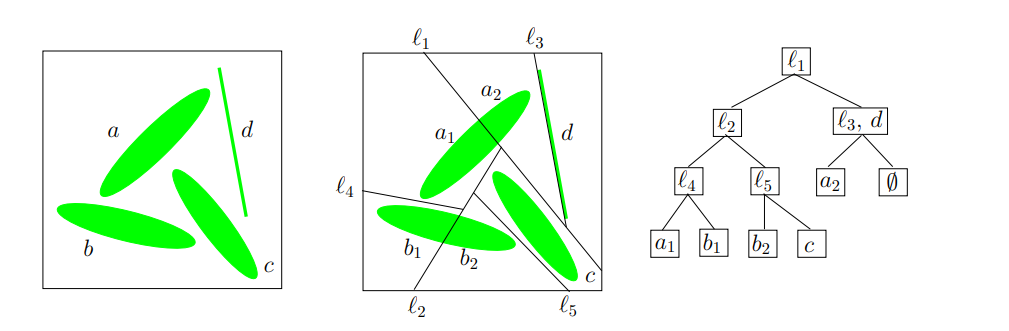
在二维平面里的二叉分割允许使用任意的直线,不过这里的Binary Space Partitioning会限制为只能水平划分或者垂直划分,对应的addCell接口里需要显示用bool isHorizontal来表明是水平划分还是垂直划分:
virtual CM::BSPNode * addCell( CellData * pCell, bool isHorizontal );
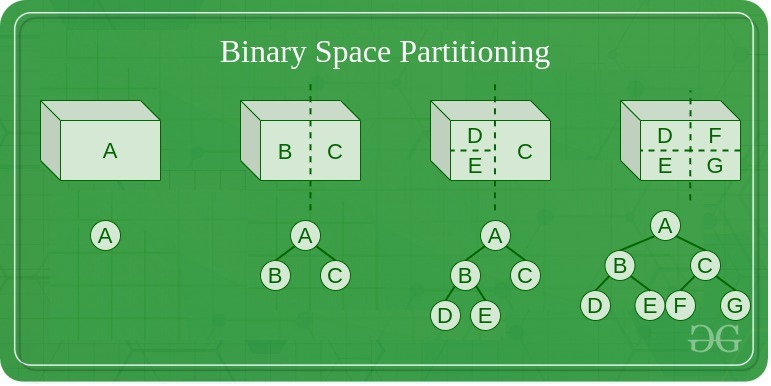
此时就退化成了一个KDTree:
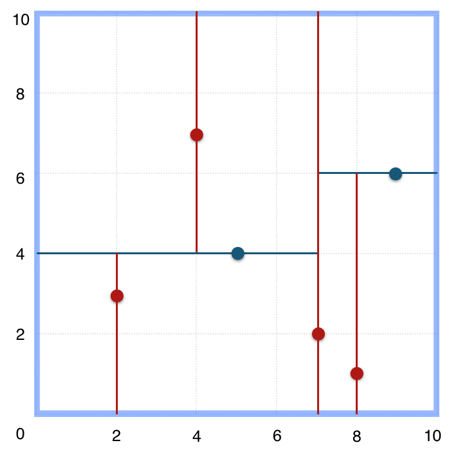
下面就是一个具体按照水平或者竖直方向进行划分的的Space实例:
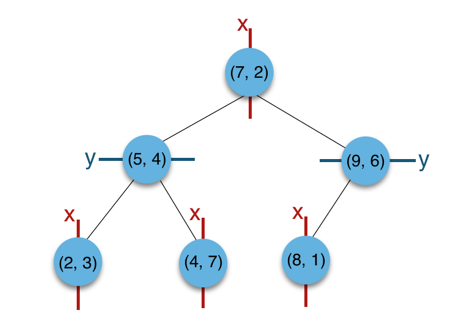
此时对应的KDTree就是这样的:
注意到前面addCell的时候,新的Cell对应的分割轴上的区间大小其实是0,也就是说新Cell对应的Rect面积是0。新添加的Cell的Rect会在后续的负载均衡中进行调整:
CM::BSPNode * CellData::addCell( CellData * pCell, bool isHorizontal )
{
	const float partitionPt = range_.range1D( isHorizontal ).max_;
	BW::Rect newRange = range_;
	newRange.range1D( isHorizontal ).min_ = partitionPt;
	newRange.range1D( isHorizontal ).max_ = partitionPt;
	pCell->setRange( newRange );

	// TODO: At the moment, the new cell is always added to the right or top. It
	// may be better to choose the side based on which side is unbounded. A
	// simple test might be to check if fabs( min_ ) < fabs( max_ ) of
	// range_.range1D( isHorizontal ).

	return new CM::InternalNode( this, pCell,
			isHorizontal, range_, partitionPt );
}
注意这里最后的返回值是CM::InternalNode,这个类型也继承自BSPNode,传入的两个CellData会作为当前InternalNode的左右子节点存在:
InternalNode::InternalNode( BSPNode * pLeft, BSPNode * pRight,
		bool isHorizontal, const BW::Rect & range, float position ) :
	// Note: There are three constructors.
	BSPNode( range )
{
	this->init();
	pLeft_ = pLeft;
	pRight_ = pRight;
	isHorizontal_ = isHorizontal;
	position_ = position;
}
所以整个BSPNode被划分为了两种类型:
- 一种是有两个子节点的
InternalNode类型,是BSP树里的内部节点,这个类型不负责具体的场景区域, - 另外一种是没有子节点的
CellData类型,是BSP树里的叶子节点,每个叶子节点负责一块具体的场景区域
Space里存储的根节点CM::BSPNode * pRoot_则可能是两种节点类型中的一种。
Space的创建
在Bigworld里,CellAppMgr负责创建Space,并将其分配到合适的CellApp上运行。这个创建Space的入口函数是createEntityInNewSpace,这个函数会在CellAppMgr收到创建新Space的请求时被调用:
void CellAppMgr::createEntityInNewSpace( const Mercury::Address& srcAddr,
		const Mercury::UnpackedMessageHeader& header,
		BinaryIStream & data )
{
	bool doesSpaceHavePreferredIP;

	data >> doesSpaceHavePreferredIP;

	uint32 preferredIP = (doesSpaceHavePreferredIP ? srcAddr.ip : 0);

	if (doesSpaceHavePreferredIP)
	{
		TRACE_MSG( "CellAppMgr::createEntityInNewSpace: "
					"Creating space with preferred IP %s\n",
				srcAddr.ipAsString() );
	}

	Space * pSpace = new Space( this->generateSpaceID(),
		/*isNewSpace*/ true, /*isFromDB*/ false,
		preferredIP );
	if (pSpace->addCell())
	{
		this->addSpace( pSpace );
	}
	else
	{
		ERROR_MSG( "CellAppMgr::createEntityInNewSpace: "
				"Unable to add a cell to space %u.\n", pSpace->id() );
		bw_safe_delete( pSpace );
	}

	//passing pSpace==NULL is needed here to send the errors (and is safe)
	this->createEntityCommon( pSpace, srcAddr, header, data );
}
这个RPC的第一个参数是bool doesSpaceHavePreferredIP,表示是否要求在RPC发送者的IP地址上创建Space。如果为false,则会将这个preferredIP设置为0,代表随机选择一个CellApp作为Space的CellApp。然后CellAppMgr会通过generateSpaceID来生成一个随机生成的SpaceID作为唯一标识符,并以这些参数来New一个新的Space对象:
Space::Space( SpaceID id, bool isNewSpace, bool isFromDB, uint32 preferredIP ) :
	id_( id ),
	pRoot_( NULL ),
	isBalancing_( false ),
	preferredIP_( preferredIP ),
	isFirstCell_( isNewSpace ),
	isFromDB_( isFromDB ),
	hasHadEntities_( !isFromDB ),
	waitForChunkBoundUpdateCount_( 0 ),
	spaceGrid_( 0.f ),
	spaceBounds_( 0.f, 0.f, 0.f, 0.f ),
	artificialMinLoad_( 0.f )
{
}
在Space的构造函数里,pRoot_被初始化为nullptr, 为了维持树结构的有效性,Space被CellAppMgr创建的时候会自动的通过addCell接口来创建根节点:
CellData * Space::addCell()
{
	CellAppGroup * pGroup = NULL;

	if (!cells_.empty())
	{
		pGroup = cells_.front()->cellApp().pGroup();
	}

	const CellApps & cellApps = CellAppMgr::instance().cellApps();
	CellApp * pCellApp = cellApps.findBestCellApp( this, pGroup );


	return pCellApp != NULL ? this->addCell( *pCellApp ) : NULL;
}
Space::addCell这个接口会通过findBestCellApp选择一个负载合适的CellApp来承载这个完整的Space。然后再以这个pCellApp作为唯一参数去调用双参数形式的addCell,此时第二个参数默认为nullptr:
CellData * Space::addCell( CellApp & cellApp, CellData * pCellToSplit = NULL )
{
	INFO_MSG( "Space::addCell: Space %u. CellApp %u (%s)\n",
			id_, cellApp.id(), cellApp.addr().c_str() );

	if (cellApp.isRetiring())
	{
		WARNING_MSG( "Space::addCell: Adding a cell to CellApp %u (%s) which "
			"is retiring.\n", cellApp.id(), cellApp.addr().c_str() );
	}

	CellData * pCellData = new CellData( cellApp, *this );

	if (pCellToSplit)
	{
		MF_ASSERT( pRoot_ != NULL );
		pRoot_ = pRoot_->addCellTo( pCellData, pCellToSplit );
		MF_ASSERT( pRoot_ != NULL );
	}
	else
	{
		pRoot_ = (pRoot_ ? pRoot_->addCell( pCellData ) : pCellData);
	}

	pRoot_->updateLoad();
	// 省略后续代码
}
这里的会发现此时的pRoot_为空,因此直接使用新创建的pCellData作为pRoot_,因此刚创建的时候Space的BSP树只有一个叶子节点CellData,负责所有区域。
在初始状态下,Space的BSP树只有一个叶子节点CellData,负责所有区域,后续会根据负载均衡的结果来不断的调整BSP树的结构,来增减CellData节点。这部分的内容将留到后续的章节中介绍。
目前执行这个远程调用的代码只有一处,在BaseApp暴露给Python脚本的Base::py_createInNewSpace里:
/**
 *	This method implements the base's script method to create an associated
 *	entity on a cell in a new space.
 */
PyObject * Base::py_createInNewSpace( PyObject * args, PyObject * kwargs )
{
	const char * errorPrefix = "Base.createEntityInNewSpace: ";

	PyObject * pPreferThisMachine = NULL;

	static char * keywords[] =
	{
		const_cast< char * >( "shouldPreferThisMachine" ),
		NULL
	};

	if (!PyArg_ParseTupleAndKeywords( args, kwargs,
		"|O:Base.createEntityInNewSpace", keywords, &pPreferThisMachine ))
	{
		return NULL;
	}

	std::auto_ptr< Mercury::ReplyMessageHandler > pHandler(
		this->prepareForCellCreate( errorPrefix ) );

	if (!pHandler.get())
	{
		return NULL;
	}

	bool shouldPreferThisMachine = false;

	if (pPreferThisMachine)
	{
		shouldPreferThisMachine = PyObject_IsTrue( pPreferThisMachine );
	}

	Mercury::Channel & channel =
		BaseApp::getChannel( BaseApp::instance().cellAppMgrAddr() );

	// We don't use the channel's own bundle here because the streaming might
	// fail and the message might need to be aborted halfway through.
	std::auto_ptr< Mercury::Bundle > pBundle( channel.newBundle() );

	// Start a request to the Cell App Manager.
	pBundle->startRequest( CellAppMgrInterface::createEntityInNewSpace,
			pHandler.get() );

	*pBundle << shouldPreferThisMachine;

	*pBundle << this->channel().version();

	*pBundle << false; /* isRestore */

	// See if we can add the necessary data to the bundle
	if (!this->addCellCreationData( *pBundle, errorPrefix ))
	{
		isCreateCellPending_ = false;
		isGetCellPending_ = false;

		return NULL;
	}

	// Send it to the Cell App Manager.
	channel.send( pBundle.get() );
	pHandler.release(); // Now owned by Mercury.

	Py_RETURN_NONE;
}
这个接口会暴露给Python脚本调用,从而创建一个新的Space,并在这个Space里创建一个新的实体。这个接口唯一的参数是shouldPreferThisMachine,表示是否要求在当前BaseApp所在的机器上创建Space。如果为true,则会将当前机器的IP地址传递给CellAppMgr。在选择合适的CellApp的时候会通过BaseCellTrafficScorer来提升指定IP的CellApp的优先级:
/**
 *	This method calculates the score for a CellApp's base-to-cell traffic.
 *	This is determined by comparing the IP address of the CellApp with the
 *	preferred IP of the space on which a new cell is being added. If this
 *	CellApp is running on the preferred machine, then it is likely that many
 *	of the space's Base entities will exist on that machine. This means that
 *	much of the base-to-cell traffic will occur between processes on the same
 *	machine, reducing network load.
 *	This method returns 1 if the CellApp is on the preferred IP, and 0 if not.
 */
float BaseCellTrafficScorer::getScore( const CellApp * pApp,
		const Space * pSpace ) const
{
	MF_ASSERT( pSpace );

	return (pApp->addr().ip == pSpace->preferredIP()) ? 1.f : 0.f;
}
这个时候大家可能有点疑问了,BaseApp上只能管理Base,是不能管理Cell的,那为什么要通知CellAppMgr优先使用当前BaseApp的IP呢?其实BaseApp与CellApp只是进程之间隔离,并不需要使用机器来隔离,一个物理机器上可以同时部署多个BaseApp和CellApp。所以BaseApp暴露自己的IP给CellAppMgr去创建Space是没有什么问题的,这样做的好处就是CellApp与相关的BaseApp之间通信延迟会大大减小,因为只需要本机通信即可。
Space的销毁
Space的销毁同样是由CellAppMgr来负责的,CellAppMgr会收到一个远程调用shutDownSpace,这个调用会传入需要销毁的SpaceID,然后通过findSpace找到对应的Space对象,然后调用其shutDown接口来销毁:
/**
 *	This method handles a message informing us to shut down a space.
 */
void CellAppMgr::shutDownSpace(
		const CellAppMgrInterface::shutDownSpaceArgs & args )
{
	Space * pSpace = this->findSpace( args.spaceID );

	if (pSpace)
	{
		if (pSpace->hasHadEntities())
		{
			// Delay shutting down the space until the end of tick
			//	don't shutdown twice
			if (spacesShuttingDown_.insert( args.spaceID ).second)
			{
				pSpace->shutDown();
			}
		}
		else
		{
			NOTICE_MSG( "CellAppMgr::shutDownSpace: Not shutting down space "
								"%u since it has not had any entities\n",
							pSpace->id() );
		}
	}
	else
	{
		ERROR_MSG( "CellAppMgr::shutDownSpace: Could not find space %u\n",
			args.spaceID );
	}
}
这里的spacesShuttingDown_是一个std::set< SpaceID >,用来记录正在销毁的Space,防止重复销毁。
在执行Space::shutDown的时候,会遍历所有的Cell,并通知其CellApp来销毁Space:
/**
 *	This method shuts down this space and removes it from the system.
 */
void Space::shutDown()
{
	INFO_MSG( "Space::shutDown: Shutting down space %u "
				"(remaining cells: %" PRIzu ")\n",
			id_, cells_.size() );

	Cells::iterator iter = cells_.begin();

	while (iter != cells_.end())
	{
		CellApp * pApp = (*iter)->pCellApp();

		if (pApp)
		{
			pApp->shutDownSpace( this->id() );
		}

		++iter;
	}
}
这里的CellApp::shutDownSpace接口会将销毁Space的请求构造为CellAppInterface::shutDownSpace消息,然后发送给对应的CellApp:
/**
 *	This method lets the CellApp know that the space is being destroyed.
 */
void CellApp::shutDownSpace( SpaceID spaceID )
{
	Mercury::Bundle & bundle = this->bundle();
	bundle.startMessage( CellAppInterface::shutDownSpace );
	bundle << spaceID;

	this->send();
}
当CellApp收到CellAppInterface::shutDownSpace消息的时候,会调用Space::shutDownSpace接口来销毁Space。这里并不会执行立即销毁,而是注册一个定时器shuttingDownTimerHandle_,计时器的超时时间为1s:
/**
 *	This method handles a message from the CellAppMgr telling us that the space
 *	has been destroyed. It may take some time before all the cells are removed.
 */
void Space::shutDownSpace( BinaryIStream & data )
{
	if (!shuttingDownTimerHandle_.isSet())
	{
		// Register a timer to go off in one second.
		shuttingDownTimerHandle_ =
			CellApp::instance().mainDispatcher().addTimer( 1000000, this, NULL,
			"ShutdownSpace" );
	}
	else
	{
		INFO_MSG( "Space::shutDownSpace: Already shutting down.\n" );
	}
}
这个销毁计时器超时之后,会调用pCell_->onSpaceGone接口来通知Cell开始执行退出逻辑,然后检查是否还有其他Cell在Space中,如果没有其他Cell在Space中且Space中没有其他实体在存在,那么就会调用CellApp::destroyCell来彻底销毁Cell:
/**
 *	This method handles the timer associated with the space.
 *	Currently it is only used for the shutting down timer.
 */
void Space::handleTimeout( TimerHandle handle, void * arg )
{
	if (pCell_)
	{
		pCell_->onSpaceGone();

		if (this->hasSingleCell() && entities_.empty())
		{
			CellApp::instance().destroyCell( pCell_ );
			// when the cell is destructed it will clear our ptr to it
			MF_ASSERT( pCell_ == NULL );
		}
	}
}
这里的onSpaceGone接口会遍历所有的实体,调用实体的onSpaceGone脚本接口,然后检查实体是否需要被销毁。如果实体需要被销毁且是RealEntity,那么就会调用实体的destroy接口来销毁实体:
/**
 *	This method is called when this space wants to be destroyed.
 */
void Cell::onSpaceGone()
{
	BW::vector< EntityPtr > entities( realEntities_.size() );
	std::copy( realEntities_.begin(), realEntities_.end(), entities.begin() );

	BW::vector< EntityPtr >::iterator iter = entities.begin();

	while (iter != entities.end())
	{
		EntityPtr pEntity = *iter;

		if (!pEntity->isDestroyed())
		{
			Entity::nominateRealEntity( *pEntity );

			PyObject * pMethod =
				PyObject_GetAttrString( pEntity.get(), "onSpaceGone" );
			Script::call( pMethod, PyTuple_New( 0 ),
					"onSpaceGone", true/*okIfFnNull*/ );

			if (!pEntity->isDestroyed() &&
					pEntity->isReal() &&
					&pEntity->space() == &this->space())
			{
				pEntity->destroy();
			}

			Entity::nominateRealEntityPop();
		}

		++iter;
	}
}
/**
 *	This method kills a cell.
 */
void CellApp::destroyCell( Cell * pCell )
{
	cells_.destroy( pCell );
}

void Cells::destroy( Cell * pCell )
{
	Container::iterator iter = container_.find( pCell->spaceID() );

	MF_ASSERT( iter != container_.end() );

	if (iter != container_.end())
	{
		container_.erase( iter );
		delete pCell;
	}
	else
	{
		ERROR_MSG( "Cells::deleteCell: Unable to kill cell %u\n",
									pCell->spaceID() );
	}

}


/**
 *	The destructor for Cell.
 */
Cell::~Cell()
{
	TRACE_MSG( "Cell::~Cell: for space %u\n", space_.id() );

	while (!realEntities_.empty())
	{
		int prevSize = realEntities_.size();

		realEntities_.front()->destroy();

		MF_ASSERT( prevSize > (int)realEntities_.size() );

		if (prevSize <= (int)realEntities_.size())
		{
			break;
		}
	}

	bw_safe_delete( pReplayData_ );

	MF_ASSERT_DEV( space_.pCell() == this );

	space_.pCell( NULL );
}
在CellAppMgr帧末尾的时候,会遍历spacesShuttingDown_集合,来强行删除所有的成员Space:
{
	SpaceIDs::iterator iter = spacesShuttingDown_.begin();
	while (iter != spacesShuttingDown_.end())
	{
		Spaces::iterator found = spaces_.find( *iter );
		if (found != spaces_.end())
		{
			delete found->second;
			spaces_.erase( found );
		}
		++iter;
	}
	spacesShuttingDown_.clear();
}
看上去一旦接收到销毁Space的请求,就会立即添加到spacesShuttingDown_集合中,然后在CellAppMgr帧末尾的时候,会遍历spacesShuttingDown_集合,来强行删除所有的成员Space。完全没有等待所有的CellSpace销毁完成的步骤,由于CellSpace的销毁是异步的,所以在CellAppMgr帧末尾的时候,可能还有CellSpace在CellApp里处于销毁中的状态。
为了避免异步操作可能出现的问题,需要在销毁的RPC发起者那里确保后续不再需要这些CellSpace去执行逻辑。目前这个shutDownSpace的唯一调用位置就在CellApp上的Space::requestShutDown接口中:
/**
 *
 */
void CellAppMgrGateway::shutDownSpace( SpaceID spaceID )
{
	CellAppMgrInterface::shutDownSpaceArgs args;
	args.spaceID = spaceID;

	channel_.bundle() << args;

	channel_.send();
}


/**
 *	This method sends a request to the CellAppMgr to shut this space down.
 */
void Space::requestShutDown()
{
	if ( CellAppConfig::useDefaultSpace() && this->id() == 1 )
	{
		ERROR_MSG( "Space::requestShutDown: Requesting shut down for "
			"the default space\n" );
	}
	CellApp::instance().cellAppMgr().shutDownSpace( this->id() );
}
这个接口有两个调用位置,一个是Entity::destroySpace,这个destroySpace暴露给了Python,用来让逻辑层来强行驱动一个场景的销毁;另一个是Space::checkForShutDown,用来检查场景是否需要被销毁。
/*~ function Entity destroySpace
	*  @components{ cell }
	*	This method attempts to shut down the space that the entity is in.
	*	It is not possible to shut down the default space.
	*/
PY_METHOD( destroySpace )

/**
 *	This method allows script to destroy a space.
 *
 *	@return Whether we were allowed to destroy the space
 */
bool Entity::destroySpace()
{
	AUTO_SCOPED_THIS_ENTITY_PROFILE;

	if ( CellAppConfig::useDefaultSpace() && this->space().id() == 1)
	{
		PyErr_Format( PyExc_ValueError,
			"destroySpace called on entity %d in default space", int(id_) );
		return false;
	}
	this->space().requestShutDown();
	return true;
}

/**
 *	This method checks whether we should request for this space to shut down.
 *	If we have no entities and we're the only cell, request a shutdown.
 *	We won't actually be deleted however until we've unloaded all our chunks.
 */
void Space::checkForShutDown()
{
	if (this->hasSingleCell() &&
			entities_.empty() && CellApp::instance().hasStarted() &&
			!this->isShuttingDown() &&
			!CellApp::instance().mainDispatcher().processingBroken() &&
			!(CellAppConfig::useDefaultSpace() && id_ == 1)) // Not for the default space.
	{
		INFO_MSG( "Space::checkForShutDown: Space %u is now empty.\n", id_ );
		this->requestShutDown();
	}
}
这个Space::checkForShutDown的销毁条件比较符合预期,就是当前场景没有实体,也只有一个Cell在运行,且不是默认场景。所以此时通知CellAppMgr来销毁这个场景是没有任何问题的。所以这个checkForShutDown接口的调用时机就是两个地方:一个是Space::removeEntity,代表一个Entity离开场景的时候;以及Space::updateGeometry,代表Cell格局被修改的时候:
/**
 *	This method removes an entity from this space.
 */
void Space::removeEntity( Entity * pEntity )
{
	// 省略一些代码

	if (entities_.empty())
	{
		if (pCell_ != NULL)
		{
			this->checkForShutDown();
		}
	}
}

/**
 *	This method handles a message from the server that updates geometry
 *	information.
 */
void Space::updateGeometry( BinaryIStream & data )
{
	bool wasMulticell = !this->hasSingleCell();
	// 省略一些代码

	// see if we want to expressly shut down this space now
	if (wasMulticell)
	{
		this->checkForShutDown();
	}
}